Hive Jump 2: A Bullet Heaven

Hive Jump 2: A Bullet Heaven

Action

| Graphite Lab

Play on PC with BlueStacks or from our cloud

  • Overview
  • Game Features
  • How to Play

Page Modified On: April 13, 2026

Play Hive Jump 2: A Bullet Heaven on PC or Mac

Step into the World of Hive Jump 2: A Bullet Heaven, a thrilling Action game from the house of Graphite Lab. Play this Android game on BlueStacks App Player and experience immersive gaming on PC or Mac.

About the Game

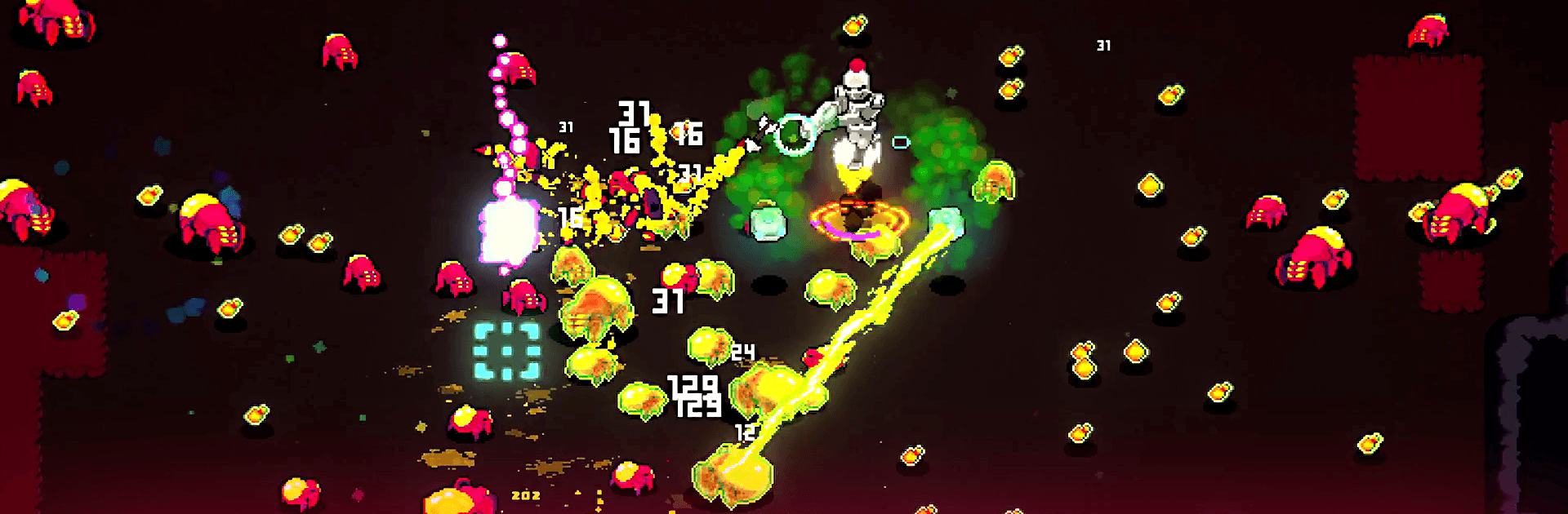
Hive Jump 2: A Bullet Heaven is an Action survival shooter from Graphite Lab where a lone jetpack trooper keeps the mission alive against swarms of nasty space bugs. It’s fast, chaotic, and strangely satisfying—one moment you’re skimming over lava, the next you’re threading through icy tunnels while your loadout chews through the horde. Prefer a big screen and tighter aim? It runs smoothly on BlueStacks, too.

Game Features

  • Jetpack Mayhem: Boost, hover, and juke through swarms while scorching enemies from above. Your jetpack isn’t just for movement—it’s part of the offense.
  • Aim Your Way: Let auto-fire handle the shooting so you can focus on dodging, or switch to manual aim for surgical control. On BlueStacks, mouse aiming feels extra crisp.
  • 19 Playable Jumpers: Pick from a roster of unique Jumpers, each with their own stats and quirks—speed demons, tanks, rapid-fire specialists, and more.
  • Build-Crafting on the Fly: Stack weapons, augments, and perks to shape your run. Create a glass-cannon blaster, a health-heavy bruiser, or something wild in between.
  • Four Distinct Biomes: Push through the Crystal Caverns, Frozen Tundra, Volcanic Wasteland, and Mushroom Forest—each with hazards, layouts, and enemy mixes that keep you on your toes.
  • Goo-Fueled Upgrades: Turn alien remains into spendable “goo” at the HSA Store to snag weapons, utilities, and relics. Grab rare Amber to boost your favorite builds.
  • Permanent Progress: Unlock lasting upgrades that give every new attempt a helpful head start without removing the challenge.
  • Swarm Survival Feel: Every wave ramps up, every decision matters, and every clutch dodge can be the difference between a heroic stand and a gooey splat.

Ready to top the leaderboard? We bet you do. Let precise controls and sharp visuals optimized on BlueStacks lead you to victory.


Game Features

Enhancements

  • Macros
  • Multi Instance
  • Multi Instance Sync
  • Eco Mode
  • Enhancements
Macros

Macros

Skip the boring parts of a game. Play Hive Jump 2: A Bullet Heaven with Macros and get the edge. Simply record a sequence of commands and execute them at any moment.
Multi Instance

Multi Instance

Why limit to one game on your phone when you can play many on your PC? Open multiple instances of Hive Jump 2: A Bullet Heaven at once with Multi-Instance. Leverage the power of different accounts by doing more.
Multi Instance Sync

Multi Instance Sync

Get the best out of Hive Jump 2: A Bullet Heaven with Multi-Instance Sync. Play the game from different accounts and build your own empire. Use Multi-instance sync to repeat the action in the main BlueStacks instance on all other instances.
Eco Mode

Eco Mode

Find the rarest heroes by making multiple summons in Hive Jump 2: A Bullet Heaven. And while you are at it, reduce your PC’s resource consumption with the Eco Mode. Farm efficiently. Get the best results.
Read More

How to Download and Play Hive Jump 2: A Bullet Heaven on PC or Mac

  • Download and install BlueStacks on your PC or Mac

  • Complete Google sign-in to access the Play Store, or do it later

  • Look for Hive Jump 2: A Bullet Heaven in the search bar at the top right corner

  • Click to install Hive Jump 2: A Bullet Heaven from the search results

  • Complete Google sign-in (if you skipped step 2) to install Hive Jump 2: A Bullet Heaven

  • Click the Hive Jump 2: A Bullet Heaven icon on the home screen to start playing

video
Watch Video

Minimum System Requirements

With BlueStacks 5, you can get started on a PC that fulfills the following requirements.

  • Operating System

    Microsoft Windows 7 or above, macOS 11 (Big Sur) or above

  • Processor

    Intel, AMD or Apple Silicon Processor

  • RAM

    at least 4GB

  • HDD

    10GB Free Disk Space

Note:

* You must be an Administrator on your PC. Up to date graphics drivers from Microsoft or the chipset vendor.

Hive Jump 2: A Bullet Heaven - FAQs

  • How to play Hive Jump 2: A Bullet Heaven on Windows PC & Mac?

    Play Hive Jump 2: A Bullet Heaven on your PC or Mac by following these simple steps.

    • Click on 'Play Hive Jump 2: A Bullet Heaven on PC’ to download BlueStacks
    • Install it and log-in to Google Play Store
    • Launch and play the game.
  • Why is BlueStacks the fastest and safest platform to play games on PC?

    BlueStacks respects your privacy and is always safe and secure to use. It does not carry any malware, spyware, or any sort of additional software that could harm your PC.

    It is engineered to optimize speed and performance for a seamless gaming experience.

  • What are Hive Jump 2: A Bullet Heaven PC requirements?

    Minimum requirement to run Hive Jump 2: A Bullet Heaven on your PC

    • OS: Microsoft Windows 7 or above MacOS 11 (Big Sur) or above
    • Processor: Intel, AMD or Apple Silicon Processor
    • RAM: Your PC must have at least 4GB of RAM. (Note that having 4GB or more disk space is not a substitute for RAM)
    • HDD: 10GB Free Disk Space.
    • You must be an Administrator on your PC.