
Just Down! Only Parkour 3D

Just Down! Only Parkour 3D

Action

| Korgi Games

Play on PC with BlueStacks or from our cloud

  • Overview
  • Game Features
  • How to Play

Page Modified On: August 07, 2025

Play Just Down! Only Parkour 3D on PC or Mac

Step into the World of Just Down! Only Parkour 3D, a thrilling Action game from the house of Korgi Games. Play this Android game on BlueStacks App Player and experience immersive gaming on PC or Mac.

About the Game

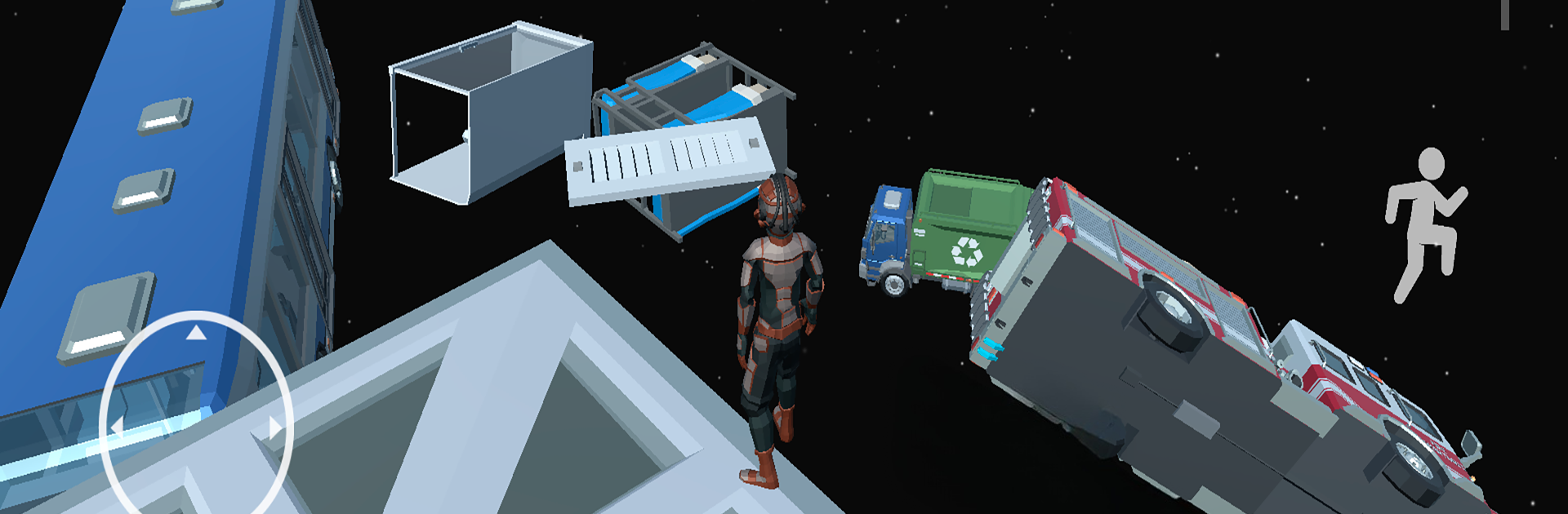
Just Down! Only Parkour 3D from Korgi Games is what happens when parkour goes vertical—and a little wild. This action game throws you right into a series of floating platforms and wild obstacles, all waiting for you to take the plunge, literally. Expect a mix of heart-pounding jumps, nail-biting slides, and a whole lot of “can I actually make that?” moments. If you’re the type who loves to be challenged and sent straight into the action, this one’s got you covered.

Game Features

  • Gravity-Defying Platforming
    You’ll need some seriously quick reflexes as you make crazy leaps, dodge swinging traps, and keep your balance while plummeting from one wild floating object to the next.

  • Smart Level Design
    Each level throws something different at you—maybe it’s a swinging pendulum, maybe it’s a barely-there bridge, or a surprise drop that’ll keep you guessing every step (or jump) of the way.

  • Custom Characters & Unlocks
    Play long enough and you’ll score new characters, each packing their own personalities and abilities. Stylize your parkour pro and show off all that hard work.

  • Worldwide Leaderboards
    Think you’ve got the fastest moves? Go for your best time and see how you stack up against friends or total strangers. It’s not just about making it down—it’s about showing off your skills, too.

  • Striking 3D Visuals
    The game’s environments are bold, colorful, and a little bit surreal, upping the thrill as you sail past obstacles floating high above the ground.

  • Smooth Controls
    Responsive controls make all the difference here. Whether you’re tapping on mobile or using BlueStacks on PC, there’s minimal fuss and maximum action.

  • Dynamic Music
    The backdrop to your freefall? A killer soundtrack that keeps every jump and slip feeling dramatic and fresh.

If parkour with a twist sounds like your thing, Just Down! Only Parkour 3D is ready to keep you busy (and maybe a little bit sweaty).

Slay your opponents with your epic moves. Play it your way on BlueStacks and dominate the battlefield.


Game Features

Enhancements

  • Macros
  • Multi Instance
  • Multi Instance Sync
  • Eco Mode
  • Enhancements
Macros

Macros

Skip the boring parts of a game. Play Just Down! Only Parkour 3D with Macros and get the edge. Simply record a sequence of commands and execute them at any moment.
Multi Instance

Multi Instance

Why limit to one game on your phone when you can play many on your PC? Open multiple instances of Just Down! Only Parkour 3D at once with Multi-Instance. Leverage the power of different accounts by doing more.
Multi Instance Sync

Multi Instance Sync

Get the best out of Just Down! Only Parkour 3D with Multi-Instance Sync. Play the game from different accounts and build your own empire. Use Multi-instance sync to repeat the action in the main BlueStacks instance on all other instances.
Eco Mode

Eco Mode

Find the rarest heroes by making multiple summons in Just Down! Only Parkour 3D. And while you are at it, reduce your PC’s resource consumption with the Eco Mode. Farm efficiently. Get the best results.
Read More

How to Download and Play Just Down! Only Parkour 3D on PC or Mac

  • Download and install BlueStacks on your PC or Mac

  • Complete Google sign-in to access the Play Store, or do it later

  • Look for Just Down! Only Parkour 3D in the search bar at the top right corner

  • Click to install Just Down! Only Parkour 3D from the search results

  • Complete Google sign-in (if you skipped step 2) to install Just Down! Only Parkour 3D

  • Click the Just Down! Only Parkour 3D icon on the home screen to start playing

video
Watch Video

Minimum System Requirements

With BlueStacks 5, you can get started on a PC that fulfills the following requirements.

  • Operating System

    Microsoft Windows 7 or above, macOS 11 (Big Sur) or above

  • Processor

    Intel, AMD or Apple Silicon Processor

  • RAM

    at least 4GB

  • HDD

    10GB Free Disk Space

Note:

* You must be an Administrator on your PC. Up to date graphics drivers from Microsoft or the chipset vendor.

Just Down! Only Parkour 3D - FAQs

  • How to play Just Down! Only Parkour 3D on Windows PC & Mac?

    Play Just Down! Only Parkour 3D on your PC or Mac by following these simple steps.

    • Click on 'Play Just Down! Only Parkour 3D on PC’ to download BlueStacks
    • Install it and log-in to Google Play Store
    • Launch and play the game.
  • Why is BlueStacks the fastest and safest platform to play games on PC?

    BlueStacks respects your privacy and is always safe and secure to use. It does not carry any malware, spyware, or any sort of additional software that could harm your PC.

    It is engineered to optimize speed and performance for a seamless gaming experience.

  • What are Just Down! Only Parkour 3D PC requirements?

    Minimum requirement to run Just Down! Only Parkour 3D on your PC

    • OS: Microsoft Windows 7 or above MacOS 11 (Big Sur) or above
    • Processor: Intel, AMD or Apple Silicon Processor
    • RAM: Your PC must have at least 4GB of RAM. (Note that having 4GB or more disk space is not a substitute for RAM)
    • HDD: 10GB Free Disk Space.
    • You must be an Administrator on your PC.







