
Mobster Madness: Open World

Mobster Madness: Open World

Action

| Vertex73

Play on PC with BlueStacks or from our cloud

  • Overview
  • Game Features
  • How to Play

Page Modified On: April 13, 2026

Play Mobster Madness: Open World on PC or Mac

Join millions to experience Mobster Madness: Open World, an exciting Action game from Vertex73. With BlueStacks App Player, you are always a step ahead of your opponent, ready to outplay them with faster gameplay and better control with the mouse and keyboard on your PC or Mac.

About the Game

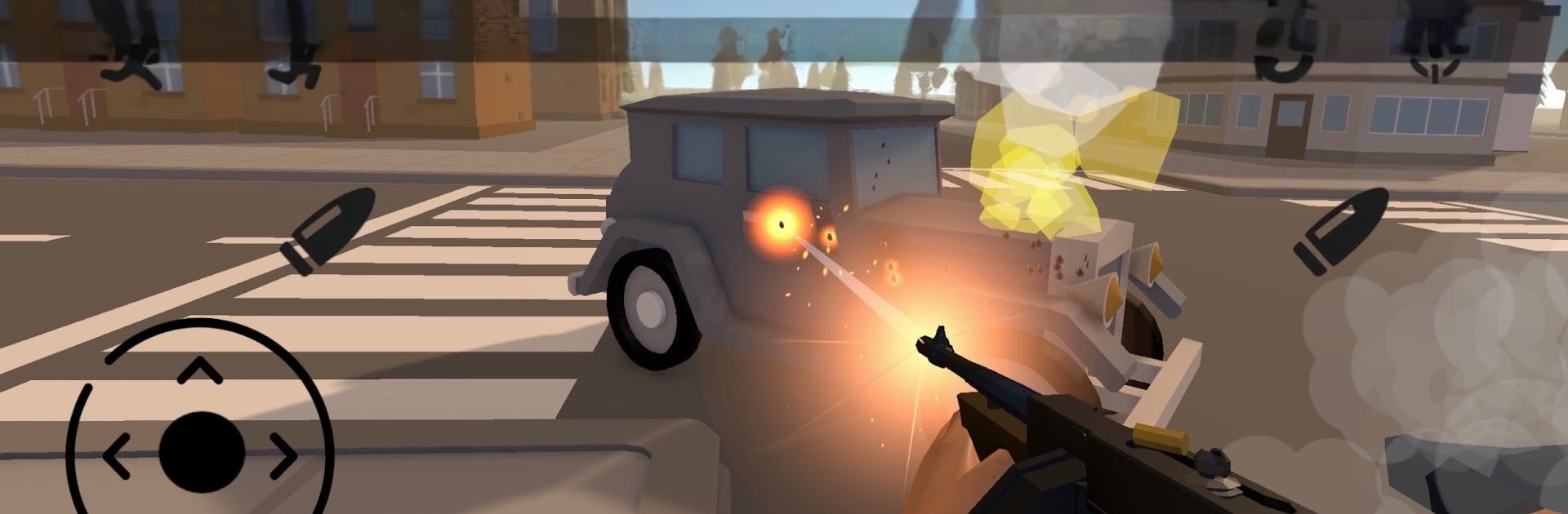
Mobster Madness: Open World drops you into a stylized 1930s city where quiet blocks can flare into chaos in a heartbeat. Pick your path—flash a badge or rock a fedora—and make split-second calls as you chase, fight, and outsmart anyone in your way. Built by Vertex73, this Action sandbox keeps the pace quick, the choices meaningful, and the streets unpredictable.

Game Features

  • 1930s Sandbox City — Roam a moody, low-poly metropolis where each district has its own rhythm and trouble spots to learn.
  • Pick a Side — Start neutral, then join the Police to keep order or the Mafia to hold territory. The city reacts with shifting patrols, turf scuffles, and rising heat.
  • Wanted and Pursuits — Rack up notoriety and feel the pressure as responses escalate. Lose the tail or stand your ground—your call.
  • Instant Getaways — Hop into cars fast and feel tight, responsive handling built for hairpin turns, bold escapes, and wild chases.
  • Fast, Gritty Combat — Swap between close-quarters brawls and snappy gunfights that reward timing and smart positioning.
  • Gear Up and Grow — Earn cash, visit shops for weapons and armor, and tweak your loadout so the next encounter hits harder.
  • Save Between Runs — Crash at hotel save points to lock in progress and return ready for the next hustle.
  • Reactive Encounters — Ragdoll physics and lively NPC behavior keep fights messy, funny, and unpredictable.
  • Hire Backup — Spend your hard-earned money, recruit companions, and keep the cash flowing with pickups across the city.
  • Offline Friendly — Jump in for quick free-roam sessions and replayable skirmishes anytime, no connection needed.
  • PC Play Option — Prefer a keyboard and mouse? It also plays smoothly on BlueStacks without changing the vibe.

Ready to top the leaderboard? We bet you do. Let precise controls and sharp visuals optimized on BlueStacks lead you to victory.


Game Features

Enhancements

  • Macros
  • Multi Instance
  • Multi Instance Sync
  • Eco Mode
  • Enhancements
Macros

Macros

Skip the boring parts of a game. Play Mobster Madness: Open World with Macros and get the edge. Simply record a sequence of commands and execute them at any moment.
Multi Instance

Multi Instance

Why limit to one game on your phone when you can play many on your PC? Open multiple instances of Mobster Madness: Open World at once with Multi-Instance. Leverage the power of different accounts by doing more.
Multi Instance Sync

Multi Instance Sync

Get the best out of Mobster Madness: Open World with Multi-Instance Sync. Play the game from different accounts and build your own empire. Use Multi-instance sync to repeat the action in the main BlueStacks instance on all other instances.
Eco Mode

Eco Mode

Find the rarest heroes by making multiple summons in Mobster Madness: Open World. And while you are at it, reduce your PC’s resource consumption with the Eco Mode. Farm efficiently. Get the best results.
Read More

How to Download and Play Mobster Madness: Open World on PC or Mac

  • Download and install BlueStacks on your PC or Mac

  • Complete Google sign-in to access the Play Store, or do it later

  • Look for Mobster Madness: Open World in the search bar at the top right corner

  • Click to install Mobster Madness: Open World from the search results

  • Complete Google sign-in (if you skipped step 2) to install Mobster Madness: Open World

  • Click the Mobster Madness: Open World icon on the home screen to start playing

video
Watch Video

Minimum System Requirements

With BlueStacks 5, you can get started on a PC that fulfills the following requirements.

  • Operating System

    Microsoft Windows 7 or above, macOS 11 (Big Sur) or above

  • Processor

    Intel, AMD or Apple Silicon Processor

  • RAM

    at least 4GB

  • HDD

    10GB Free Disk Space

Note:

* You must be an Administrator on your PC. Up to date graphics drivers from Microsoft or the chipset vendor.

Mobster Madness: Open World - FAQs

  • How to play Mobster Madness: Open World on Windows PC & Mac?

    Play Mobster Madness: Open World on your PC or Mac by following these simple steps.

    • Click on 'Play Mobster Madness: Open World on PC’ to download BlueStacks
    • Install it and log-in to Google Play Store
    • Launch and play the game.
  • Why is BlueStacks the fastest and safest platform to play games on PC?

    BlueStacks respects your privacy and is always safe and secure to use. It does not carry any malware, spyware, or any sort of additional software that could harm your PC.

    It is engineered to optimize speed and performance for a seamless gaming experience.

  • What are Mobster Madness: Open World PC requirements?

    Minimum requirement to run Mobster Madness: Open World on your PC

    • OS: Microsoft Windows 7 or above MacOS 11 (Big Sur) or above
    • Processor: Intel, AMD or Apple Silicon Processor
    • RAM: Your PC must have at least 4GB of RAM. (Note that having 4GB or more disk space is not a substitute for RAM)
    • HDD: 10GB Free Disk Space.
    • You must be an Administrator on your PC.







