Monkey King: Myth of Skull

Monkey King: Myth of Skull

Action

| MGIF

Play on PC with BlueStacks or from our cloud

  • Overview
  • Game Features
  • How to Play

Page Modified On: January 05, 2026

Play Monkey King: Myth of Skull on PC or Mac

Bring your A-game to Monkey King: Myth of Skull, the Action game sensation from MGIF. Give your gameplay the much-needed boost with precise game controls, high FPS graphics, and top-tier features on your PC or Mac with BlueStacks.

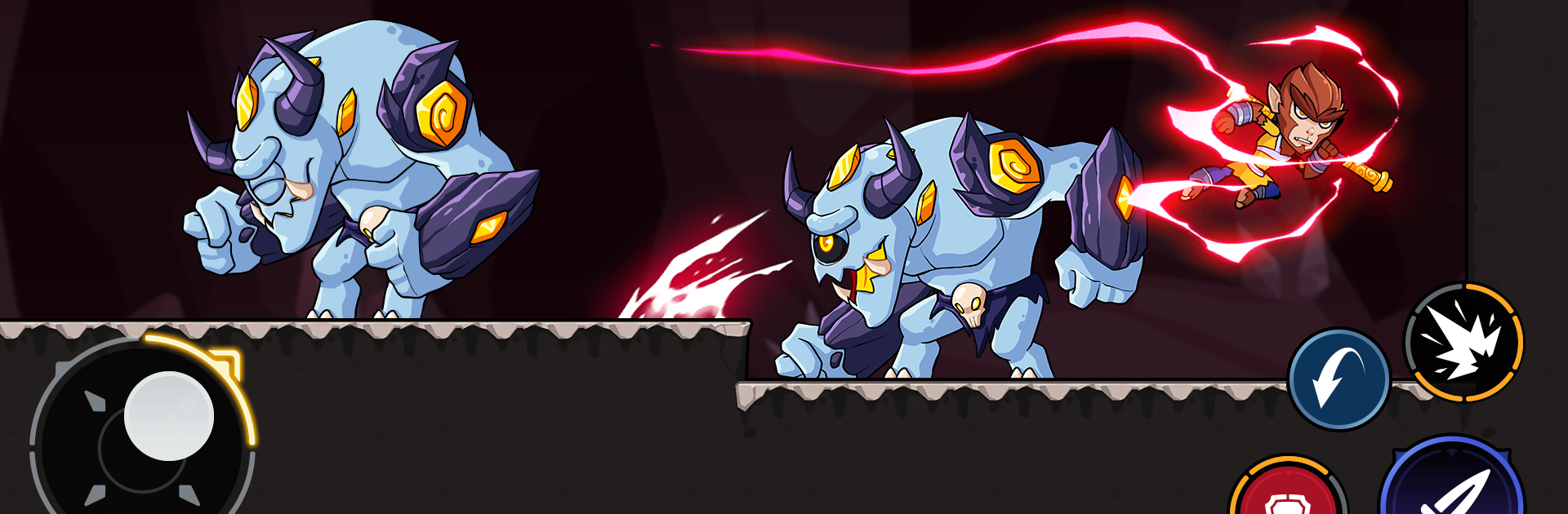
Monkey King: Myth of Skull feels like a fast, side-scrolling sword game with real bite. The setup is wild, an ancient power turned creatures into armored beasts and a fighter from the future is trying to shut it all down before things fall apart. That story mostly gives the action some weight, then it lets players get to the good stuff. Movement is snappy, with running and jumping through tight spaces, and fights lean on timing more than button mashing. There is a simple attack and guard layout, but parries are the star. Reading an enemy’s swing, tapping guard at the right frame, and snapping back with a counter is the kind of thing that never gets old.

The world breaks into distinct regions that each push different tactics, from hot lava tunnels to darker underground stretches with mean platforming. Enemies have clear patterns, and bosses hit hard enough that learning them matters. Gear and skills are upgradeable, and crafting new weapons or armor really shifts how a build feels, not just the numbers. It runs offline, so no connection needed, and it has that challenge loop where players keep going to master one more fight. On PC through BlueStacks, key mapping makes parry windows and jumps easier to nail, and a bigger screen helps read those boss tells. If someone likes deliberate sword combat, tough encounters, and a bit of exploration between duels, this hits that spot.

Ready to top the leaderboard? We bet you do. Let precise controls and sharp visuals optimized on BlueStacks lead you to victory.


Game Features

Enhancements

  • Macros
  • Multi Instance
  • Multi Instance Sync
  • Eco Mode
  • Enhancements
Macros

Macros

Skip the boring parts of a game. Play Monkey King: Myth of Skull with Macros and get the edge. Simply record a sequence of commands and execute them at any moment.
Multi Instance

Multi Instance

Why limit to one game on your phone when you can play many on your PC? Open multiple instances of Monkey King: Myth of Skull at once with Multi-Instance. Leverage the power of different accounts by doing more.
Multi Instance Sync

Multi Instance Sync

Get the best out of Monkey King: Myth of Skull with Multi-Instance Sync. Play the game from different accounts and build your own empire. Use Multi-instance sync to repeat the action in the main BlueStacks instance on all other instances.
Eco Mode

Eco Mode

Find the rarest heroes by making multiple summons in Monkey King: Myth of Skull. And while you are at it, reduce your PC’s resource consumption with the Eco Mode. Farm efficiently. Get the best results.
Read More

How to Download and Play Monkey King: Myth of Skull on PC or Mac

  • Download and install BlueStacks on your PC or Mac

  • Complete Google sign-in to access the Play Store, or do it later

  • Look for Monkey King: Myth of Skull in the search bar at the top right corner

  • Click to install Monkey King: Myth of Skull from the search results

  • Complete Google sign-in (if you skipped step 2) to install Monkey King: Myth of Skull

  • Click the Monkey King: Myth of Skull icon on the home screen to start playing

video
Watch Video

Minimum System Requirements

With BlueStacks 5, you can get started on a PC that fulfills the following requirements.

  • Operating System

    Microsoft Windows 7 or above, macOS 11 (Big Sur) or above

  • Processor

    Intel, AMD or Apple Silicon Processor

  • RAM

    at least 4GB

  • HDD

    10GB Free Disk Space

Note:

* You must be an Administrator on your PC. Up to date graphics drivers from Microsoft or the chipset vendor.

Monkey King: Myth of Skull - FAQs

  • How to play Monkey King: Myth of Skull on Windows PC & Mac?

    Play Monkey King: Myth of Skull on your PC or Mac by following these simple steps.

    • Click on 'Play Monkey King: Myth of Skull on PC’ to download BlueStacks
    • Install it and log-in to Google Play Store
    • Launch and play the game.
  • Why is BlueStacks the fastest and safest platform to play games on PC?

    BlueStacks respects your privacy and is always safe and secure to use. It does not carry any malware, spyware, or any sort of additional software that could harm your PC.

    It is engineered to optimize speed and performance for a seamless gaming experience.

  • What are Monkey King: Myth of Skull PC requirements?

    Minimum requirement to run Monkey King: Myth of Skull on your PC

    • OS: Microsoft Windows 7 or above MacOS 11 (Big Sur) or above
    • Processor: Intel, AMD or Apple Silicon Processor
    • RAM: Your PC must have at least 4GB of RAM. (Note that having 4GB or more disk space is not a substitute for RAM)
    • HDD: 10GB Free Disk Space.
    • You must be an Administrator on your PC.