
Old Of Sea
Old Of Sea

Old Of Sea

Action

| CVLGAMES,LLC

Play on PC with BlueStacks or from our cloud

  • Overview
  • Game Features
  • How to Play

Page Modified On: September 25, 2026

Play Old Of Sea on PC or Mac

Step into the World of Old Of Sea, a thrilling Action game from the house of CVLGAMES,LLC. Play this Android game on BlueStacks App Player and experience immersive gaming on PC or Mac.

About the Game

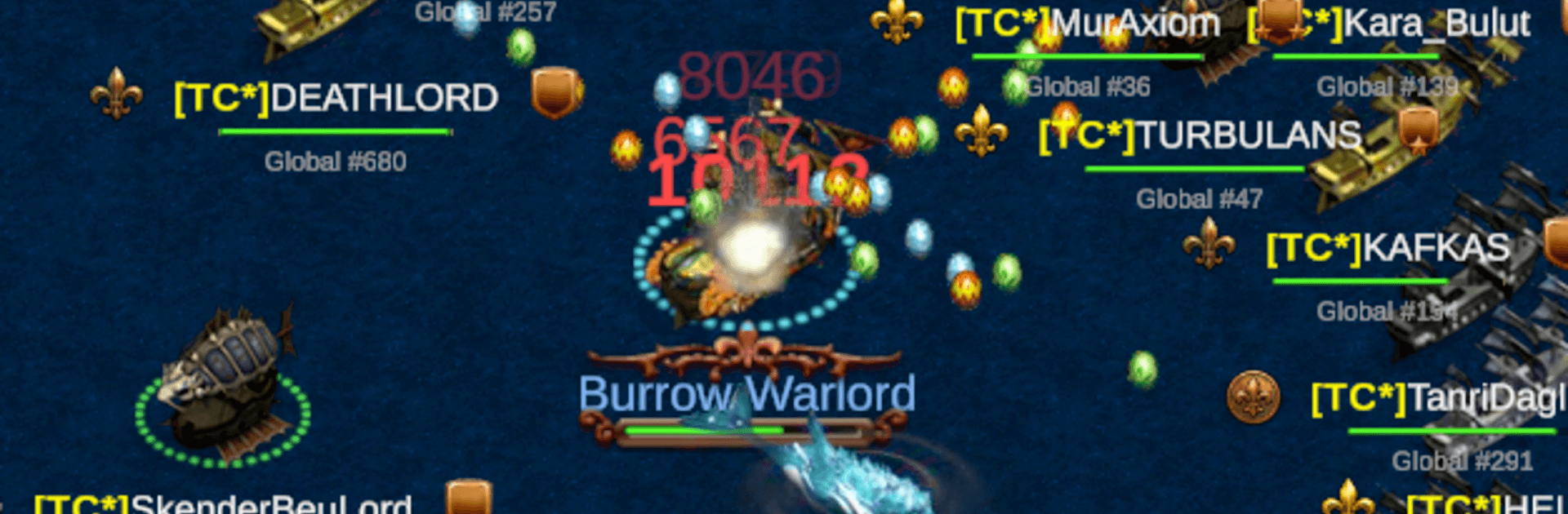
Old Of Sea is an Action game where you captain a customizable warship and clash with real players in tense, real-time naval showdowns. Chart your course through island takeovers, fleet coordination, and a scrappy player economy that rewards bold moves and smart trading. Prefer a bigger view while you command? It plays great on BlueStacks, too.

Game Features

  • Live Ship Battles: Fights unfold in real time with aiming, positioning, and timing that actually matter, plus critical hits, range and accuracy quirks, and clutch combat buffs.
  • Real Captains, Real Stakes: You’re squaring off against actual players, so every bluff, chase, and broadside carries weight—no scripted duels here.
  • Island Raids & Defense: Assault rival strongholds or fortify your own with upgradeable towers, then coordinate defenses when the counterattack comes.
  • Build Your Warship: Tune launchers for damage, range, reloads, and crits; pick your ammo loadout; swap skins; craft a setup that fits how you like to fight.
  • Form Powerful Fleets: Join a guild, pool resources, claim shared islands, and coordinate multi-ship strikes through chat and announcements.
  • Pirate Shakedowns: Cripple an enemy and force a payout, scoop up gold from defeated rivals, and stash your haul before someone flips the tables.
  • Player Market & Auctions: Trade gear and resources in a live marketplace, place sneaky bids, and outplay competitors without firing a shot.
  • Rankings & Social Tools: Track your climb on live leaderboards, hop into global chat, or DM allies and rivals to strategize—or stir the waters.
  • Fair Play Systems: Server-side checks keep matches clean and competitive so victories feel earned, not lucky.
  • Two Paths to Power: Win Gold through battles and trades while collecting Pearls for premium customization—mix both to build your legend.

BlueStacks gives you more room to focus on the game and less time adjusting around mobile limitations.


Game Features

Enhancements

  • Macros
  • Multi Instance
  • Multi Instance Sync
  • Eco Mode
  • Enhancements
Macros

Macros

Skip the boring parts of a game. Play Old Of Sea with Macros and get the edge. Simply record a sequence of commands and execute them at any moment.
Multi Instance

Multi Instance

Why limit to one game on your phone when you can play many on your PC? Open multiple instances of Old Of Sea at once with Multi-Instance. Leverage the power of different accounts by doing more.
Multi Instance Sync

Multi Instance Sync

Get the best out of Old Of Sea with Multi-Instance Sync. Play the game from different accounts and build your own empire. Use Multi-instance sync to repeat the action in the main BlueStacks instance on all other instances.
Eco Mode

Eco Mode

Find the rarest heroes by making multiple summons in Old Of Sea. And while you are at it, reduce your PC’s resource consumption with the Eco Mode. Farm efficiently. Get the best results.
Read More

How to Download and Play Old Of Sea on PC or Mac

  • Download and install BlueStacks on your PC or Mac

  • Complete Google sign-in to access the Play Store, or do it later

  • Look for Old Of Sea in the search bar at the top right corner

  • Click to install Old Of Sea from the search results

  • Complete Google sign-in (if you skipped step 2) to install Old Of Sea

  • Click the Old Of Sea icon on the home screen to start playing

video
Watch Video

Minimum System Requirements

With BlueStacks 5, you can get started on a PC that fulfills the following requirements.

  • Operating System

    Microsoft Windows 7 or above, macOS 11 (Big Sur) or above

  • Processor

    Intel, AMD or Apple Silicon Processor

  • RAM

    at least 4GB

  • HDD

    10GB Free Disk Space

Note:

* You must be an Administrator on your PC. Up to date graphics drivers from Microsoft or the chipset vendor.

Old Of Sea - FAQs

  • How to play Old Of Sea on Windows PC & Mac?

    Play Old Of Sea on your PC or Mac by following these simple steps.

    • Click on 'Play Old Of Sea on PC’ to download BlueStacks
    • Install it and log-in to Google Play Store
    • Launch and play the game.
  • Why is BlueStacks the fastest and safest platform to play games on PC?

    BlueStacks respects your privacy and is always safe and secure to use. It does not carry any malware, spyware, or any sort of additional software that could harm your PC.

    It is engineered to optimize speed and performance for a seamless gaming experience.

  • What are Old Of Sea PC requirements?

    Minimum requirement to run Old Of Sea on your PC

    • OS: Microsoft Windows 7 or above MacOS 11 (Big Sur) or above
    • Processor: Intel, AMD or Apple Silicon Processor
    • RAM: Your PC must have at least 4GB of RAM. (Note that having 4GB or more disk space is not a substitute for RAM)
    • HDD: 10GB Free Disk Space.
    • You must be an Administrator on your PC.







