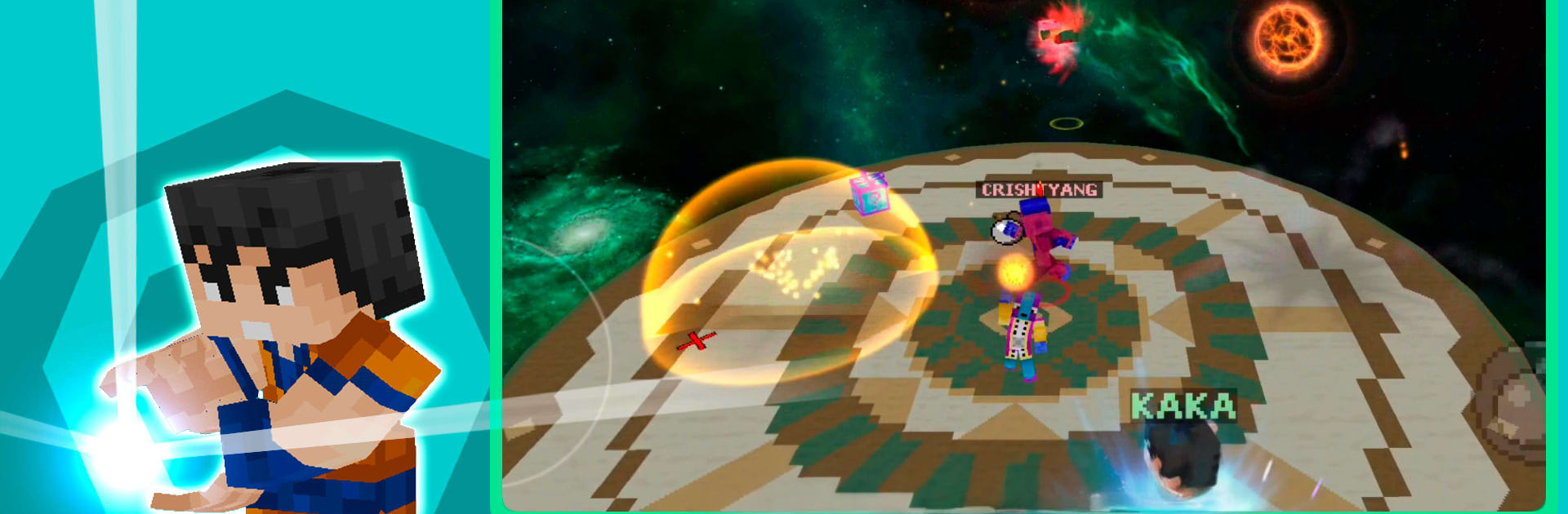
Pixel Cube Z Super Warriors

Pixel Cube Z Super Warriors

Action

| Rey Studios

Play on PC with BlueStacks or from our cloud

  • Overview
  • Game Features
  • How to Play

Page Modified On: December 22, 2025

Play Pixel Cube Z Super Warriors on PC or Mac

Step into the World of Pixel Cube Z Super Warriors, a thrilling Action game from the house of Rey Studios. Play this Android game on BlueStacks App Player and experience immersive gaming on PC or Mac.

About the Game

Pixel Cube Z Super Warriors is a fast, chaotic Action brawler where you toss energy blasts, smash through crumbling arenas, and try to outlast everyone else in short, wild matches. Pick a quirky hero, jump into 2–4 player battles, and watch the stage literally shake under your feet. It’s flashy, a little ridiculous, and proudly made by Rey Studios.

Game Features

  • Real-time PvP Mayhem: Hop into online matches with 2, 3, or 4 players and scrap your way to the last hit. Quick rounds keep the adrenaline high.
  • Quaking Arenas: Gekishin Quake can shake the battlefield apart mid‑fight, opening gaps and hazards that force you to improvise or plummet.
  • Bold Roster, Bigger Personalities: Unlock and customize offbeat legends like Kokun, Picola, Refri, and more—each with distinct stats and attitude.
  • Signature Anime Moves: Fling an Energy Ball, land a Dragon Punch, spark up your special, or unleash tricks like Zero Damage and Spark Wave.
  • Zero Sama Interference: A god of chaos can show up and flip the script. You had a plan… until he didn’t care.
  • Survival Mode: A Sky Wars‑style gauntlet that puts endurance first—stay alive, snag openings, and keep moving.
  • Pixel + Low‑Poly Style: Colorful, lightweight visuals that look sharp and run smoothly on most phones.
  • Fair Play, No Nonsense: Free to play with no pay‑to‑win pressure and no intrusive ads. Just you, your skills, and a bit of luck.
  • Progress Your Squad: Open Pixel Caps to collect new warriors, then upgrade damage, defense, and that all‑important Sparking special.
  • Climb the Boards: Earn your spot on global leaderboards and prove you’re the strongest Super Warrior around.
  • Easy Controls, Real Depth: Simple movement and ability buttons make it approachable; timing and positioning make it competitive.
  • Constantly Evolving: The game’s in active development with frequent additions—new fighters, maps, skins, items, and modes.
  • A Sense of Humor: Expect memes, chaotic moments, and a wildcard named Pillín who has a habit of stealing the spotlight.
  • PC-Friendly Option: Prefer keyboard and mouse? You can play through BlueStacks without changing the pick‑up‑and‑play feel.

Make your gaming sessions memorable with precise controls that give you an edge in close combats and visuals that pop up, bringing every character to life.


Game Features

Enhancements

  • Macros
  • Multi Instance
  • Multi Instance Sync
  • Eco Mode
  • Enhancements
Macros

Macros

Skip the boring parts of a game. Play Pixel Cube Z Super Warriors with Macros and get the edge. Simply record a sequence of commands and execute them at any moment.
Multi Instance

Multi Instance

Why limit to one game on your phone when you can play many on your PC? Open multiple instances of Pixel Cube Z Super Warriors at once with Multi-Instance. Leverage the power of different accounts by doing more.
Multi Instance Sync

Multi Instance Sync

Get the best out of Pixel Cube Z Super Warriors with Multi-Instance Sync. Play the game from different accounts and build your own empire. Use Multi-instance sync to repeat the action in the main BlueStacks instance on all other instances.
Eco Mode

Eco Mode

Find the rarest heroes by making multiple summons in Pixel Cube Z Super Warriors. And while you are at it, reduce your PC’s resource consumption with the Eco Mode. Farm efficiently. Get the best results.
Read More

How to Download and Play Pixel Cube Z Super Warriors on PC or Mac

  • Download and install BlueStacks on your PC or Mac

  • Complete Google sign-in to access the Play Store, or do it later

  • Look for Pixel Cube Z Super Warriors in the search bar at the top right corner

  • Click to install Pixel Cube Z Super Warriors from the search results

  • Complete Google sign-in (if you skipped step 2) to install Pixel Cube Z Super Warriors

  • Click the Pixel Cube Z Super Warriors icon on the home screen to start playing

video
Watch Video

Minimum System Requirements

With BlueStacks 5, you can get started on a PC that fulfills the following requirements.

  • Operating System

    Microsoft Windows 7 or above, macOS 11 (Big Sur) or above

  • Processor

    Intel, AMD or Apple Silicon Processor

  • RAM

    at least 4GB

  • HDD

    10GB Free Disk Space

Note:

* You must be an Administrator on your PC. Up to date graphics drivers from Microsoft or the chipset vendor.

Pixel Cube Z Super Warriors - FAQs

  • How to play Pixel Cube Z Super Warriors on Windows PC & Mac?

    Play Pixel Cube Z Super Warriors on your PC or Mac by following these simple steps.

    • Click on 'Play Pixel Cube Z Super Warriors on PC’ to download BlueStacks
    • Install it and log-in to Google Play Store
    • Launch and play the game.
  • Why is BlueStacks the fastest and safest platform to play games on PC?

    BlueStacks respects your privacy and is always safe and secure to use. It does not carry any malware, spyware, or any sort of additional software that could harm your PC.

    It is engineered to optimize speed and performance for a seamless gaming experience.

  • What are Pixel Cube Z Super Warriors PC requirements?

    Minimum requirement to run Pixel Cube Z Super Warriors on your PC

    • OS: Microsoft Windows 7 or above MacOS 11 (Big Sur) or above
    • Processor: Intel, AMD or Apple Silicon Processor
    • RAM: Your PC must have at least 4GB of RAM. (Note that having 4GB or more disk space is not a substitute for RAM)
    • HDD: 10GB Free Disk Space.
    • You must be an Administrator on your PC.