Ratchet & Clank: Ranger Rumble

Ratchet & Clank: Ranger Rumble

Action

| PlayStation Mobile Inc.

Play on PC with BlueStacks or from our cloud

  • Overview
  • Tips & Tricks
  • Game Features
  • How to Play

Page Modified On: November 19, 2025

Play Ratchet & Clank: Ranger Rumble on PC or Mac

Bring your A-game to Ratchet & Clank: Ranger Rumble, the Action game sensation from PlayStation Mobile Inc.. Give your gameplay the much-needed boost with precise game controls, high FPS graphics, and top-tier features on your PC or Mac with BlueStacks.

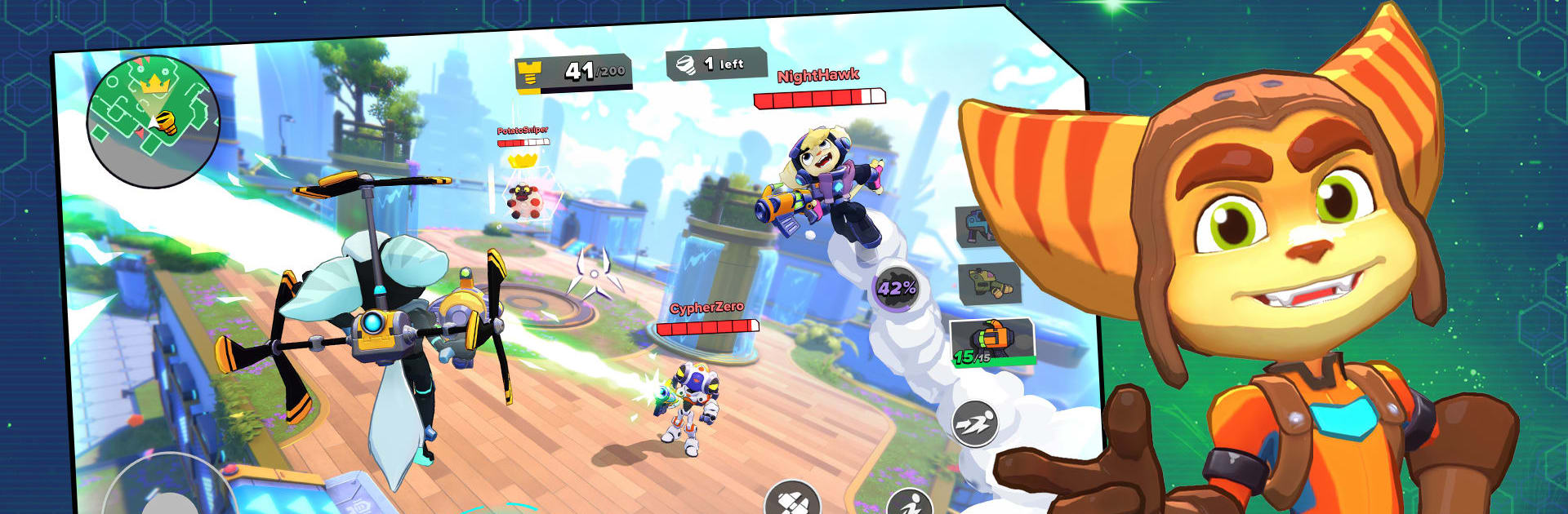
Ratchet & Clank: Ranger Rumble plays like a crunchy little arena shooter mixed with a 3D platformer, the kind where movement matters as much as aim. Matches are quick and noisy, with dashes, double jumps, wall runs, and rail grinding turning every fight into a chase. The camera sits behind the character, so you are bouncing across rooftops in Megalopolis one game, then skirting through scrapyard canyons on Torren IV the next. On PC through BlueStacks, mouse aim feels tight and the framerate holds up well, so spraying Buzz Blades across a lane or lining up a rocket is very doable.

The weapons steal the show. There is goofy stuff like the Glove of Doom sending tiny killer bots after people, and there are straight damage toys like flamethrowers and rockets. You swap loadouts to match a hero, then pop an ultimate that can be ridiculous, like turning enemies into sheep or bulking up into a tank. Modes mix things up nicely. Bolt Rush throws six players into a map with mobs and bosses roaming around while everyone scrambles for bolts, which keeps the pace hectic without being random. Total Rumble is a last-one-standing free for all, very scrappy and great for quick bursts. Blast Ball is a 3v3 ball mode where guns push the play around, more chaotic sport than shooter but in a good way.

There is a light story wrapper with Captain Qwark running a combat sim to find new Rangers, then the usual progression hooks are layered on top. Heroes and weapons have upgrades, there are daily goals to chase, and loads of cosmetics if someone wants to dress up a favorite character. New seasons roll in with gear and maps so the pool keeps changing. If someone likes fast third person shooters where locomotion is a big part of the skill, and the Ratchet style of weird gadgets, this lands right in that sweet spot.

Slay your opponents with your epic moves. Play it your way on BlueStacks and dominate the battlefield.


Game Features

Enhancements

  • Macros
  • Multi Instance
  • Multi Instance Sync
  • Eco Mode
  • Enhancements
Macros

Macros

Skip the boring parts of a game. Play Ratchet & Clank: Ranger Rumble with Macros and get the edge. Simply record a sequence of commands and execute them at any moment.
Multi Instance

Multi Instance

Why limit to one game on your phone when you can play many on your PC? Open multiple instances of Ratchet & Clank: Ranger Rumble at once with Multi-Instance. Leverage the power of different accounts by doing more.
Multi Instance Sync

Multi Instance Sync

Get the best out of Ratchet & Clank: Ranger Rumble with Multi-Instance Sync. Play the game from different accounts and build your own empire. Use Multi-instance sync to repeat the action in the main BlueStacks instance on all other instances.
Eco Mode

Eco Mode

Find the rarest heroes by making multiple summons in Ratchet & Clank: Ranger Rumble. And while you are at it, reduce your PC’s resource consumption with the Eco Mode. Farm efficiently. Get the best results.
Read More

How to Download and Play Ratchet & Clank: Ranger Rumble on PC or Mac

  • Download and install BlueStacks on your PC or Mac

  • Complete Google sign-in to access the Play Store, or do it later

  • Look for Ratchet & Clank: Ranger Rumble in the search bar at the top right corner

  • Click to install Ratchet & Clank: Ranger Rumble from the search results

  • Complete Google sign-in (if you skipped step 2) to install Ratchet & Clank: Ranger Rumble

  • Click the Ratchet & Clank: Ranger Rumble icon on the home screen to start playing

video
Watch Video

Minimum System Requirements

With BlueStacks 5, you can get started on a PC that fulfills the following requirements.

  • Operating System

    Microsoft Windows 7 or above, macOS 11 (Big Sur) or above

  • Processor

    Intel, AMD or Apple Silicon Processor

  • RAM

    at least 4GB

  • HDD

    10GB Free Disk Space

Note:

* You must be an Administrator on your PC. Up to date graphics drivers from Microsoft or the chipset vendor.

Ratchet & Clank: Ranger Rumble - FAQs

  • How to play Ratchet & Clank: Ranger Rumble on Windows PC & Mac?

    Play Ratchet & Clank: Ranger Rumble on your PC or Mac by following these simple steps.

    • Click on 'Play Ratchet & Clank: Ranger Rumble on PC’ to download BlueStacks
    • Install it and log-in to Google Play Store
    • Launch and play the game.
  • Why is BlueStacks the fastest and safest platform to play games on PC?

    BlueStacks respects your privacy and is always safe and secure to use. It does not carry any malware, spyware, or any sort of additional software that could harm your PC.

    It is engineered to optimize speed and performance for a seamless gaming experience.

  • What are Ratchet & Clank: Ranger Rumble PC requirements?

    Minimum requirement to run Ratchet & Clank: Ranger Rumble on your PC

    • OS: Microsoft Windows 7 or above MacOS 11 (Big Sur) or above
    • Processor: Intel, AMD or Apple Silicon Processor
    • RAM: Your PC must have at least 4GB of RAM. (Note that having 4GB or more disk space is not a substitute for RAM)
    • HDD: 10GB Free Disk Space.
    • You must be an Administrator on your PC.