Runic Curse Demo
Runic Curse Demo

Runic Curse Demo

Action

| Alexey Suslin

Play on PC with BlueStacks or from our cloud

  • Overview
  • Game Features
  • How to Play

Page Modified On: January 09, 2026

Play Runic Curse Demo on PC or Mac

Step into the World of Runic Curse Demo, a thrilling Action game from the house of Alexey Suslin. Play this Android game on BlueStacks App Player and experience immersive gaming on PC or Mac.

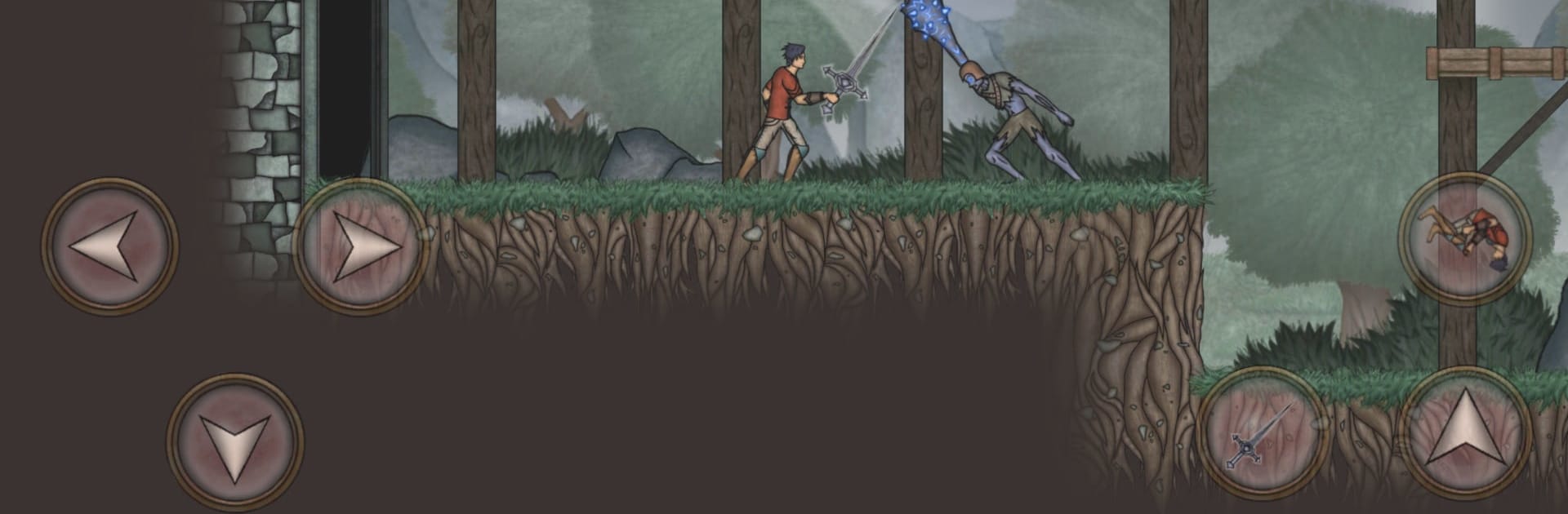
Runic Curse Demo is a side scrolling action RPG with a heavy Metroidvania feel, set on a cursed island that does not like visitors. It is a free slice of the game, enough to see how it plays without a huge time sink. The structure is classic explore, fight, unlock, double back, then push into new areas once abilities or gear open the way. Combat is quick and deliberate, more timing than button mashing. Weapons each carry their own rhythm, and the whole thing comes alive once the player starts slotting magical runes that tweak attacks, add status effects, or change how a build works. There are more than fifty spells to mix in, plus crafting of one use runes and upgrades for weapon runes, so it becomes a little playground for trying builds until something clicks.

Progression is simple to grasp. Gain levels, pick which stats to push, find equipment that nudges damage, defense, or mana efficiency, then use new abilities to reach spots that were blocked before. The demo shows off a good chunk of its ten zones with varied enemies and a couple of tough boss fights. There is a Boss Rush for quick challenges and a New Game Plus that can be repeated without a cap, which is nice for players who enjoy refining a build. On PC with BlueStacks, swapping spells on a hotkey and aiming abilities with a mouse feels smooth, and dodging with keys makes the tougher battles less frustrating. The tone stays dark and moody, but it is really about making a rune setup that feels good, then proving it against something big and very angry.

Slay your opponents with your epic moves. Play it your way on BlueStacks and dominate the battlefield.


Game Features

Enhancements

  • Macros
  • Multi Instance
  • Multi Instance Sync
  • Eco Mode
  • Enhancements
Macros

Macros

Skip the boring parts of a game. Play Runic Curse Demo with Macros and get the edge. Simply record a sequence of commands and execute them at any moment.
Multi Instance

Multi Instance

Why limit to one game on your phone when you can play many on your PC? Open multiple instances of Runic Curse Demo at once with Multi-Instance. Leverage the power of different accounts by doing more.
Multi Instance Sync

Multi Instance Sync

Get the best out of Runic Curse Demo with Multi-Instance Sync. Play the game from different accounts and build your own empire. Use Multi-instance sync to repeat the action in the main BlueStacks instance on all other instances.
Eco Mode

Eco Mode

Find the rarest heroes by making multiple summons in Runic Curse Demo. And while you are at it, reduce your PC’s resource consumption with the Eco Mode. Farm efficiently. Get the best results.
Read More

How to Download and Play Runic Curse Demo on PC or Mac

  • Download and install BlueStacks on your PC or Mac

  • Complete Google sign-in to access the Play Store, or do it later

  • Look for Runic Curse Demo in the search bar at the top right corner

  • Click to install Runic Curse Demo from the search results

  • Complete Google sign-in (if you skipped step 2) to install Runic Curse Demo

  • Click the Runic Curse Demo icon on the home screen to start playing

video
Watch Video

Minimum System Requirements

With BlueStacks 5, you can get started on a PC that fulfills the following requirements.

  • Operating System

    Microsoft Windows 7 or above, macOS 11 (Big Sur) or above

  • Processor

    Intel, AMD or Apple Silicon Processor

  • RAM

    at least 4GB

  • HDD

    10GB Free Disk Space

Note:

* You must be an Administrator on your PC. Up to date graphics drivers from Microsoft or the chipset vendor.

Runic Curse Demo - FAQs

  • How to play Runic Curse Demo on Windows PC & Mac?

    Play Runic Curse Demo on your PC or Mac by following these simple steps.

    • Click on 'Play Runic Curse Demo on PC’ to download BlueStacks
    • Install it and log-in to Google Play Store
    • Launch and play the game.
  • Why is BlueStacks the fastest and safest platform to play games on PC?

    BlueStacks respects your privacy and is always safe and secure to use. It does not carry any malware, spyware, or any sort of additional software that could harm your PC.

    It is engineered to optimize speed and performance for a seamless gaming experience.

  • What are Runic Curse Demo PC requirements?

    Minimum requirement to run Runic Curse Demo on your PC

    • OS: Microsoft Windows 7 or above MacOS 11 (Big Sur) or above
    • Processor: Intel, AMD or Apple Silicon Processor
    • RAM: Your PC must have at least 4GB of RAM. (Note that having 4GB or more disk space is not a substitute for RAM)
    • HDD: 10GB Free Disk Space.
    • You must be an Administrator on your PC.