Samurai - Pixel Platformer 2D

Samurai - Pixel Platformer 2D

Action

| Chronokrit

Play on PC with BlueStacks or from our cloud

  • Overview
  • Game Features
  • How to Play

Page Modified On: August 31, 2026

Play Samurai - Pixel Platformer 2D on PC or Mac

Step into the World of Samurai – Pixel Platformer 2D, a thrilling Action game from the house of Chronokrit. Play this Android game on BlueStacks App Player and experience immersive gaming on PC or Mac.

About the Game

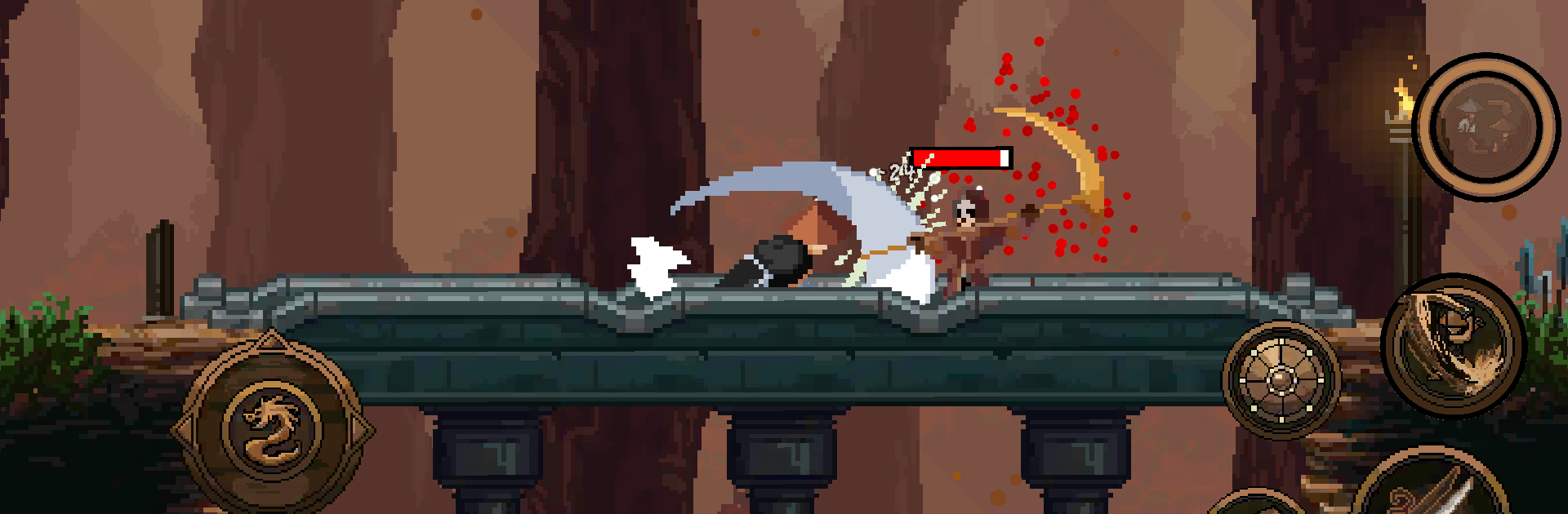
Samurai – Pixel Platformer 2D is an Action side-scroller that hands you not one, but two blade-wielding heroes to swap between whenever the fight demands it. Expect snappy swordplay, tight jumps, and chunky bosses wrapped in a brooding pixel world that’s easy to get lost in. Prefer a bigger view and crisp inputs? It feels great on BlueStacks, too.

Game Features

  • Tag-Team Blades: Instantly switch between two distinct fighters, using each one’s strengths to crack platforming sections, counter tricky enemy types, and keep momentum going.
  • Snappy Swordplay: Every slash lands with weight thanks to responsive controls, clean hit pauses, and quick dodge-dashes that reward timing and nerve.
  • Build Your Warrior: Spend the spoils you earn to boost health, stack more damage, raise crit chances, and unlock special techniques that suit your style.
  • Pattern-Savvy Bosses: Face towering guardians that demand smart reads and fast reactions—learn their tells, punish openings, and walk away victorious.
  • Moody Retro Look: Gritty pixel art, a shadowy Japanese vibe, and hand-crafted animations give the world a tense, old-school feel without losing clarity.
  • Smooth And Lightweight: Quick loads and steady performance keep the action flowing, while the compact install won’t hog storage or chew through battery.
  • Smart Level Crafting: Stages blend combat and platforming so both heroes shine, encouraging you to plan ahead and swap at just the right moment.

Start playing Samurai – Pixel Platformer 2D on BlueStacks and get a smoother, more comfortable PC or Mac setup.


Game Features

Enhancements

  • Macros
  • Multi Instance
  • Multi Instance Sync
  • Eco Mode
  • Enhancements
Macros

Macros

Skip the boring parts of a game. Play Samurai - Pixel Platformer 2D with Macros and get the edge. Simply record a sequence of commands and execute them at any moment.
Multi Instance

Multi Instance

Why limit to one game on your phone when you can play many on your PC? Open multiple instances of Samurai - Pixel Platformer 2D at once with Multi-Instance. Leverage the power of different accounts by doing more.
Multi Instance Sync

Multi Instance Sync

Get the best out of Samurai - Pixel Platformer 2D with Multi-Instance Sync. Play the game from different accounts and build your own empire. Use Multi-instance sync to repeat the action in the main BlueStacks instance on all other instances.
Eco Mode

Eco Mode

Find the rarest heroes by making multiple summons in Samurai - Pixel Platformer 2D. And while you are at it, reduce your PC’s resource consumption with the Eco Mode. Farm efficiently. Get the best results.
Read More

How to Download and Play Samurai - Pixel Platformer 2D on PC or Mac

  • Download and install BlueStacks on your PC or Mac

  • Complete Google sign-in to access the Play Store, or do it later

  • Look for Samurai - Pixel Platformer 2D in the search bar at the top right corner

  • Click to install Samurai - Pixel Platformer 2D from the search results

  • Complete Google sign-in (if you skipped step 2) to install Samurai - Pixel Platformer 2D

  • Click the Samurai - Pixel Platformer 2D icon on the home screen to start playing

video
Watch Video

Minimum System Requirements

With BlueStacks 5, you can get started on a PC that fulfills the following requirements.

  • Operating System

    Microsoft Windows 7 or above, macOS 11 (Big Sur) or above

  • Processor

    Intel, AMD or Apple Silicon Processor

  • RAM

    at least 4GB

  • HDD

    10GB Free Disk Space

Note:

* You must be an Administrator on your PC. Up to date graphics drivers from Microsoft or the chipset vendor.

Samurai - Pixel Platformer 2D - FAQs

  • How to play Samurai - Pixel Platformer 2D on Windows PC & Mac?

    Play Samurai - Pixel Platformer 2D on your PC or Mac by following these simple steps.

    • Click on 'Play Samurai - Pixel Platformer 2D on PC’ to download BlueStacks
    • Install it and log-in to Google Play Store
    • Launch and play the game.
  • Why is BlueStacks the fastest and safest platform to play games on PC?

    BlueStacks respects your privacy and is always safe and secure to use. It does not carry any malware, spyware, or any sort of additional software that could harm your PC.

    It is engineered to optimize speed and performance for a seamless gaming experience.

  • What are Samurai - Pixel Platformer 2D PC requirements?

    Minimum requirement to run Samurai - Pixel Platformer 2D on your PC

    • OS: Microsoft Windows 7 or above MacOS 11 (Big Sur) or above
    • Processor: Intel, AMD or Apple Silicon Processor
    • RAM: Your PC must have at least 4GB of RAM. (Note that having 4GB or more disk space is not a substitute for RAM)
    • HDD: 10GB Free Disk Space.
    • You must be an Administrator on your PC.