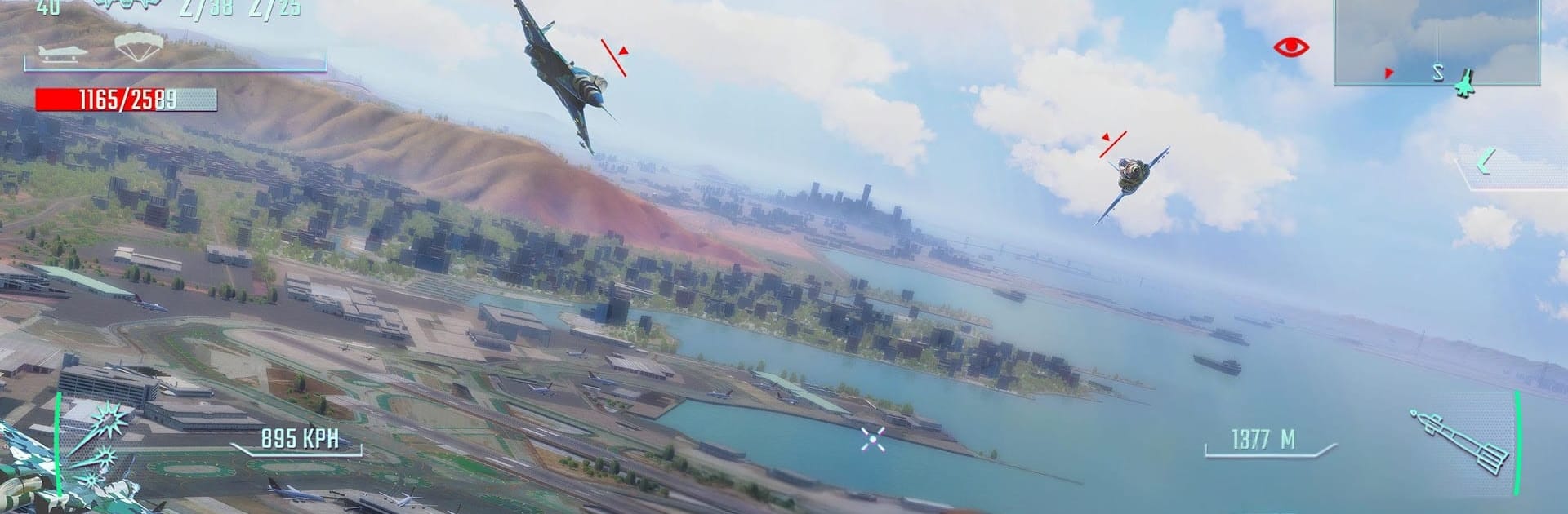
Sky Gamblers - Infinite Jets

Sky Gamblers - Infinite Jets

Action

| Atypical Games

Play on PC with BlueStacks or from our cloud

  • Overview
  • Game Features
  • How to Play

Page Modified On: November 10, 2025

Play Sky Gamblers - Infinite Jets on PC or Mac

From the innovators and creators at Atypical Games, Sky Gamblers – Infinite Jets is another fun addition to the World of Action games. Go beyond your mobile screen and play it bigger and better on your PC or Mac. An immersive experience awaits you.

Sky Gamblers – Infinite Jets is all about fast jet combat with a big arcade feel. It throws players into tight dogfights where missile locks and cannon bursts keep the tempo high, then lets them cool off in a hangar full of toys. There are over a hundred planes to unlock and tweak, with upgrades for weapons and defenses, and a surprising amount of style choices. Paint jobs, patterns, badges, the whole look can be tuned so a favorite jet actually feels like theirs.

The single player campaign aims for a movie vibe, with a story of bravery tangled up with betrayal. Missions play out over large maps that look like real places, including San Francisco and Rio de Janeiro, and they are busy. Enemy jets swarm the sky, ships bristle on the water, and SAM sites hide near buildings or in the trees, so flying low is fun but risky. There is a custom match setup against AI that is great for practicing evasive moves and target tracking before jumping online. Multiplayer goes up to 7 vs 7, PVP or co-op PVE, and it gets loud and chaotic in a good way when missiles start painting everything. On PC with BlueStacks, mouse and keyboard aiming feels clean, and the bigger screen makes spotting threats and lining up long shots much easier without changing the arcade heart of it.

Get ready for a buttery smooth, high-performance gaming action only on BlueStacks.

Game Features

Enhancements

  • Macros
  • Multi Instance
  • Multi Instance Sync
  • Eco Mode
  • Enhancements
Macros

Macros

Skip the boring parts of a game. Play Sky Gamblers - Infinite Jets with Macros and get the edge. Simply record a sequence of commands and execute them at any moment.
Multi Instance

Multi Instance

Why limit to one game on your phone when you can play many on your PC? Open multiple instances of Sky Gamblers - Infinite Jets at once with Multi-Instance. Leverage the power of different accounts by doing more.
Multi Instance Sync

Multi Instance Sync

Get the best out of Sky Gamblers - Infinite Jets with Multi-Instance Sync. Play the game from different accounts and build your own empire. Use Multi-instance sync to repeat the action in the main BlueStacks instance on all other instances.
Eco Mode

Eco Mode

Find the rarest heroes by making multiple summons in Sky Gamblers - Infinite Jets. And while you are at it, reduce your PC’s resource consumption with the Eco Mode. Farm efficiently. Get the best results.
Read More

How to Download and Play Sky Gamblers - Infinite Jets on PC or Mac

  • Download and install BlueStacks on your PC or Mac

  • Complete Google sign-in to access the Play Store, or do it later

  • Look for Sky Gamblers - Infinite Jets in the search bar at the top right corner

  • Click to install Sky Gamblers - Infinite Jets from the search results

  • Complete Google sign-in (if you skipped step 2) to install Sky Gamblers - Infinite Jets

  • Click the Sky Gamblers - Infinite Jets icon on the home screen to start playing

video
Watch Video

Minimum System Requirements

With BlueStacks 5, you can get started on a PC that fulfills the following requirements.

  • Operating System

    Microsoft Windows 7 or above, macOS 11 (Big Sur) or above

  • Processor

    Intel, AMD or Apple Silicon Processor

  • RAM

    at least 4GB

  • HDD

    10GB Free Disk Space

Note:

* You must be an Administrator on your PC. Up to date graphics drivers from Microsoft or the chipset vendor.

Sky Gamblers - Infinite Jets - FAQs

  • How to play Sky Gamblers - Infinite Jets on Windows PC & Mac?

    Play Sky Gamblers - Infinite Jets on your PC or Mac by following these simple steps.

    • Click on 'Play Sky Gamblers - Infinite Jets on PC’ to download BlueStacks
    • Install it and log-in to Google Play Store
    • Launch and play the game.
  • Why is BlueStacks the fastest and safest platform to play games on PC?

    BlueStacks respects your privacy and is always safe and secure to use. It does not carry any malware, spyware, or any sort of additional software that could harm your PC.

    It is engineered to optimize speed and performance for a seamless gaming experience.

  • What are Sky Gamblers - Infinite Jets PC requirements?

    Minimum requirement to run Sky Gamblers - Infinite Jets on your PC

    • OS: Microsoft Windows 7 or above MacOS 11 (Big Sur) or above
    • Processor: Intel, AMD or Apple Silicon Processor
    • RAM: Your PC must have at least 4GB of RAM. (Note that having 4GB or more disk space is not a substitute for RAM)
    • HDD: 10GB Free Disk Space.
    • You must be an Administrator on your PC.