Tung Sahur: Brainrot Survivor

Tung Sahur: Brainrot Survivor

Action

| Achoally Studio

Play on PC with BlueStacks or from our cloud

  • Overview
  • Game Features
  • How to Play

Page Modified On: September 02, 2025

Play Tung Sahur: Brainrot Survivor on PC or Mac

From the innovators and creators at Achoally Studio, Tung Sahur: Brainrot Survivor is another fun addition to the World of Action games. Go beyond your mobile screen and play it bigger and better on your PC or Mac. An immersive experience awaits you.

About the Game

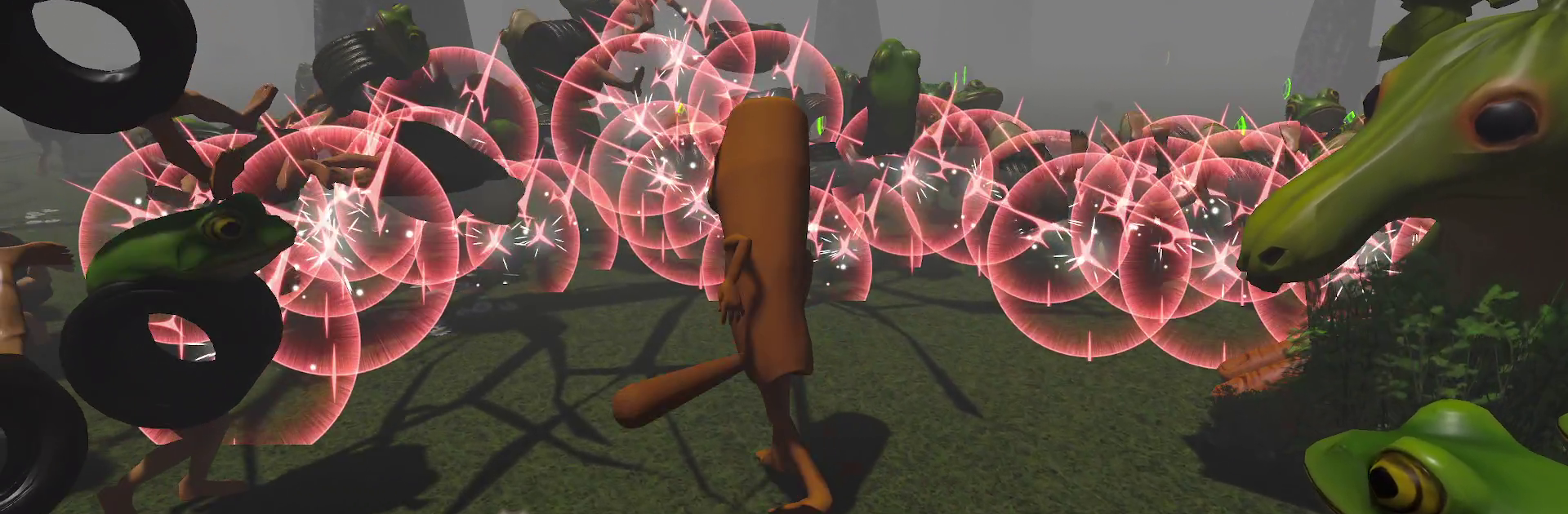
Tung Sahur: Brainrot Survivor is an Action oddity from Achoally Studio where you sprint barefoot through a foggy forest, clutching a baseball bat and a bad idea. The goal? Stay alive long enough to bait out the big weirdo running the place and break his bark-covered face. Runs are quick, upgrades come fast, and every swing turns chaos into slapstick. Prefer a larger screen? It plays nicely on PC with BlueStacks.

Game Features

  • Pick-up-and-swing controls: Left thumb to move and strafe, right thumb to smack threats into tomorrow. Drag the screen to keep creepy things in view—simple, snappy, satisfying.

  • Knockback comedy: Land a clean hit and watch enemies ping off trees for extra damage. The physics sell every whiff, wallop, and glorious faceplant.

  • Level as you fight: Enemies drop EXP gems; scoop them up to level and pick from three random perks. Go heavier, faster, wider, or pushier—builds change on the fly.

  • Strange boss hunt: Survive waves long enough to lure out Brr Brr Patapim, a half-proboscis monkey, half-tree nightmare that rules the fog.

  • Oddball roster: Battle Boneca Ambalabu (frog head, tire gut, human legs) and Tric Trac Barabum (a zucchini bruiser with cartoon feet). Each enemy is weird in a fun, “what am I looking at?” way.

  • Bite-size runs: Perfect for short sessions. Fail, retry, and get sharper without timers or energy meters—and no forced ads stopping the momentum.

  • Build variety that matters: Stack faster swings with bigger arcs, crank up knockback, or chase raw damage to send packs flying—it all meshes with the physics.

  • More arenas on the horizon: A sun-blasted desert with Lirilì Larilà and a rolling-ocean map patrolled by Tralalero Tralala are teased, plus new upgrades and mechanics to tinker with.

Slay your opponents with your epic moves. Play it your way on BlueStacks and dominate the battlefield.


Game Features

Enhancements

  • Macros
  • Multi Instance
  • Multi Instance Sync
  • Eco Mode
  • Enhancements
Macros

Macros

Skip the boring parts of a game. Play Tung Sahur: Brainrot Survivor with Macros and get the edge. Simply record a sequence of commands and execute them at any moment.
Multi Instance

Multi Instance

Why limit to one game on your phone when you can play many on your PC? Open multiple instances of Tung Sahur: Brainrot Survivor at once with Multi-Instance. Leverage the power of different accounts by doing more.
Multi Instance Sync

Multi Instance Sync

Get the best out of Tung Sahur: Brainrot Survivor with Multi-Instance Sync. Play the game from different accounts and build your own empire. Use Multi-instance sync to repeat the action in the main BlueStacks instance on all other instances.
Eco Mode

Eco Mode

Find the rarest heroes by making multiple summons in Tung Sahur: Brainrot Survivor. And while you are at it, reduce your PC’s resource consumption with the Eco Mode. Farm efficiently. Get the best results.
Read More

How to Download and Play Tung Sahur: Brainrot Survivor on PC or Mac

  • Download and install BlueStacks on your PC or Mac

  • Complete Google sign-in to access the Play Store, or do it later

  • Look for Tung Sahur: Brainrot Survivor in the search bar at the top right corner

  • Click to install Tung Sahur: Brainrot Survivor from the search results

  • Complete Google sign-in (if you skipped step 2) to install Tung Sahur: Brainrot Survivor

  • Click the Tung Sahur: Brainrot Survivor icon on the home screen to start playing

video
Watch Video

Minimum System Requirements

With BlueStacks 5, you can get started on a PC that fulfills the following requirements.

  • Operating System

    Microsoft Windows 7 or above, macOS 11 (Big Sur) or above

  • Processor

    Intel, AMD or Apple Silicon Processor

  • RAM

    at least 4GB

  • HDD

    10GB Free Disk Space

Note:

* You must be an Administrator on your PC. Up to date graphics drivers from Microsoft or the chipset vendor.

Tung Sahur: Brainrot Survivor - FAQs

  • How to play Tung Sahur: Brainrot Survivor on Windows PC & Mac?

    Play Tung Sahur: Brainrot Survivor on your PC or Mac by following these simple steps.

    • Click on 'Play Tung Sahur: Brainrot Survivor on PC’ to download BlueStacks
    • Install it and log-in to Google Play Store
    • Launch and play the game.
  • Why is BlueStacks the fastest and safest platform to play games on PC?

    BlueStacks respects your privacy and is always safe and secure to use. It does not carry any malware, spyware, or any sort of additional software that could harm your PC.

    It is engineered to optimize speed and performance for a seamless gaming experience.

  • What are Tung Sahur: Brainrot Survivor PC requirements?

    Minimum requirement to run Tung Sahur: Brainrot Survivor on your PC

    • OS: Microsoft Windows 7 or above MacOS 11 (Big Sur) or above
    • Processor: Intel, AMD or Apple Silicon Processor
    • RAM: Your PC must have at least 4GB of RAM. (Note that having 4GB or more disk space is not a substitute for RAM)
    • HDD: 10GB Free Disk Space.
    • You must be an Administrator on your PC.