World War Heroes Test

World War Heroes Test

Action

| Azur Interactive Games Limited

Play on PC with BlueStacks or from our cloud

  • Overview
  • Game Features
  • How to Play

Page Modified On: January 09, 2026

Play World War Heroes Test on PC or Mac

Join millions to experience World War Heroes Test, an exciting Action game from Azur Interactive Games Limited. With BlueStacks App Player, you are always a step ahead of your opponent, ready to outplay them with faster gameplay and better control with the mouse and keyboard on your PC or Mac.

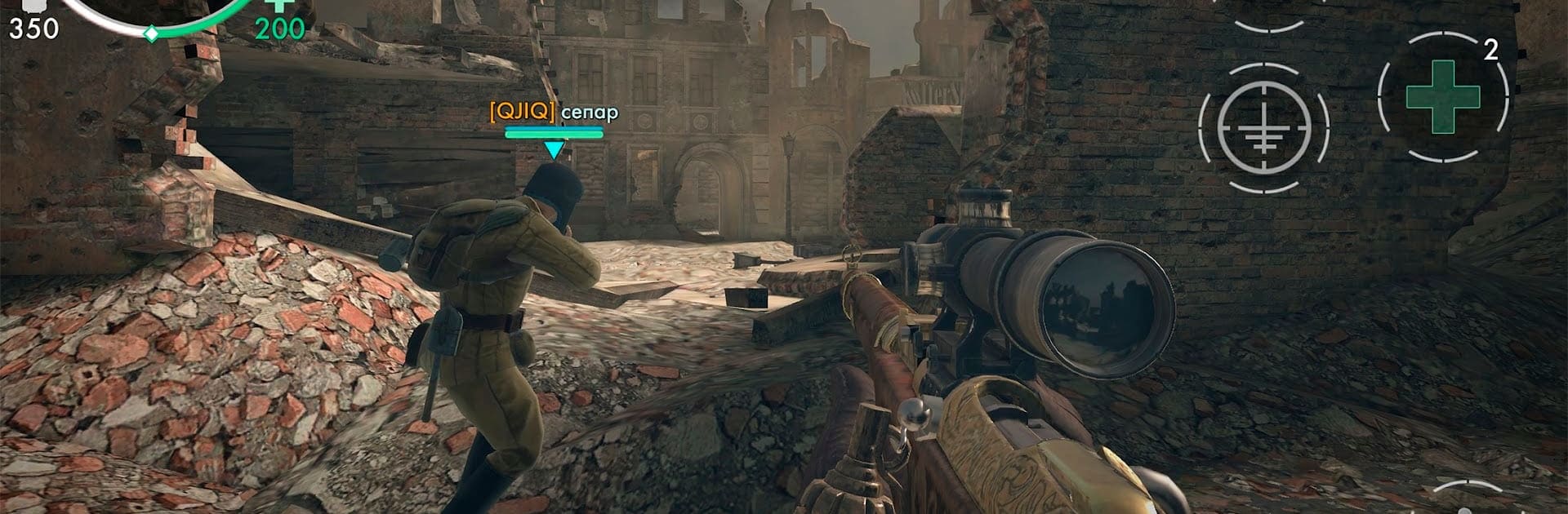
World War Heroes Test plays like a fast, scrappy World War II shooter where matches pop off in tight city streets and open squares that look ripped from mid-century Europe. It is all about quick decisions and clear shots. One round might be a straight team brawl, the next is everyone for themselves, then it swaps to holding capture points or guarding a base while the other side tries to blow it up. There is also a last-team-alive mode with no respawns that gets tense fast, and custom rooms if a group wants to set house rules. Tanks are not just decoration either. Players can jump in, rumble through alleys, and force people out of cover, which changes the flow alot.

The gun pool is big and specific to the era. Pistols, bolt rifles, submachine guns, shotguns, sniper rifles, even bazookas when someone is being stubborn behind armor. Recoil and reloads feel chunky in a good way, and upgrades nudge damage, ammo, kick, and reload time so a favorite loadout keeps improving. On PC with BlueStacks, mouse aim makes tracking heads at mid range feel way easier, and tanks are simpler to steer with keys. Visuals are clean for a mobile shooter, nothing flashy, just clear sightlines and readable models. Matches fill fast, maps rotate, and the whole thing leans more arcade than sim, which suits anyone who wants WWII flavor, steady unlocks, daily tasks, and a place to hop in for a few rounds without fuss.

Ready to top the leaderboard? We bet you do. Let precise controls and sharp visuals optimized on BlueStacks lead you to victory.


Game Features

Enhancements

  • Macros
  • Multi Instance
  • Multi Instance Sync
  • Eco Mode
  • Enhancements
Macros

Macros

Skip the boring parts of a game. Play World War Heroes Test with Macros and get the edge. Simply record a sequence of commands and execute them at any moment.
Multi Instance

Multi Instance

Why limit to one game on your phone when you can play many on your PC? Open multiple instances of World War Heroes Test at once with Multi-Instance. Leverage the power of different accounts by doing more.
Multi Instance Sync

Multi Instance Sync

Get the best out of World War Heroes Test with Multi-Instance Sync. Play the game from different accounts and build your own empire. Use Multi-instance sync to repeat the action in the main BlueStacks instance on all other instances.
Eco Mode

Eco Mode

Find the rarest heroes by making multiple summons in World War Heroes Test. And while you are at it, reduce your PC’s resource consumption with the Eco Mode. Farm efficiently. Get the best results.
Read More

How to Download and Play World War Heroes Test on PC or Mac

  • Download and install BlueStacks on your PC or Mac

  • Complete Google sign-in to access the Play Store, or do it later

  • Look for World War Heroes Test in the search bar at the top right corner

  • Click to install World War Heroes Test from the search results

  • Complete Google sign-in (if you skipped step 2) to install World War Heroes Test

  • Click the World War Heroes Test icon on the home screen to start playing

video
Watch Video

Minimum System Requirements

With BlueStacks 5, you can get started on a PC that fulfills the following requirements.

  • Operating System

    Microsoft Windows 7 or above, macOS 11 (Big Sur) or above

  • Processor

    Intel, AMD or Apple Silicon Processor

  • RAM

    at least 4GB

  • HDD

    10GB Free Disk Space

Note:

* You must be an Administrator on your PC. Up to date graphics drivers from Microsoft or the chipset vendor.

World War Heroes Test - FAQs

  • How to play World War Heroes Test on Windows PC & Mac?

    Play World War Heroes Test on your PC or Mac by following these simple steps.

    • Click on 'Play World War Heroes Test on PC’ to download BlueStacks
    • Install it and log-in to Google Play Store
    • Launch and play the game.
  • Why is BlueStacks the fastest and safest platform to play games on PC?

    BlueStacks respects your privacy and is always safe and secure to use. It does not carry any malware, spyware, or any sort of additional software that could harm your PC.

    It is engineered to optimize speed and performance for a seamless gaming experience.

  • What are World War Heroes Test PC requirements?

    Minimum requirement to run World War Heroes Test on your PC

    • OS: Microsoft Windows 7 or above MacOS 11 (Big Sur) or above
    • Processor: Intel, AMD or Apple Silicon Processor
    • RAM: Your PC must have at least 4GB of RAM. (Note that having 4GB or more disk space is not a substitute for RAM)
    • HDD: 10GB Free Disk Space.
    • You must be an Administrator on your PC.