Zombie In Space Shooter

Zombie In Space Shooter

Action

| KATbIK STUDIOS

Play on PC with BlueStacks or from our cloud

  • Overview
  • Game Features
  • How to Play

Page Modified On: August 19, 2025

Play Zombie In Space Shooter on PC or Mac

Step into the World of Zombie In Space Shooter, a thrilling Action game from the house of KATbIK STUDIOS. Play this Android game on BlueStacks App Player and experience immersive gaming on PC or Mac.

About the Game

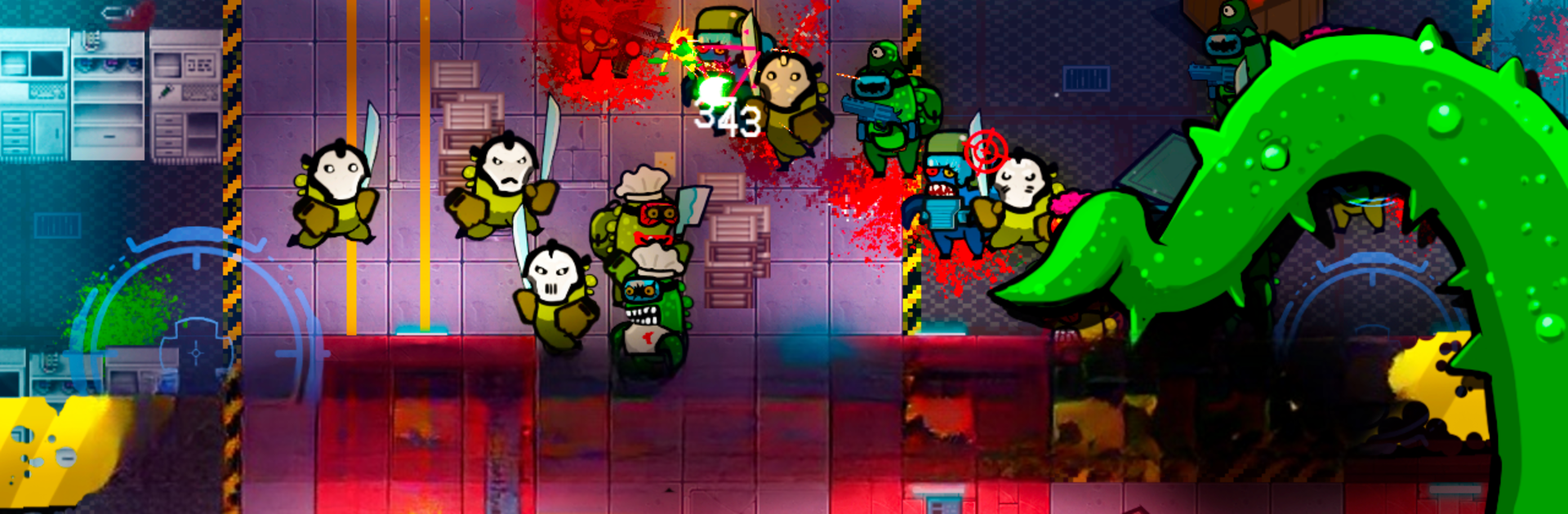
If you’re up for some sci-fi chaos with a side of dark humor, Zombie In Space Shooter is your kind of action game. The setup? A zombie outbreak on a distant galactic space station, thanks to one really sneaky imposter. Alone or with a friend on the same device, you’ll jump into wild, top-down battles as a mercenary set on snagging an artifact—while fending off floods of bizarre zombies. It’s intense, sometimes funny, and always challenging, with plenty of weapons to keep things interesting.

Game Features

  • Two-Player Local Mode
    Prefer to battle zombies with backup? Hand the device over to a friend and fight together, side by side. Or, if you’re feeling brave, go it alone and see how far you get.

  • Loads of Weapons
    Blast your way through with everything from classic rifles to wild sci-fi plasma cannons. There’s a weapon here for every kind of mayhem.

  • Quirky Zombie Enemies
    It’s not just the “regular” undead—expect machete-wielding maniacs, evil clown zombies, and enormous bosses that won’t go down easy.

  • Mercenary Upgrades
    As you progress, beef up your gear and skills. Upgrading your mercenary makes those epic boss fights a lot less terrifying.

  • Skill Boosts and Bonuses
    Snag power-ups scattered around each level for a temporary edge in firepower, speed, or defense. They’re around when you need them most.

  • Offline Play
    No WiFi? No sweat. Zombie In Space Shooter lets you enjoy the action wherever you are—space ship, couch, or on the go.

  • Simple Top-Down Controls
    Jump straight into the action with an easy control scheme that doesn’t get in the way of blasting zombies.

  • RPG Vibes & Sci-Fi Easter Eggs
    There’s a real “space adventure” feel here, sprinkled with nods to classic sci-fi cinema and a dose of lighthearted jokes.

  • Brutal Boss Battles
    Every so often, buckle up for a memorable fight against a boss that really puts your skills (and arsenal) to the test.

If you want to play Zombie In Space Shooter on your PC, BlueStacks has you covered, letting you really experience the carnage up close.

Start your journey now. Download the game on BlueStacks, invite your friends, and march on a new adventure.


Game Features

Enhancements

  • Macros
  • Multi Instance
  • Multi Instance Sync
  • Eco Mode
  • Enhancements
Macros

Macros

Skip the boring parts of a game. Play Zombie In Space Shooter with Macros and get the edge. Simply record a sequence of commands and execute them at any moment.
Multi Instance

Multi Instance

Why limit to one game on your phone when you can play many on your PC? Open multiple instances of Zombie In Space Shooter at once with Multi-Instance. Leverage the power of different accounts by doing more.
Multi Instance Sync

Multi Instance Sync

Get the best out of Zombie In Space Shooter with Multi-Instance Sync. Play the game from different accounts and build your own empire. Use Multi-instance sync to repeat the action in the main BlueStacks instance on all other instances.
Eco Mode

Eco Mode

Find the rarest heroes by making multiple summons in Zombie In Space Shooter. And while you are at it, reduce your PC’s resource consumption with the Eco Mode. Farm efficiently. Get the best results.
Read More

How to Download and Play Zombie In Space Shooter on PC or Mac

  • Download and install BlueStacks on your PC or Mac

  • Complete Google sign-in to access the Play Store, or do it later

  • Look for Zombie In Space Shooter in the search bar at the top right corner

  • Click to install Zombie In Space Shooter from the search results

  • Complete Google sign-in (if you skipped step 2) to install Zombie In Space Shooter

  • Click the Zombie In Space Shooter icon on the home screen to start playing

video
Watch Video

Minimum System Requirements

With BlueStacks 5, you can get started on a PC that fulfills the following requirements.

  • Operating System

    Microsoft Windows 7 or above, macOS 11 (Big Sur) or above

  • Processor

    Intel, AMD or Apple Silicon Processor

  • RAM

    at least 4GB

  • HDD

    10GB Free Disk Space

Note:

* You must be an Administrator on your PC. Up to date graphics drivers from Microsoft or the chipset vendor.

Zombie In Space Shooter - FAQs

  • How to play Zombie In Space Shooter on Windows PC & Mac?

    Play Zombie In Space Shooter on your PC or Mac by following these simple steps.

    • Click on 'Play Zombie In Space Shooter on PC’ to download BlueStacks
    • Install it and log-in to Google Play Store
    • Launch and play the game.
  • Why is BlueStacks the fastest and safest platform to play games on PC?

    BlueStacks respects your privacy and is always safe and secure to use. It does not carry any malware, spyware, or any sort of additional software that could harm your PC.

    It is engineered to optimize speed and performance for a seamless gaming experience.

  • What are Zombie In Space Shooter PC requirements?

    Minimum requirement to run Zombie In Space Shooter on your PC

    • OS: Microsoft Windows 7 or above MacOS 11 (Big Sur) or above
    • Processor: Intel, AMD or Apple Silicon Processor
    • RAM: Your PC must have at least 4GB of RAM. (Note that having 4GB or more disk space is not a substitute for RAM)
    • HDD: 10GB Free Disk Space.
    • You must be an Administrator on your PC.