Aerovice Frutiger World

Aerovice Frutiger World

Adventure

| enastudios_sv

Play on PC with BlueStacks or from our cloud

  • Overview
  • Game Features
  • How to Play

Page Modified On: June 29, 2026

Play Aerovice Frutiger World on PC or Mac

Bring your A-game to Aerovice Frutiger World, the Adventure game sensation from enastudios_sv. Give your gameplay the much-needed boost with precise game controls, high FPS graphics, and top-tier features on your PC or Mac with BlueStacks.

About the Game

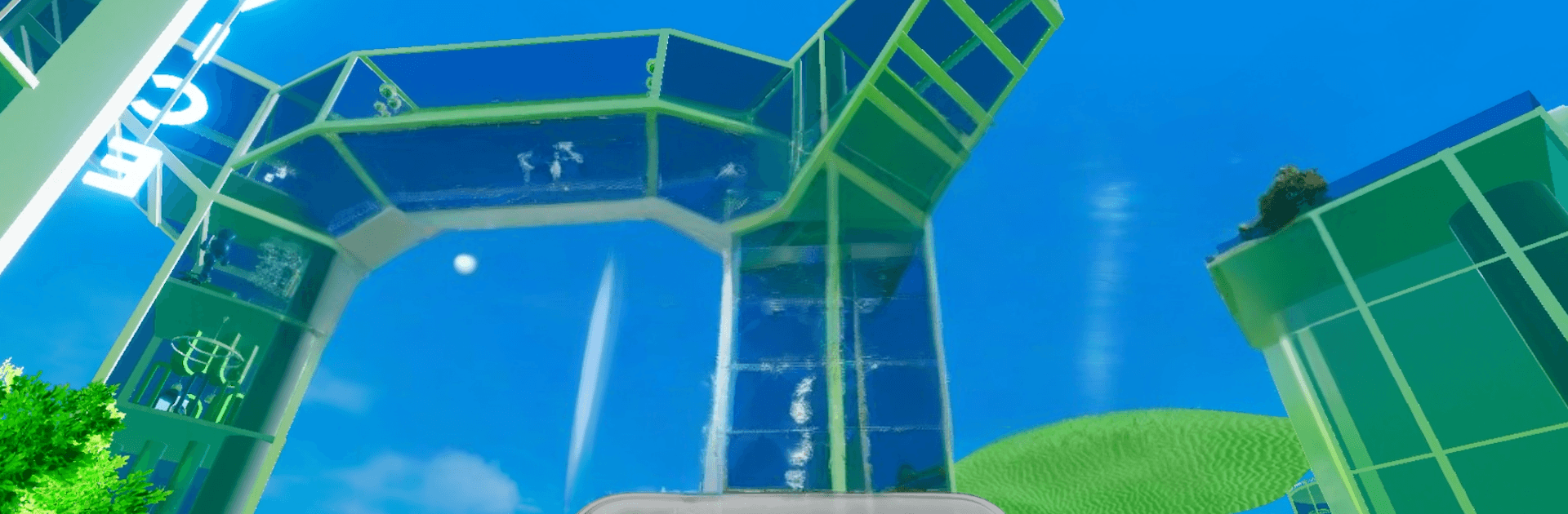
Aerovice Frutiger World is an Adventure about getting pleasantly lost in places that feel almost real—until they don’t. You’ll stroll through glossy halls, quiet poolrooms, and looping backrooms with a dreamcore vibe that’s calm one minute and a little uncanny the next. No rush here; just you, the hum of big empty spaces, and the pull to see what’s hiding around the corner.

Game Features

  • Frutiger Aero mood: Smooth textures, soft lighting, and nostalgic color palettes capture that oddly familiar, high-gloss aesthetic.
  • Liminal spaces to roam: Backrooms, poolrooms, and abstract corridors stretch into stillness, inviting you to wander and wonder.
  • Calm, slightly eerie feel: It’s relaxing to explore—but the silence and scale add a gentle tension that keeps you curious.
  • Minimal UI, all atmosphere: The screen stays clean so the world can do the talking—no clutter, just space and sound.
  • Discovery-led play: Follow visual clues and environmental details to piece together meaning without pop-ups or hand-holding.
  • Freeform pacing: Walk, pause, soak it in, double back—exploration is the whole point, and you set the tempo.
  • Sculpted in 3D: Depth, reflections, and spacious sound give each area weight and presence from every angle.
  • Subtle storytelling: Rooms, layouts, and transitions hint at a bigger picture—no cutscenes needed.
  • PC-friendly on BlueStacks: Prefer a keyboard and a bigger display? It works smoothly there, too.

Start your journey now. Download the game on BlueStacks, invite your friends, and march on a new adventure.


Game Features

Enhancements

  • Macros
  • Multi Instance
  • Multi Instance Sync
  • Script
  • Enhancements
Macros

Macros

Automate the predictable in Aerovice Frutiger World and transform your gameplay with Macros. Get access to inventive Macros in the BlueStacks Macro Community
Multi Instance

Multi Instance

Play Aerovice Frutiger World on one window. And chat with your friend on the other. Press CTRL + Shift + 8 to open the Multi-Instance Manager. And start creating fresh instances or clone an existing one.
Multi Instance Sync

Multi Instance Sync

Play Aerovice Frutiger World with the power of Multi-Instance Sync. Replicate what you are doing on the main instance on all other instances. Level up faster, play more.
Script

Script

Script your way to gaming glory in Aerovice Frutiger World with BlueStacks Script. Write and run a set of commands to automate repeated tasks. Trigger the command by assigning it to any key.
Read More

How to Download and Play Aerovice Frutiger World on PC or Mac

  • Download and install BlueStacks on your PC or Mac

  • Complete Google sign-in to access the Play Store, or do it later

  • Look for Aerovice Frutiger World in the search bar at the top right corner

  • Click to install Aerovice Frutiger World from the search results

  • Complete Google sign-in (if you skipped step 2) to install Aerovice Frutiger World

  • Click the Aerovice Frutiger World icon on the home screen to start playing

video
Watch Video

Minimum System Requirements

With BlueStacks 5, you can get started on a PC that fulfills the following requirements.

  • Operating System

    Microsoft Windows 7 or above, macOS 11 (Big Sur) or above

  • Processor

    Intel, AMD or Apple Silicon Processor

  • RAM

    at least 4GB

  • HDD

    10GB Free Disk Space

Note:

* You must be an Administrator on your PC. Up to date graphics drivers from Microsoft or the chipset vendor.

Aerovice Frutiger World - FAQs

  • How to play Aerovice Frutiger World on Windows PC & Mac?

    Play Aerovice Frutiger World on your PC or Mac by following these simple steps.

    • Click on 'Play Aerovice Frutiger World on PC’ to download BlueStacks
    • Install it and log-in to Google Play Store
    • Launch and play the game.
  • Why is BlueStacks the fastest and safest platform to play games on PC?

    BlueStacks respects your privacy and is always safe and secure to use. It does not carry any malware, spyware, or any sort of additional software that could harm your PC.

    It is engineered to optimize speed and performance for a seamless gaming experience.

  • What are Aerovice Frutiger World PC requirements?

    Minimum requirement to run Aerovice Frutiger World on your PC

    • OS: Microsoft Windows 7 or above MacOS 11 (Big Sur) or above
    • Processor: Intel, AMD or Apple Silicon Processor
    • RAM: Your PC must have at least 4GB of RAM. (Note that having 4GB or more disk space is not a substitute for RAM)
    • HDD: 10GB Free Disk Space.
    • You must be an Administrator on your PC.