
Berry Bury Strawberry

Berry Bury Strawberry

Adventure

| Pivito Games

Play on PC with BlueStacks or from our cloud

  • Overview
  • Game Features
  • How to Play

Page Modified On: June 17, 2026

Play Berry Bury Strawberry on PC or Mac

Play Berry Bury Strawberry by Pivito Games on PC or Mac with BlueStacks. Use a bigger screen, mouse and keyboard controls, and smoother performance while you play.

About the Game

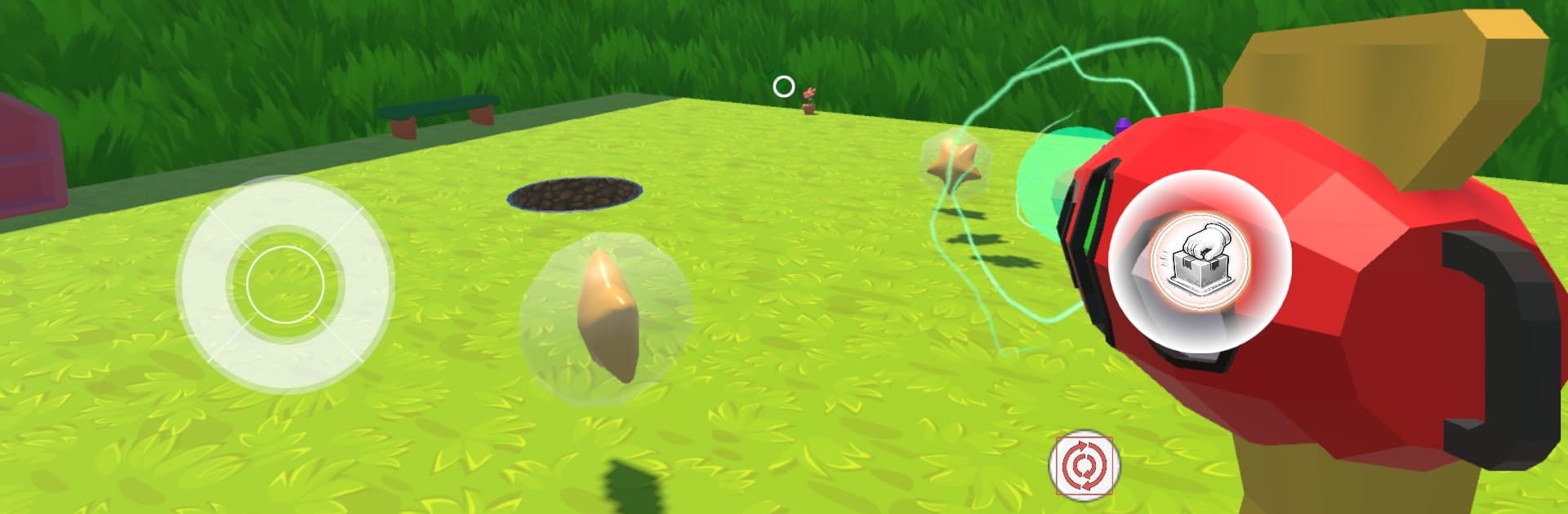
Berry Bury Strawberry is a quick, feel-good Adventure where your Berry Vacuum slurps up anything shiny in a whimsical garden. You’ll zip through leafy paths grabbing berries, stars, and coins while each new day tosses in fresh hurdles. Start with pocket change, stick with it, and pretty soon you’re chasing totals that slide into the billions.

Game Features

  • Satisfying Berry Vacuum: Sweep up swarms of berries with a smooth pull that chains pickups together for huge hauls.
  • Day-by-day climb: Every new day raises the stakes with trickier patterns and surprises, turning small wins into serious cash.
  • Lively garden world: Stroll through bright flowerbeds, glittering stashes, and a few mysterious gnomes peeking out from the hedges.
  • Bubble bursts of loot: Pop floating bubbles to spill stars, shiny gems, and hefty piles of gold coins.
  • Big-money milestones: Watch your stash grow from a few cents to eye-watering numbers—yep, even past 1.1B if you keep your cool.
  • Clean, colorful look: Crisp animation and cheerful effects make every pickup pop and every coin clink feel extra nice.
  • Play your way: Tap and swipe on mobile, or fire it up on BlueStacks if you’d rather go with mouse clicks and a roomier screen.

BlueStacks gives you more room to focus on the game and less time adjusting around mobile limitations.


Game Features

Enhancements

  • Macros
  • Multi Instance
  • Multi Instance Sync
  • Script
  • Enhancements
Macros

Macros

Automate the predictable in Berry Bury Strawberry and transform your gameplay with Macros. Get access to inventive Macros in the BlueStacks Macro Community
Multi Instance

Multi Instance

Play Berry Bury Strawberry on one window. And chat with your friend on the other. Press CTRL + Shift + 8 to open the Multi-Instance Manager. And start creating fresh instances or clone an existing one.
Multi Instance Sync

Multi Instance Sync

Play Berry Bury Strawberry with the power of Multi-Instance Sync. Replicate what you are doing on the main instance on all other instances. Level up faster, play more.
Script

Script

Script your way to gaming glory in Berry Bury Strawberry with BlueStacks Script. Write and run a set of commands to automate repeated tasks. Trigger the command by assigning it to any key.
Read More

How to Download and Play Berry Bury Strawberry on PC or Mac

  • Download and install BlueStacks on your PC or Mac

  • Complete Google sign-in to access the Play Store, or do it later

  • Look for Berry Bury Strawberry in the search bar at the top right corner

  • Click to install Berry Bury Strawberry from the search results

  • Complete Google sign-in (if you skipped step 2) to install Berry Bury Strawberry

  • Click the Berry Bury Strawberry icon on the home screen to start playing

video
Watch Video

Minimum System Requirements

With BlueStacks 5, you can get started on a PC that fulfills the following requirements.

  • Operating System

    Microsoft Windows 7 or above, macOS 11 (Big Sur) or above

  • Processor

    Intel, AMD or Apple Silicon Processor

  • RAM

    at least 4GB

  • HDD

    10GB Free Disk Space

Note:

* You must be an Administrator on your PC. Up to date graphics drivers from Microsoft or the chipset vendor.

Berry Bury Strawberry - FAQs

  • How to play Berry Bury Strawberry on Windows PC & Mac?

    Play Berry Bury Strawberry on your PC or Mac by following these simple steps.

    • Click on 'Play Berry Bury Strawberry on PC’ to download BlueStacks
    • Install it and log-in to Google Play Store
    • Launch and play the game.
  • Why is BlueStacks the fastest and safest platform to play games on PC?

    BlueStacks respects your privacy and is always safe and secure to use. It does not carry any malware, spyware, or any sort of additional software that could harm your PC.

    It is engineered to optimize speed and performance for a seamless gaming experience.

  • What are Berry Bury Strawberry PC requirements?

    Minimum requirement to run Berry Bury Strawberry on your PC

    • OS: Microsoft Windows 7 or above MacOS 11 (Big Sur) or above
    • Processor: Intel, AMD or Apple Silicon Processor
    • RAM: Your PC must have at least 4GB of RAM. (Note that having 4GB or more disk space is not a substitute for RAM)
    • HDD: 10GB Free Disk Space.
    • You must be an Administrator on your PC.







