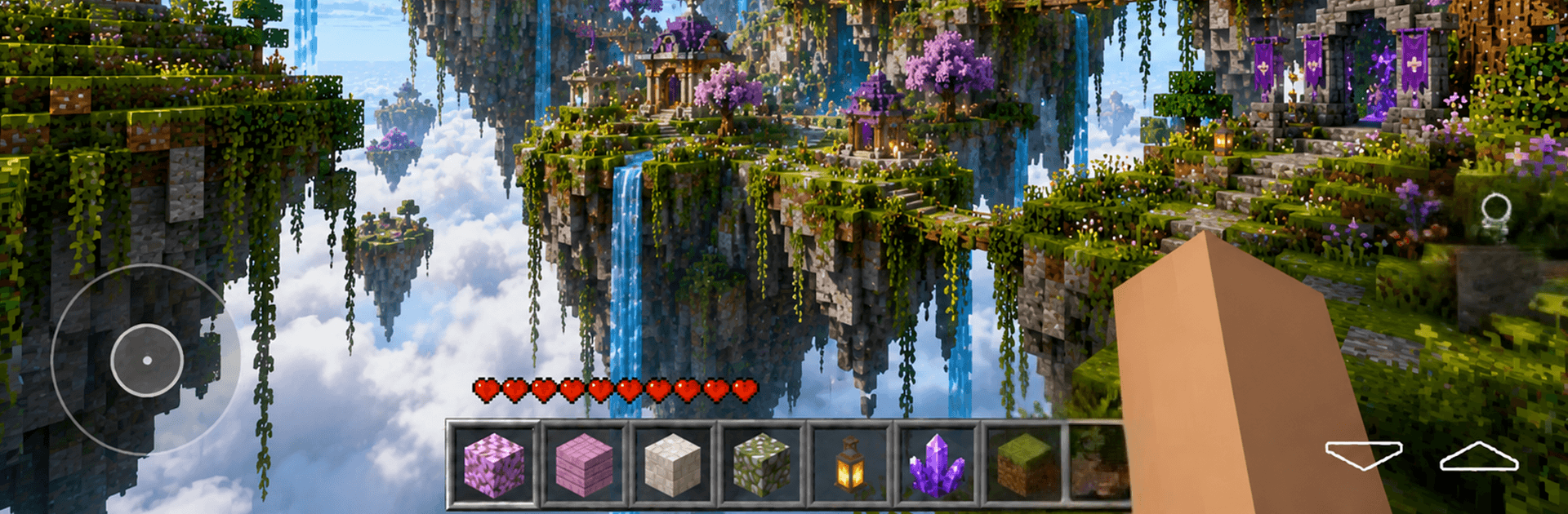
Craftsmaster: Deluxe Building

Craftsmaster: Deluxe Building

Adventure

| SPTRDEV

Play on PC with BlueStacks or from our cloud

  • Overview
  • Game Features
  • How to Play

Page Modified On: July 14, 2026

Play Craftsmaster: Deluxe Building on PC or Mac

Bring your A-game to Craftsmaster: Deluxe Building, the Adventure game sensation from SPTRDEV. Give your gameplay the much-needed boost with precise game controls, high FPS graphics, and top-tier features on your PC or Mac with BlueStacks.

About the Game

Craftsmaster: Deluxe Building is an Adventure sandbox where every idea starts with a single block and grows into something you’re proud of. Sketch out a cozy cabin, a towering base, or an intricate city—it’s all about turning quick sparks into finished builds without wrestling with clunky menus. Go solo or open your world to friends and see what you can make together in creative or survival play.

Game Features

  • Intuitive Building Tools: Place, remove, and reshape blocks with controls that feel natural right away. Rough out a design, then fine-tune details without digging through layers of interface.
  • Creative Mode, Pure Freedom: Unlimited materials mean you can experiment nonstop—test colors, plan layouts, sculpt terrain, and try bold ideas with zero pressure.
  • Survival, With Stakes: Resource gathering and hazards add tension that makes every wall, bridge, and shelter matter. It’s a great way to see which builds hold up when things get tough.
  • Easy Multiplayer: Invite friends into the same world and collaborate in real time. Split tasks, share resources, or compare designs—co-op feels straightforward and low-fuss.
  • Build at Your Pace: Perfect for quick five-minute sketches or weekend-long projects. Save progress and return to iterate whenever inspiration hits.
  • Optimized Performance: Designed to run smoothly across a wide range of phones and tablets, including low-memory devices, with responsive controls and steady frame rates.
  • Clean, HD Visuals: Crisp textures and stable performance keep large projects comfortable to explore and expand.
  • Quick Mode Switching: Hop between creative and survival in the same world to test designs under different conditions without starting over.
  • PC-Friendly with BlueStacks: Prefer a bigger screen and keyboard controls? The game plays comfortably there too, if that’s your style.

Get ready for a buttery smooth, high-performance gaming action only on BlueStacks.

Game Features

Enhancements

  • Macros
  • Multi Instance
  • Multi Instance Sync
  • Script
  • Enhancements
Macros

Macros

Automate the predictable in Craftsmaster: Deluxe Building and transform your gameplay with Macros. Get access to inventive Macros in the BlueStacks Macro Community
Multi Instance

Multi Instance

Play Craftsmaster: Deluxe Building on one window. And chat with your friend on the other. Press CTRL + Shift + 8 to open the Multi-Instance Manager. And start creating fresh instances or clone an existing one.
Multi Instance Sync

Multi Instance Sync

Play Craftsmaster: Deluxe Building with the power of Multi-Instance Sync. Replicate what you are doing on the main instance on all other instances. Level up faster, play more.
Script

Script

Script your way to gaming glory in Craftsmaster: Deluxe Building with BlueStacks Script. Write and run a set of commands to automate repeated tasks. Trigger the command by assigning it to any key.
Read More

How to Download and Play Craftsmaster: Deluxe Building on PC or Mac

  • Download and install BlueStacks on your PC or Mac

  • Complete Google sign-in to access the Play Store, or do it later

  • Look for Craftsmaster: Deluxe Building in the search bar at the top right corner

  • Click to install Craftsmaster: Deluxe Building from the search results

  • Complete Google sign-in (if you skipped step 2) to install Craftsmaster: Deluxe Building

  • Click the Craftsmaster: Deluxe Building icon on the home screen to start playing

video
Watch Video

Minimum System Requirements

With BlueStacks 5, you can get started on a PC that fulfills the following requirements.

  • Operating System

    Microsoft Windows 7 or above, macOS 11 (Big Sur) or above

  • Processor

    Intel, AMD or Apple Silicon Processor

  • RAM

    at least 4GB

  • HDD

    10GB Free Disk Space

Note:

* You must be an Administrator on your PC. Up to date graphics drivers from Microsoft or the chipset vendor.

Craftsmaster: Deluxe Building - FAQs

  • How to play Craftsmaster: Deluxe Building on Windows PC & Mac?

    Play Craftsmaster: Deluxe Building on your PC or Mac by following these simple steps.

    • Click on 'Play Craftsmaster: Deluxe Building on PC’ to download BlueStacks
    • Install it and log-in to Google Play Store
    • Launch and play the game.
  • Why is BlueStacks the fastest and safest platform to play games on PC?

    BlueStacks respects your privacy and is always safe and secure to use. It does not carry any malware, spyware, or any sort of additional software that could harm your PC.

    It is engineered to optimize speed and performance for a seamless gaming experience.

  • What are Craftsmaster: Deluxe Building PC requirements?

    Minimum requirement to run Craftsmaster: Deluxe Building on your PC

    • OS: Microsoft Windows 7 or above MacOS 11 (Big Sur) or above
    • Processor: Intel, AMD or Apple Silicon Processor
    • RAM: Your PC must have at least 4GB of RAM. (Note that having 4GB or more disk space is not a substitute for RAM)
    • HDD: 10GB Free Disk Space.
    • You must be an Administrator on your PC.