GMM 3 Multiplayer
GMM 3 Multiplayer

GMM 3 Multiplayer

Adventure

| WhiteForce

Play on PC with BlueStacks or from our cloud

  • Overview
  • Game Features
  • How to Play

Page Modified On: October 23, 2025

Play GMM 3 Multiplayer on PC or Mac

Explore a whole new adventure with GMM 3 Multiplayer, a Adventure game created by WhiteForce. Experience great gameplay with BlueStacks, the most popular gaming platform to play Android games on your PC or Mac.

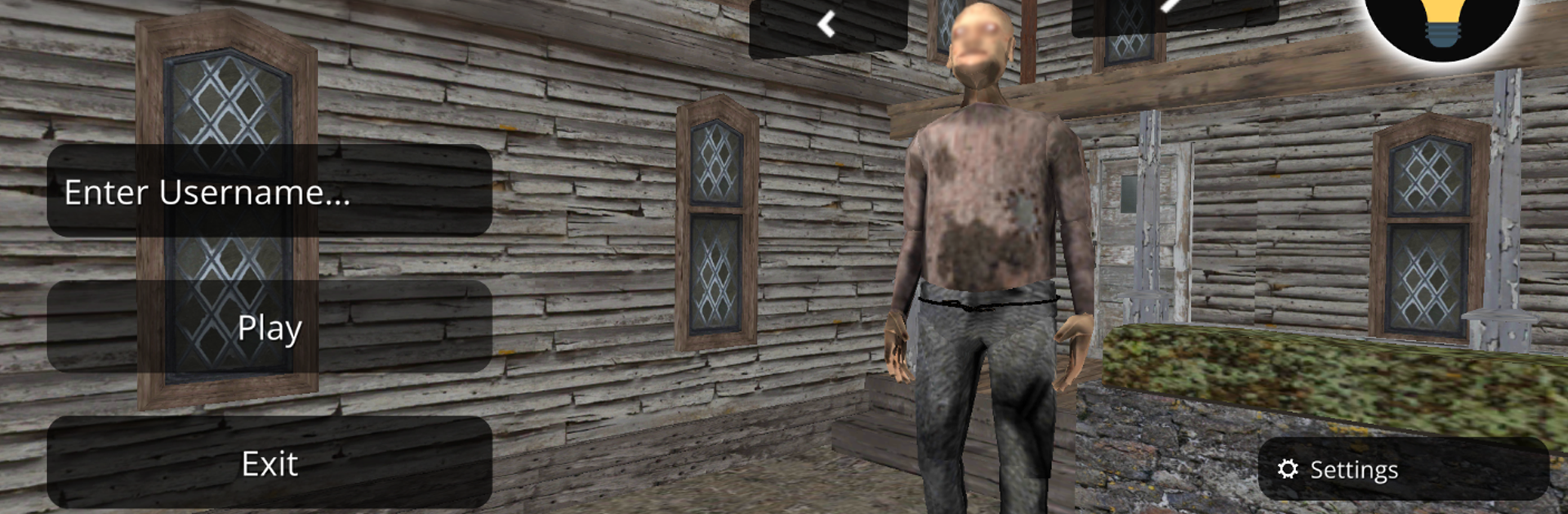
GMM 3 Multiplayer is a small, creepy escape game that drops players inside a worn old house and says, alright, find a way out. Movement is slow and deliberate, doors creak, and every new room feels like it might help or waste time. The fun part is the multiplayer bit, because a quiet hallway suddenly gets tense when another player slips past, or someone hints that a different route might be safer. The rules feel simple on purpose, explore rooms, learn the layout, and piece together a path that actually leads outside without getting stuck circling the same corridor.

There is a twist where the game sometimes makes the player Grandpa, which changes the whole mood. Instead of sneaking, that role feels heavier and more direct, like being the one everyone else worries about. It is early and barebones in a good way, more like a spooky playground than a puzzle maze, with new updates promised. Sessions move fast, so it works for quick hops with friends. On PC with BlueStacks, keyboard controls and a bigger screen make peeking around corners and lining up movement feel cleaner, no thumb fumbling. Expect rough edges here and there, a few empty rooms and some awkward pauses, but the tension lands, and the house has that slow, nervy pull that keeps people going one more round.

Slay your opponents with your epic moves. Play it your way on BlueStacks and dominate the battlefield.


Game Features

Enhancements

  • Macros
  • Multi Instance
  • Multi Instance Sync
  • Script
  • Enhancements
Macros

Macros

Automate the predictable in GMM 3 Multiplayer and transform your gameplay with Macros. Get access to inventive Macros in the BlueStacks Macro Community
Multi Instance

Multi Instance

Play GMM 3 Multiplayer on one window. And chat with your friend on the other. Press CTRL + Shift + 8 to open the Multi-Instance Manager. And start creating fresh instances or clone an existing one.
Multi Instance Sync

Multi Instance Sync

Play GMM 3 Multiplayer with the power of Multi-Instance Sync. Replicate what you are doing on the main instance on all other instances. Level up faster, play more.
Script

Script

Script your way to gaming glory in GMM 3 Multiplayer with BlueStacks Script. Write and run a set of commands to automate repeated tasks. Trigger the command by assigning it to any key.
Read More

How to Download and Play GMM 3 Multiplayer on PC or Mac

  • Download and install BlueStacks on your PC or Mac

  • Complete Google sign-in to access the Play Store, or do it later

  • Look for GMM 3 Multiplayer in the search bar at the top right corner

  • Click to install GMM 3 Multiplayer from the search results

  • Complete Google sign-in (if you skipped step 2) to install GMM 3 Multiplayer

  • Click the GMM 3 Multiplayer icon on the home screen to start playing

video
Watch Video

Minimum System Requirements

With BlueStacks 5, you can get started on a PC that fulfills the following requirements.

  • Operating System

    Microsoft Windows 7 or above, macOS 11 (Big Sur) or above

  • Processor

    Intel, AMD or Apple Silicon Processor

  • RAM

    at least 4GB

  • HDD

    10GB Free Disk Space

Note:

* You must be an Administrator on your PC. Up to date graphics drivers from Microsoft or the chipset vendor.

GMM 3 Multiplayer - FAQs

  • How to play GMM 3 Multiplayer on Windows PC & Mac?

    Play GMM 3 Multiplayer on your PC or Mac by following these simple steps.

    • Click on 'Play GMM 3 Multiplayer on PC’ to download BlueStacks
    • Install it and log-in to Google Play Store
    • Launch and play the game.
  • Why is BlueStacks the fastest and safest platform to play games on PC?

    BlueStacks respects your privacy and is always safe and secure to use. It does not carry any malware, spyware, or any sort of additional software that could harm your PC.

    It is engineered to optimize speed and performance for a seamless gaming experience.

  • What are GMM 3 Multiplayer PC requirements?

    Minimum requirement to run GMM 3 Multiplayer on your PC

    • OS: Microsoft Windows 7 or above MacOS 11 (Big Sur) or above
    • Processor: Intel, AMD or Apple Silicon Processor
    • RAM: Your PC must have at least 4GB of RAM. (Note that having 4GB or more disk space is not a substitute for RAM)
    • HDD: 10GB Free Disk Space.
    • You must be an Administrator on your PC.