Legendary Tales 5
Legendary Tales 5

Legendary Tales 5

Adventure

| FIVE-BN GAMES

Play on PC with BlueStacks or from our cloud

  • Overview
  • Game Features
  • How to Play

Page Modified On: December 24, 2025

Play Legendary Tales 5 on PC or Mac

Legendary Tales 5 brings the Adventure genre to life, and throws up exciting challenges for gamers. Developed by FIVE-BN GAMES, this Android game is best experienced on BlueStacks, the World’s #1 app player for PC and Mac users.

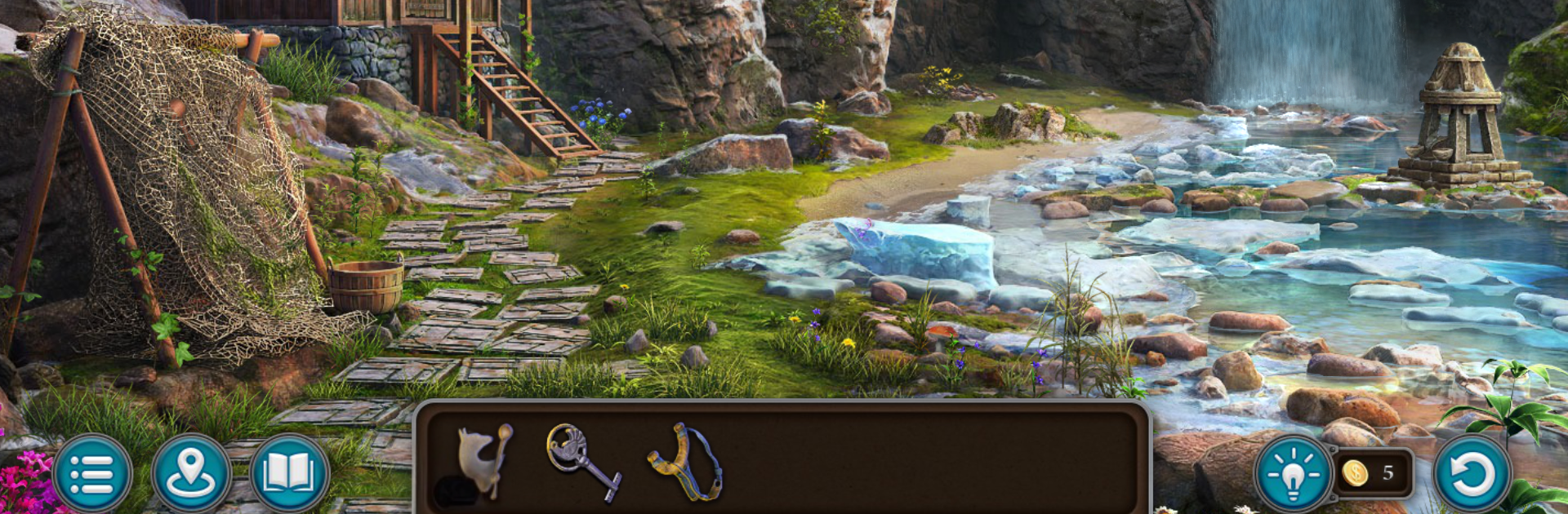
Legendary Tales 5 feels like a cozy fantasy mystery dressed up as a hidden object adventure. The setup is neat, a world run by witches where people scrape by, and small bits of old magic hint that change could still happen. The game moves through catacombs, crumbled cities, and dusty halls, each scene packed with stuff to poke at. Hidden object searches are the main course, with plenty of mini games and puzzles breaking things up, the kind where a locked door is a little logic test, or a strange device wants symbols lined up just right. It leans more moody fairy tale than horror, so tense but still comfortable.

What stands out is how it keeps throwing in little surprises, an ally who shows up when needed, a secret tucked behind a loose brick, a collectible hiding in the corner that the eyes almost slide past. Characters have that familiar adventure tone, a bit earnest, a bit witty, and the story keeps nudging forward with new locations that look hand made. It rewards slow looking, and it does not punish too hard if someone misses something, hints are there if needed. On PC with BlueStacks, the bigger screen and a mouse make those tiny items much easier to spot, and the art looks cleaner. Good pick for anyone who likes searching, solving, and following a steady fantasy plot without rushing through it.

Slay your opponents with your epic moves. Play it your way on BlueStacks and dominate the battlefield.


Game Features

Enhancements

  • Macros
  • Multi Instance
  • Multi Instance Sync
  • Script
  • Enhancements
Macros

Macros

Automate the predictable in Legendary Tales 5 and transform your gameplay with Macros. Get access to inventive Macros in the BlueStacks Macro Community
Multi Instance

Multi Instance

Play Legendary Tales 5 on one window. And chat with your friend on the other. Press CTRL + Shift + 8 to open the Multi-Instance Manager. And start creating fresh instances or clone an existing one.
Multi Instance Sync

Multi Instance Sync

Play Legendary Tales 5 with the power of Multi-Instance Sync. Replicate what you are doing on the main instance on all other instances. Level up faster, play more.
Script

Script

Script your way to gaming glory in Legendary Tales 5 with BlueStacks Script. Write and run a set of commands to automate repeated tasks. Trigger the command by assigning it to any key.
Read More

How to Download and Play Legendary Tales 5 on PC or Mac

  • Download and install BlueStacks on your PC or Mac

  • Complete Google sign-in to access the Play Store, or do it later

  • Look for Legendary Tales 5 in the search bar at the top right corner

  • Click to install Legendary Tales 5 from the search results

  • Complete Google sign-in (if you skipped step 2) to install Legendary Tales 5

  • Click the Legendary Tales 5 icon on the home screen to start playing

video
Watch Video

Minimum System Requirements

With BlueStacks 5, you can get started on a PC that fulfills the following requirements.

  • Operating System

    Microsoft Windows 7 or above, macOS 11 (Big Sur) or above

  • Processor

    Intel, AMD or Apple Silicon Processor

  • RAM

    at least 4GB

  • HDD

    10GB Free Disk Space

Note:

* You must be an Administrator on your PC. Up to date graphics drivers from Microsoft or the chipset vendor.

Legendary Tales 5 - FAQs

  • How to play Legendary Tales 5 on Windows PC & Mac?

    Play Legendary Tales 5 on your PC or Mac by following these simple steps.

    • Click on 'Play Legendary Tales 5 on PC’ to download BlueStacks
    • Install it and log-in to Google Play Store
    • Launch and play the game.
  • Why is BlueStacks the fastest and safest platform to play games on PC?

    BlueStacks respects your privacy and is always safe and secure to use. It does not carry any malware, spyware, or any sort of additional software that could harm your PC.

    It is engineered to optimize speed and performance for a seamless gaming experience.

  • What are Legendary Tales 5 PC requirements?

    Minimum requirement to run Legendary Tales 5 on your PC

    • OS: Microsoft Windows 7 or above MacOS 11 (Big Sur) or above
    • Processor: Intel, AMD or Apple Silicon Processor
    • RAM: Your PC must have at least 4GB of RAM. (Note that having 4GB or more disk space is not a substitute for RAM)
    • HDD: 10GB Free Disk Space.
    • You must be an Administrator on your PC.