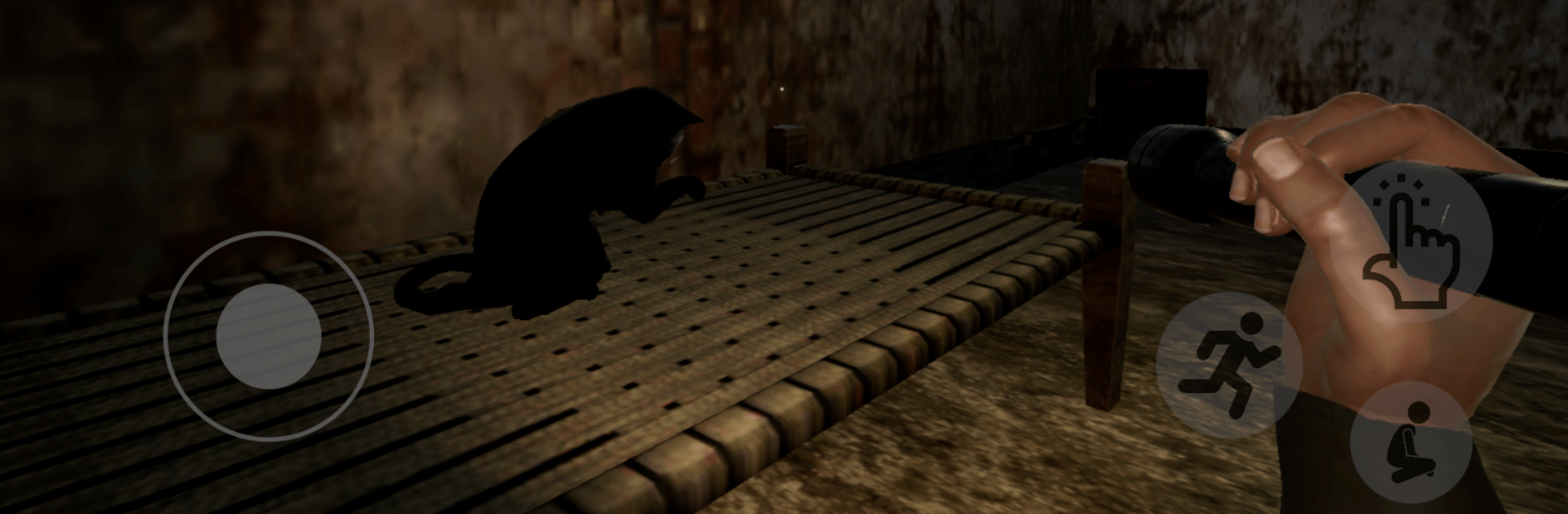
Maya Ek Pishachini Horror Game

Maya Ek Pishachini Horror Game

Adventure

| Akshat Softwares

Play on PC with BlueStacks or from our cloud

  • Overview
  • Game Features
  • How to Play

Page Modified On: April 21, 2026

Play Maya Ek Pishachini Horror Game on PC or Mac

Join millions to experience Maya Ek Pishachini Horror Game, an exciting Adventure game from Akshat Softwares. With BlueStacks App Player, you are always a step ahead of your opponent, ready to outplay them with faster gameplay and better control with the mouse and keyboard on your PC or Mac.

About the Game

Maya Ek Pishachini Horror Game throws you into a late-night rescue mission gone sideways—your friends vanish inside a long-abandoned haveli, and the gates lock behind you. It’s a nerve-wracking blend of survival and sleuthing where every creak might be a warning and every hallway feels like it’s watching. Built by Akshat Softwares, this Adventure title leans into atmospheric scares, tense escapes, and clues that actually matter. Prefer a bigger screen for those creeping shadows? It also runs smoothly on BlueStacks.

Game Features

  • Haunted Haveli Atmosphere: Explore a crumbling mansion that’s alive with flickering lights, eerie murmurs, and rooms that seem to shift when you’re not looking. Your flashlight won’t always feel like enough.

  • Puzzles With Consequences: Gather notes, decode locks, and piece together fragments to open barred paths. Every solved clue nudges you closer to your friends—and deeper into danger.

  • A Stalker That Ramps Up: The spirit isn’t just a jump scare. She studies your movement, grows bolder, and turns patience into pressure as the night wears on.

  • Stealth and Sprints: Crouch, peek, and stay quiet when she’s near. When hiding fails, run—your timing and route choices can be the difference between escape and a dead end.

  • Evolving Scares: Expect shifting layouts, sudden events, and set pieces that escalate as you progress. Complacency gets punished.

  • Indian Horror, Front and Center: Experience a culturally rooted tale with Hindi voice performances and English subtitles that carry the story’s tone and texture.

  • Choose Your Challenge: Whether you’re here for story beats or sweat-inducing survival, pick from Easy, Medium, or Hard and play at your pace.

  • Immersive Sound & Voice: Authentic Hindi voice acting and layered sound design sell every whisper, footstep, and knock from the next room.

Get ready for a buttery smooth, high-performance gaming action only on BlueStacks.

Game Features

Enhancements

  • Macros
  • Multi Instance
  • Multi Instance Sync
  • Script
  • Enhancements
Macros

Macros

Automate the predictable in Maya Ek Pishachini Horror Game and transform your gameplay with Macros. Get access to inventive Macros in the BlueStacks Macro Community
Multi Instance

Multi Instance

Play Maya Ek Pishachini Horror Game on one window. And chat with your friend on the other. Press CTRL + Shift + 8 to open the Multi-Instance Manager. And start creating fresh instances or clone an existing one.
Multi Instance Sync

Multi Instance Sync

Play Maya Ek Pishachini Horror Game with the power of Multi-Instance Sync. Replicate what you are doing on the main instance on all other instances. Level up faster, play more.
Script

Script

Script your way to gaming glory in Maya Ek Pishachini Horror Game with BlueStacks Script. Write and run a set of commands to automate repeated tasks. Trigger the command by assigning it to any key.
Read More

How to Download and Play Maya Ek Pishachini Horror Game on PC or Mac

  • Download and install BlueStacks on your PC or Mac

  • Complete Google sign-in to access the Play Store, or do it later

  • Look for Maya Ek Pishachini Horror Game in the search bar at the top right corner

  • Click to install Maya Ek Pishachini Horror Game from the search results

  • Complete Google sign-in (if you skipped step 2) to install Maya Ek Pishachini Horror Game

  • Click the Maya Ek Pishachini Horror Game icon on the home screen to start playing

video
Watch Video

Minimum System Requirements

With BlueStacks 5, you can get started on a PC that fulfills the following requirements.

  • Operating System

    Microsoft Windows 7 or above, macOS 11 (Big Sur) or above

  • Processor

    Intel, AMD or Apple Silicon Processor

  • RAM

    at least 4GB

  • HDD

    10GB Free Disk Space

Note:

* You must be an Administrator on your PC. Up to date graphics drivers from Microsoft or the chipset vendor.

Maya Ek Pishachini Horror Game - FAQs

  • How to play Maya Ek Pishachini Horror Game on Windows PC & Mac?

    Play Maya Ek Pishachini Horror Game on your PC or Mac by following these simple steps.

    • Click on 'Play Maya Ek Pishachini Horror Game on PC’ to download BlueStacks
    • Install it and log-in to Google Play Store
    • Launch and play the game.
  • Why is BlueStacks the fastest and safest platform to play games on PC?

    BlueStacks respects your privacy and is always safe and secure to use. It does not carry any malware, spyware, or any sort of additional software that could harm your PC.

    It is engineered to optimize speed and performance for a seamless gaming experience.

  • What are Maya Ek Pishachini Horror Game PC requirements?

    Minimum requirement to run Maya Ek Pishachini Horror Game on your PC

    • OS: Microsoft Windows 7 or above MacOS 11 (Big Sur) or above
    • Processor: Intel, AMD or Apple Silicon Processor
    • RAM: Your PC must have at least 4GB of RAM. (Note that having 4GB or more disk space is not a substitute for RAM)
    • HDD: 10GB Free Disk Space.
    • You must be an Administrator on your PC.