AetherSX2 Emulator
AetherSX2 Emulator

AetherSX2 Emulator

Arcade

| STE RIDA AGENCY

Play on PC with BlueStacks or from our cloud

  • Overview
  • Game Features
  • How to Play

Page Modified On: August 14, 2026

Play AetherSX2 Emulator on PC or Mac

Step into the World of AetherSX2 Emulator, a thrilling Arcade game from the house of STE RIDA AGENCY. Play this Android game on BlueStacks App Player and experience immersive gaming on PC or Mac.

About the Game

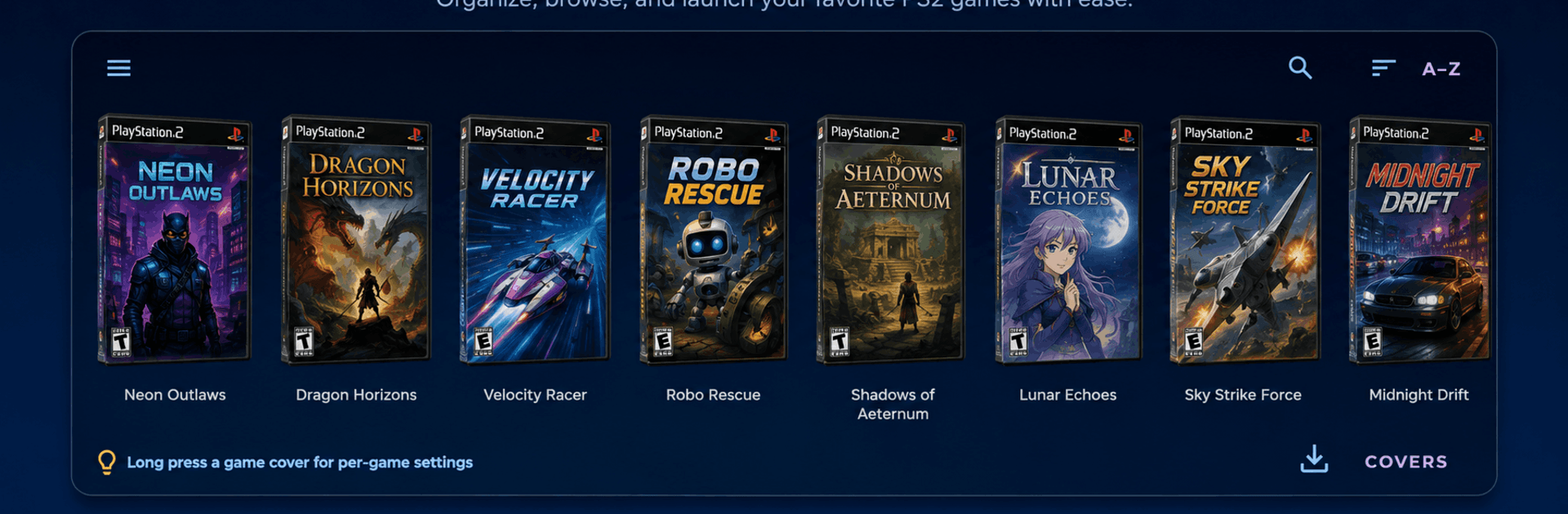
Remember a stack of PS2 favorites you’ve been meaning to revisit? AetherSX2 Emulator brings that era back with a slick, library-first design that makes your collection easy to browse, tweak, and play the way you want. It lands in the Genre: Arcade, but think of it as your all‑in‑one console vault with modern comforts, deep settings, and controls that actually fit how you play.

Game Features

  • Real Library, Not Just Files: Point it at your folders and watch a clean, cover‑art gallery appear. Swipe through box art, search by name, sort your list, and even set custom covers for titles that need a personal touch.
  • Everything in One Screen: A side drawer and quick‑actions panel keep the library, settings, save states, texture packs, and achievements within thumb’s reach—no menu maze.
  • Save States plus Memory Cards: Snap the exact moment you’re in and jump back instantly, or manage virtual memory cards per game so your progress stays organized.
  • Graphics Your Way: Pick Vulkan or OpenGL, upscale resolutions, adjust blending, set aspect ratios, toggle V‑Sync, apply widescreen patches, and clean up shimmer with no‑interlacing.
  • HD Texture Packs Inside: Browse, download, and manage community texture packs right in the app. Precache them or toggle per title—downloads run quietly in the background.
  • Controls That Fit: Plug in a USB or Bluetooth gamepad and it maps automatically (with a tester to confirm every button). Prefer touch? Move, resize, and fine‑tune the on‑screen layout, including an optional right‑stick.
  • Per‑Game Profiles: Give tricky titles their own renderer or settings without touching your global setup. Changes stick and reapply next time you launch.
  • Cheats and Achievements: Load compatible cheat lists and flip codes on or off. Track progress, unlock badges, or try a tougher hardcore mode.
  • Collection Helpers: Merge multiple folders into one view, fetch missing art in a tap, rescan when you add new games, and fix unmatched covers manually.
  • Smart Extras: Picture‑in‑picture play, optional custom GPU drivers, support for select arcade‑board releases, a short guided setup, and a clean dark theme built for comfort.
  • Runs Great on BlueStacks: Prefer a bigger display and easy keyboard/gamepad mapping? AetherSX2 Emulator feels right at home on BlueStacks without fuss.

Start your journey now. Download the game on BlueStacks, invite your friends, and march on a new adventure.


Game Features

Enhancements

  • Macros
  • Multi Instance
  • Multi Instance Sync
  • Script
  • Enhancements
Macros

Macros

Automate the predictable in AetherSX2 Emulator and transform your gameplay with Macros. Get access to inventive Macros in the BlueStacks Macro Community
Multi Instance

Multi Instance

Play AetherSX2 Emulator on one window. And chat with your friend on the other. Press CTRL + Shift + 8 to open the Multi-Instance Manager. And start creating fresh instances or clone an existing one.
Multi Instance Sync

Multi Instance Sync

Play AetherSX2 Emulator with the power of Multi-Instance Sync. Replicate what you are doing on the main instance on all other instances. Level up faster, play more.
Script

Script

Script your way to gaming glory in AetherSX2 Emulator with BlueStacks Script. Write and run a set of commands to automate repeated tasks. Trigger the command by assigning it to any key.
Read More

How to Download and Play AetherSX2 Emulator on PC or Mac

  • Download and install BlueStacks on your PC or Mac

  • Complete Google sign-in to access the Play Store, or do it later

  • Look for AetherSX2 Emulator in the search bar at the top right corner

  • Click to install AetherSX2 Emulator from the search results

  • Complete Google sign-in (if you skipped step 2) to install AetherSX2 Emulator

  • Click the AetherSX2 Emulator icon on the home screen to start playing

video
Watch Video

Minimum System Requirements

With BlueStacks 5, you can get started on a PC that fulfills the following requirements.

  • Operating System

    Microsoft Windows 7 or above, macOS 11 (Big Sur) or above

  • Processor

    Intel, AMD or Apple Silicon Processor

  • RAM

    at least 4GB

  • HDD

    10GB Free Disk Space

Note:

* You must be an Administrator on your PC. Up to date graphics drivers from Microsoft or the chipset vendor.

AetherSX2 Emulator - FAQs

  • How to play AetherSX2 Emulator on Windows PC & Mac?

    Play AetherSX2 Emulator on your PC or Mac by following these simple steps.

    • Click on 'Play AetherSX2 Emulator on PC’ to download BlueStacks
    • Install it and log-in to Google Play Store
    • Launch and play the game.
  • Why is BlueStacks the fastest and safest platform to play games on PC?

    BlueStacks respects your privacy and is always safe and secure to use. It does not carry any malware, spyware, or any sort of additional software that could harm your PC.

    It is engineered to optimize speed and performance for a seamless gaming experience.

  • What are AetherSX2 Emulator PC requirements?

    Minimum requirement to run AetherSX2 Emulator on your PC

    • OS: Microsoft Windows 7 or above MacOS 11 (Big Sur) or above
    • Processor: Intel, AMD or Apple Silicon Processor
    • RAM: Your PC must have at least 4GB of RAM. (Note that having 4GB or more disk space is not a substitute for RAM)
    • HDD: 10GB Free Disk Space.
    • You must be an Administrator on your PC.