Catch it all n steal brainrot

Catch it all n steal brainrot

Arcade

| Foram Studios

Play on PC with BlueStacks or from our cloud

  • Overview
  • Game Features
  • How to Play

Page Modified On: July 20, 2026

Play Catch it all n steal brainrot on PC or Mac

Catch it all n steal brainrot brings the Arcade genre to life, and throws up exciting challenges for gamers. Developed by Foram Studios, this Android game is best experienced on BlueStacks, the World’s #1 app player for PC and Mac users.

About the Game

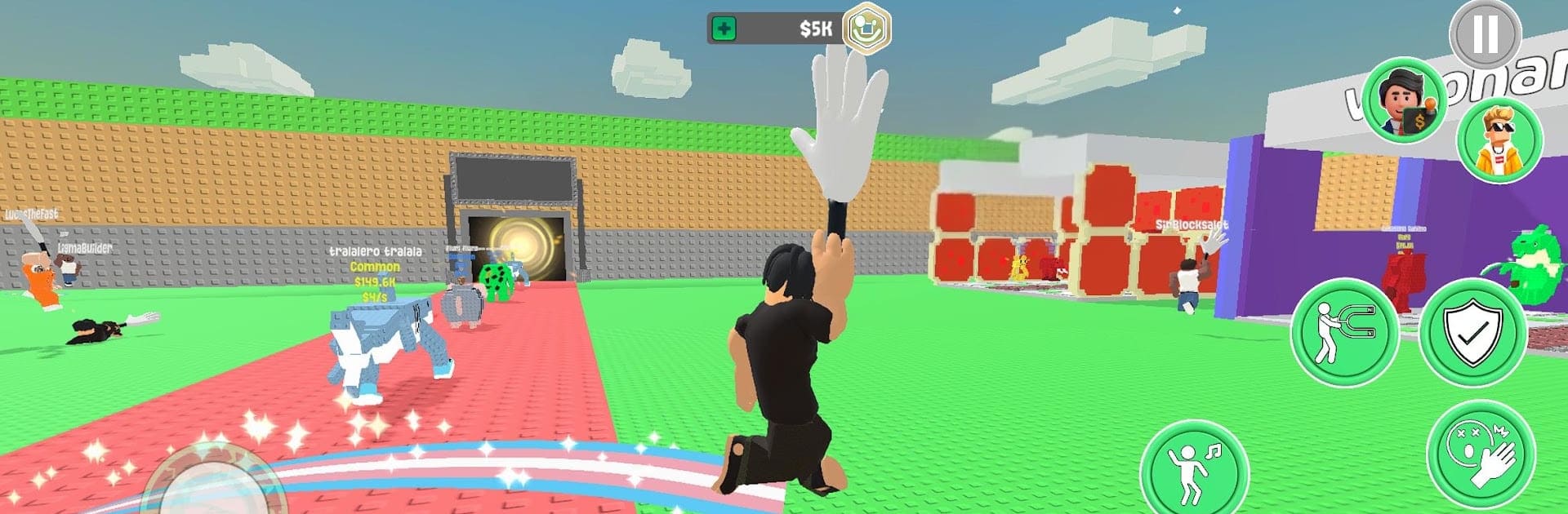
Catch it all n steal brainrot is a chaotic Arcade scramble where you swipe wild “brainrot” power-ups, bank them for profit, and mess with anyone who gets in your way. It’s fast, goofy, and super reactive—one second you’re rich, the next you’re face‑planted after a surprise smack. Want quick laughs or a longer grind for the biggest haul? It handles both without fuss.

Game Features

  • Steal the brainrot: Dash into the arena, snatch brainrot from rivals, and make a clean getaway before they clap back.
  • Turn chaos into cash: Convert your collected brainrot into in-game money and keep the momentum rolling.
  • Trolling combat: Bonk, smack, and knock opponents off their path to force hilarious drops and last‑second steals.
  • Wacky variations: Different types of brainrot keep matches unpredictable, with effects that change how you play on the fly.
  • Flashy toys: Rock a star trail, blast a boombox, and make some noise while everyone scrambles to protect their stash.
  • Smart tools, big swings: Pop a magnet to pull nearby brainrot your way or time a boombox groove to throw off pursuers and slip a steal.
  • Style and moves: Dance, emote, and flex mid‑chase—because it’s not just about winning, it’s about how ridiculous you look doing it.
  • Pick‑up‑and‑play pace: Short, punchy match flow that’s easy to hop into whenever you’re craving a little chaos.
  • Plays great anywhere: Snappy touch controls on mobile, and it runs nicely on BlueStacks if you like a bigger screen and steady performance.

Get ready for a buttery smooth, high-performance gaming action only on BlueStacks.

Game Features

Enhancements

  • Macros
  • Multi Instance
  • Multi Instance Sync
  • Script
  • Enhancements
Macros

Macros

Automate the predictable in Catch it all n steal brainrot and transform your gameplay with Macros. Get access to inventive Macros in the BlueStacks Macro Community
Multi Instance

Multi Instance

Play Catch it all n steal brainrot on one window. And chat with your friend on the other. Press CTRL + Shift + 8 to open the Multi-Instance Manager. And start creating fresh instances or clone an existing one.
Multi Instance Sync

Multi Instance Sync

Play Catch it all n steal brainrot with the power of Multi-Instance Sync. Replicate what you are doing on the main instance on all other instances. Level up faster, play more.
Script

Script

Script your way to gaming glory in Catch it all n steal brainrot with BlueStacks Script. Write and run a set of commands to automate repeated tasks. Trigger the command by assigning it to any key.
Read More

How to Download and Play Catch it all n steal brainrot on PC or Mac

  • Download and install BlueStacks on your PC or Mac

  • Complete Google sign-in to access the Play Store, or do it later

  • Look for Catch it all n steal brainrot in the search bar at the top right corner

  • Click to install Catch it all n steal brainrot from the search results

  • Complete Google sign-in (if you skipped step 2) to install Catch it all n steal brainrot

  • Click the Catch it all n steal brainrot icon on the home screen to start playing

video
Watch Video

Minimum System Requirements

With BlueStacks 5, you can get started on a PC that fulfills the following requirements.

  • Operating System

    Microsoft Windows 7 or above, macOS 11 (Big Sur) or above

  • Processor

    Intel, AMD or Apple Silicon Processor

  • RAM

    at least 4GB

  • HDD

    10GB Free Disk Space

Note:

* You must be an Administrator on your PC. Up to date graphics drivers from Microsoft or the chipset vendor.

Catch it all n steal brainrot - FAQs

  • How to play Catch it all n steal brainrot on Windows PC & Mac?

    Play Catch it all n steal brainrot on your PC or Mac by following these simple steps.

    • Click on 'Play Catch it all n steal brainrot on PC’ to download BlueStacks
    • Install it and log-in to Google Play Store
    • Launch and play the game.
  • Why is BlueStacks the fastest and safest platform to play games on PC?

    BlueStacks respects your privacy and is always safe and secure to use. It does not carry any malware, spyware, or any sort of additional software that could harm your PC.

    It is engineered to optimize speed and performance for a seamless gaming experience.

  • What are Catch it all n steal brainrot PC requirements?

    Minimum requirement to run Catch it all n steal brainrot on your PC

    • OS: Microsoft Windows 7 or above MacOS 11 (Big Sur) or above
    • Processor: Intel, AMD or Apple Silicon Processor
    • RAM: Your PC must have at least 4GB of RAM. (Note that having 4GB or more disk space is not a substitute for RAM)
    • HDD: 10GB Free Disk Space.
    • You must be an Administrator on your PC.