Rally Car X
Rally Car X

Rally Car X

Arcade

| Hutonsoft Corp.

Play on PC with BlueStacks or from our cloud

  • Overview
  • Game Features
  • How to Play

Page Modified On: November 03, 2025

Play Rally Car X on PC or Mac

Explore a whole new adventure with Rally Car X, a Arcade game created by Hutonsoft Corp.. Experience great gameplay with BlueStacks, the most popular gaming platform to play Android games on your PC or Mac.

About the Game

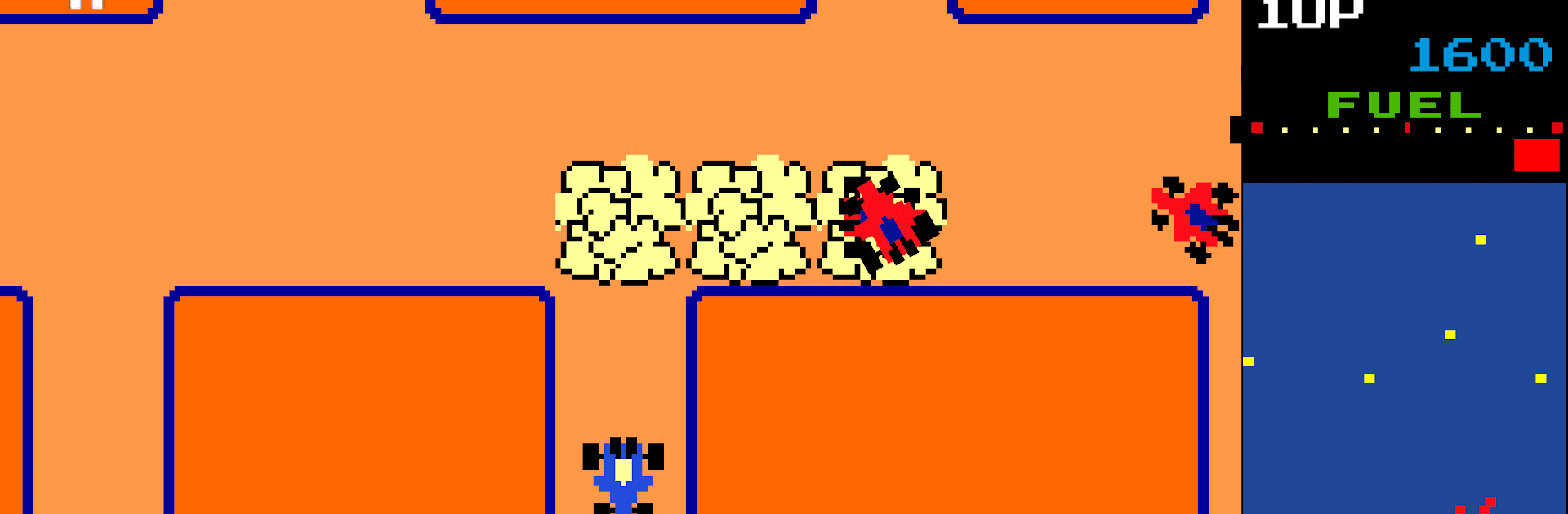
Rally Car X is a snappy Arcade maze-chaser where you steer a scrappy blue car through free-scrolling arenas packed with flags, hazards, and relentless rivals. It’s all about smart routes, quick decision-making, and squeezing out big scores before your fuel gives up. Prefer a bigger view and sharper controls? It runs smoothly on BlueStacks, too.

Game Features

  • Slick Maze Driving: Navigate a scrolling overhead maze where your car keeps moving in the direction you press. Tap a wall and it’ll pivot and keep rolling, so planning lines matters.
  • Flag Streak Scoring: Collect every flag to clear the round. Each one is worth more than the last, turning a clean sweep into a serious points rush.
  • Special Flags, Bigger Rewards: Grab the red S to double flag values for the rest of the round—unless you crash. Snag the red L for a fuel bonus calculated from your remaining gauge when the round ends.
  • Use the Smokescreen: Drop a smokescreen to stun chasing red cars for a moment. It burns a bit of fuel, so timing and conservation go hand in hand.
  • Ever-Tougher Pursuit: You start with a single chaser and end up dodging a pack of five. Touch one while it’s active and you lose a life.
  • Fuel Matters: Fuel ticks down constantly. Run dry and your smokescreen quits, making escape way harder.
  • Rocks Keep You Honest: Stationary rocks appear in trickier numbers as you progress. They’re not shown on the radar and a single bump is fatal—watch those corners.
  • Handy Radar: Keep track of cars and flags at a glance. Use it to plan routes and avoid dead ends.
  • Flexible Controls: Play with Joystick or D-Pad, switch anytime, and resize the on-screen controller to fit your hands.
  • Extra Lives & Progression: Earn another life every 20,000 points. Clear all flags to advance and push your high score even further.

Get ready for a buttery smooth, high-performance gaming action only on BlueStacks.

Game Features

Enhancements

  • Macros
  • Multi Instance
  • Multi Instance Sync
  • Script
  • Enhancements
Macros

Macros

Automate the predictable in Rally Car X and transform your gameplay with Macros. Get access to inventive Macros in the BlueStacks Macro Community
Multi Instance

Multi Instance

Play Rally Car X on one window. And chat with your friend on the other. Press CTRL + Shift + 8 to open the Multi-Instance Manager. And start creating fresh instances or clone an existing one.
Multi Instance Sync

Multi Instance Sync

Play Rally Car X with the power of Multi-Instance Sync. Replicate what you are doing on the main instance on all other instances. Level up faster, play more.
Script

Script

Script your way to gaming glory in Rally Car X with BlueStacks Script. Write and run a set of commands to automate repeated tasks. Trigger the command by assigning it to any key.
Read More

How to Download and Play Rally Car X on PC or Mac

  • Download and install BlueStacks on your PC or Mac

  • Complete Google sign-in to access the Play Store, or do it later

  • Look for Rally Car X in the search bar at the top right corner

  • Click to install Rally Car X from the search results

  • Complete Google sign-in (if you skipped step 2) to install Rally Car X

  • Click the Rally Car X icon on the home screen to start playing

video
Watch Video

Minimum System Requirements

With BlueStacks 5, you can get started on a PC that fulfills the following requirements.

  • Operating System

    Microsoft Windows 7 or above, macOS 11 (Big Sur) or above

  • Processor

    Intel, AMD or Apple Silicon Processor

  • RAM

    at least 4GB

  • HDD

    10GB Free Disk Space

Note:

* You must be an Administrator on your PC. Up to date graphics drivers from Microsoft or the chipset vendor.

Rally Car X - FAQs

  • How to play Rally Car X on Windows PC & Mac?

    Play Rally Car X on your PC or Mac by following these simple steps.

    • Click on 'Play Rally Car X on PC’ to download BlueStacks
    • Install it and log-in to Google Play Store
    • Launch and play the game.
  • Why is BlueStacks the fastest and safest platform to play games on PC?

    BlueStacks respects your privacy and is always safe and secure to use. It does not carry any malware, spyware, or any sort of additional software that could harm your PC.

    It is engineered to optimize speed and performance for a seamless gaming experience.

  • What are Rally Car X PC requirements?

    Minimum requirement to run Rally Car X on your PC

    • OS: Microsoft Windows 7 or above MacOS 11 (Big Sur) or above
    • Processor: Intel, AMD or Apple Silicon Processor
    • RAM: Your PC must have at least 4GB of RAM. (Note that having 4GB or more disk space is not a substitute for RAM)
    • HDD: 10GB Free Disk Space.
    • You must be an Administrator on your PC.