Slenderman: The Curse (2025)

Slenderman: The Curse (2025)

Arcade

| Kalipso Games

Play on PC with BlueStacks or from our cloud

  • Overview
  • Game Features
  • How to Play

Page Modified On: May 05, 2026

Play Slenderman: The Curse (2025) on PC or Mac

Join millions to experience Slenderman: The Curse (2025), an exciting Arcade game from Kalipso Games. With BlueStacks App Player, you are always a step ahead of your opponent, ready to outplay them with faster gameplay and better control with the mouse and keyboard on your PC or Mac.

About the Game

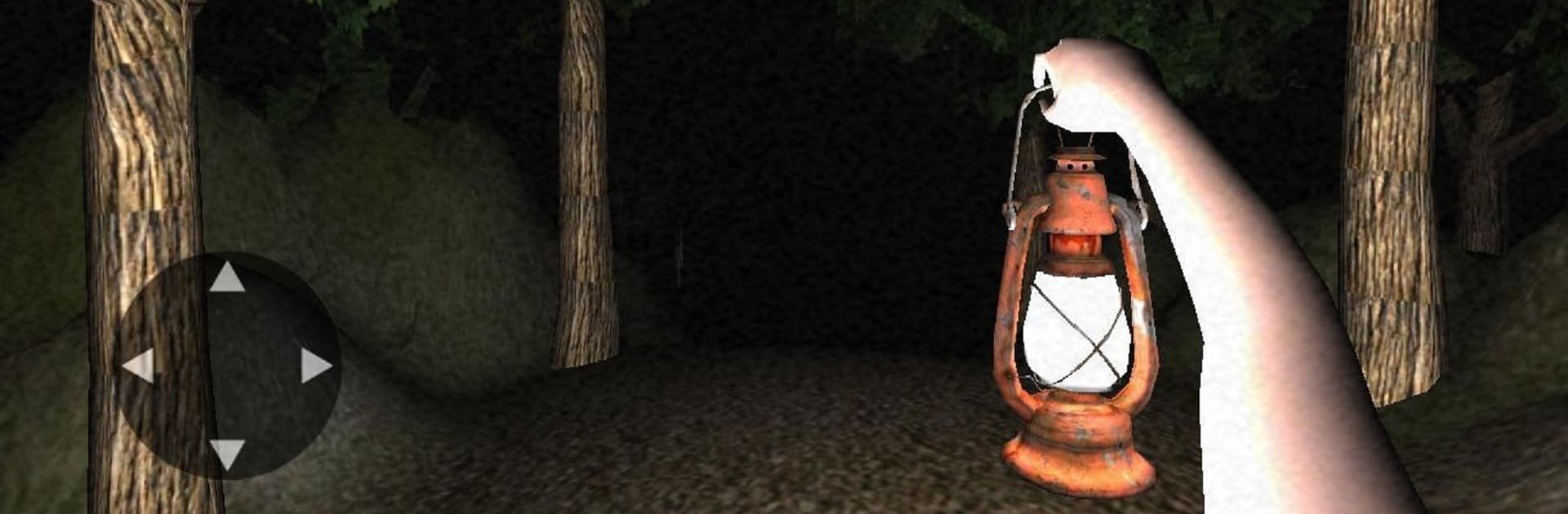
Slenderman: The Curse (2025) puts you in the worst kind of prank-gone-wrong. After a messy night, your buddies dump you in the woods for a laugh—except something out there has a long memory and no mercy. This Arcade horror experience from Kalipso Games is all about staying calm under pressure: hunt for keys, manage your flashlight, and keep your distance from the thing that won’t stop hunting you.

Game Features

  • A bad joke turns deadly: Start stranded in a shadowy forest with a past no one talks about. The tension builds fast, and every step feels like it could be the one that gives you away.
  • Key-hunting survival: Your way out is locked. Scour the area for keys while listening for the slightest hint that he’s near.
  • Flashlight strategy: Light helps, but it’s limited. Use short bursts to scout paths, read the terrain, and avoid burning through precious battery when panic hits.
  • He’s always closer than you think: The threat doesn’t forgive mistakes. Slip up, linger too long, or look the wrong way, and you’ll feel the pressure close in.
  • Sound and atmosphere that crawl under your skin: Rustling leaves, distant snaps, and uneasy silence make simple choices—run or wait—feel incredibly risky.
  • Clean, focused Arcade tension: No fluff, no filler—just tight, nerve-wracking runs that reward steady nerves and smart decisions.
  • Play comfortably on PC: Prefer a bigger screen and precise controls? BlueStacks makes it easy to play your mobile fright fest with a keyboard and mouse.

Get ready for a buttery smooth, high-performance gaming action only on BlueStacks.

Game Features

Enhancements

  • Macros
  • Multi Instance
  • Multi Instance Sync
  • Script
  • Enhancements
Macros

Macros

Automate the predictable in Slenderman: The Curse (2025) and transform your gameplay with Macros. Get access to inventive Macros in the BlueStacks Macro Community
Multi Instance

Multi Instance

Play Slenderman: The Curse (2025) on one window. And chat with your friend on the other. Press CTRL + Shift + 8 to open the Multi-Instance Manager. And start creating fresh instances or clone an existing one.
Multi Instance Sync

Multi Instance Sync

Play Slenderman: The Curse (2025) with the power of Multi-Instance Sync. Replicate what you are doing on the main instance on all other instances. Level up faster, play more.
Script

Script

Script your way to gaming glory in Slenderman: The Curse (2025) with BlueStacks Script. Write and run a set of commands to automate repeated tasks. Trigger the command by assigning it to any key.
Read More

How to Download and Play Slenderman: The Curse (2025) on PC or Mac

  • Download and install BlueStacks on your PC or Mac

  • Complete Google sign-in to access the Play Store, or do it later

  • Look for Slenderman: The Curse (2025) in the search bar at the top right corner

  • Click to install Slenderman: The Curse (2025) from the search results

  • Complete Google sign-in (if you skipped step 2) to install Slenderman: The Curse (2025)

  • Click the Slenderman: The Curse (2025) icon on the home screen to start playing

video
Watch Video

Minimum System Requirements

With BlueStacks 5, you can get started on a PC that fulfills the following requirements.

  • Operating System

    Microsoft Windows 7 or above, macOS 11 (Big Sur) or above

  • Processor

    Intel, AMD or Apple Silicon Processor

  • RAM

    at least 4GB

  • HDD

    10GB Free Disk Space

Note:

* You must be an Administrator on your PC. Up to date graphics drivers from Microsoft or the chipset vendor.

Slenderman: The Curse (2025) - FAQs

  • How to play Slenderman: The Curse (2025) on Windows PC & Mac?

    Play Slenderman: The Curse (2025) on your PC or Mac by following these simple steps.

    • Click on 'Play Slenderman: The Curse (2025) on PC’ to download BlueStacks
    • Install it and log-in to Google Play Store
    • Launch and play the game.
  • Why is BlueStacks the fastest and safest platform to play games on PC?

    BlueStacks respects your privacy and is always safe and secure to use. It does not carry any malware, spyware, or any sort of additional software that could harm your PC.

    It is engineered to optimize speed and performance for a seamless gaming experience.

  • What are Slenderman: The Curse (2025) PC requirements?

    Minimum requirement to run Slenderman: The Curse (2025) on your PC

    • OS: Microsoft Windows 7 or above MacOS 11 (Big Sur) or above
    • Processor: Intel, AMD or Apple Silicon Processor
    • RAM: Your PC must have at least 4GB of RAM. (Note that having 4GB or more disk space is not a substitute for RAM)
    • HDD: 10GB Free Disk Space.
    • You must be an Administrator on your PC.