Zombie Country
Zombie Country

Zombie Country

Arcade

| Dopamine Factory

Play on PC with BlueStacks or from our cloud

  • Overview
  • Game Features
  • How to Play

Page Modified On: June 02, 2026

Play Zombie Country on PC or Mac

Step into the World of Zombie Country, a thrilling Arcade game from the house of Dopamine Factory. Play this Android game on BlueStacks App Player and experience immersive gaming on PC or Mac.

About the Game

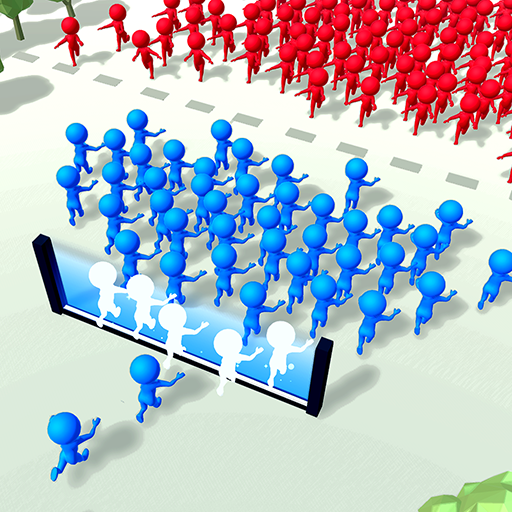
Zombie Country flips the zombie fantasy on its head—you’re the one spreading the outbreak. Each level is a compact puzzle where a single well-placed infection can snowball into total collapse if you plan it right. It’s quick to learn, surprisingly tactical, and delivers that crisp Arcade snap where every tap counts.

Game Features

  • Smart infection planning: Pick the starting point, time your spread, and plot routes through crowds to trigger satisfying chain reactions. You’ve only got so many actions, so every move matters.
  • Snappy stages, big payoffs: Levels are short, easy to retry, and perfect for quick sessions. The challenge ramps up with new threats that keep your brain busy.
  • Global takeover, one win at a time: Each cleared stage pushes your influence across a world map. Countries fall step by step, and the map visibly shifts as the outbreak grows—with progress that sticks.
  • Enemies that fight back: Armed citizens and special opponents won’t make it easy. Outsmart them with clever timing and positioning instead of brute force.
  • Clean, drag-and-go controls: Drag to drop infection points and enjoy a smooth camera that keeps the action readable. Simple to start, layered with strategy as you go.
  • Solo and offline: Play anywhere without a connection, with your campaign saved between sessions.
  • PC-friendly touch: Prefer a bigger screen? The drag controls feel great on BlueStacks.

BlueStacks gives you more room to focus on the game and less time adjusting around mobile limitations.


Game Features

Enhancements

  • Macros
  • Multi Instance
  • Multi Instance Sync
  • Script
  • Enhancements
Macros

Macros

Automate the predictable in Zombie Country and transform your gameplay with Macros. Get access to inventive Macros in the BlueStacks Macro Community
Multi Instance

Multi Instance

Play Zombie Country on one window. And chat with your friend on the other. Press CTRL + Shift + 8 to open the Multi-Instance Manager. And start creating fresh instances or clone an existing one.
Multi Instance Sync

Multi Instance Sync

Play Zombie Country with the power of Multi-Instance Sync. Replicate what you are doing on the main instance on all other instances. Level up faster, play more.
Script

Script

Script your way to gaming glory in Zombie Country with BlueStacks Script. Write and run a set of commands to automate repeated tasks. Trigger the command by assigning it to any key.
Read More

How to Download and Play Zombie Country on PC or Mac

  • Download and install BlueStacks on your PC or Mac

  • Complete Google sign-in to access the Play Store, or do it later

  • Look for Zombie Country in the search bar at the top right corner

  • Click to install Zombie Country from the search results

  • Complete Google sign-in (if you skipped step 2) to install Zombie Country

  • Click the Zombie Country icon on the home screen to start playing

video
Watch Video

Minimum System Requirements

With BlueStacks 5, you can get started on a PC that fulfills the following requirements.

  • Operating System

    Microsoft Windows 7 or above, macOS 11 (Big Sur) or above

  • Processor

    Intel, AMD or Apple Silicon Processor

  • RAM

    at least 4GB

  • HDD

    10GB Free Disk Space

Note:

* You must be an Administrator on your PC. Up to date graphics drivers from Microsoft or the chipset vendor.

Zombie Country - FAQs

  • How to play Zombie Country on Windows PC & Mac?

    Play Zombie Country on your PC or Mac by following these simple steps.

    • Click on 'Play Zombie Country on PC’ to download BlueStacks
    • Install it and log-in to Google Play Store
    • Launch and play the game.
  • Why is BlueStacks the fastest and safest platform to play games on PC?

    BlueStacks respects your privacy and is always safe and secure to use. It does not carry any malware, spyware, or any sort of additional software that could harm your PC.

    It is engineered to optimize speed and performance for a seamless gaming experience.

  • What are Zombie Country PC requirements?

    Minimum requirement to run Zombie Country on your PC

    • OS: Microsoft Windows 7 or above MacOS 11 (Big Sur) or above
    • Processor: Intel, AMD or Apple Silicon Processor
    • RAM: Your PC must have at least 4GB of RAM. (Note that having 4GB or more disk space is not a substitute for RAM)
    • HDD: 10GB Free Disk Space.
    • You must be an Administrator on your PC.