Folklore Assistant
Folklore Assistant

Folklore Assistant

Board

| GivverApps

Play on PC with BlueStacks or from our cloud

  • Overview
  • Game Features
  • How to Play

Page Modified On: November 03, 2025

Play Folklore Assistant on PC or Mac

Folklore Assistant brings the Board genre to life, and throws up exciting challenges for gamers. Developed by GivverApps, this Android game is best experienced on BlueStacks, the World’s #1 app player for PC and Mac users.

About the Game

Folklore Assistant is a smart, time-saving companion for Folklore: The Affliction that takes the bookkeeping off your hands so the table can focus on the story. Build heroes, track statuses, manage cards, and keep enemy stats updated without digging through stacks of paper. Prefer a bigger screen while you play? It also works smoothly on PC with BlueStacks.

Game Features

  • Hero Builder, Ready to Go: Create a new hero in seconds. All archetypes are available—pick yours, tweak the details, and jump in.
  • Party Management: Save a group of up to five heroes and swap between them with a tap. Copy, delete, import, or export heroes for backups or sharing across devices.
  • Quick Reference on Hand: Use the side menu for keyword lookup and rule reminders, accessible from anywhere in the app.
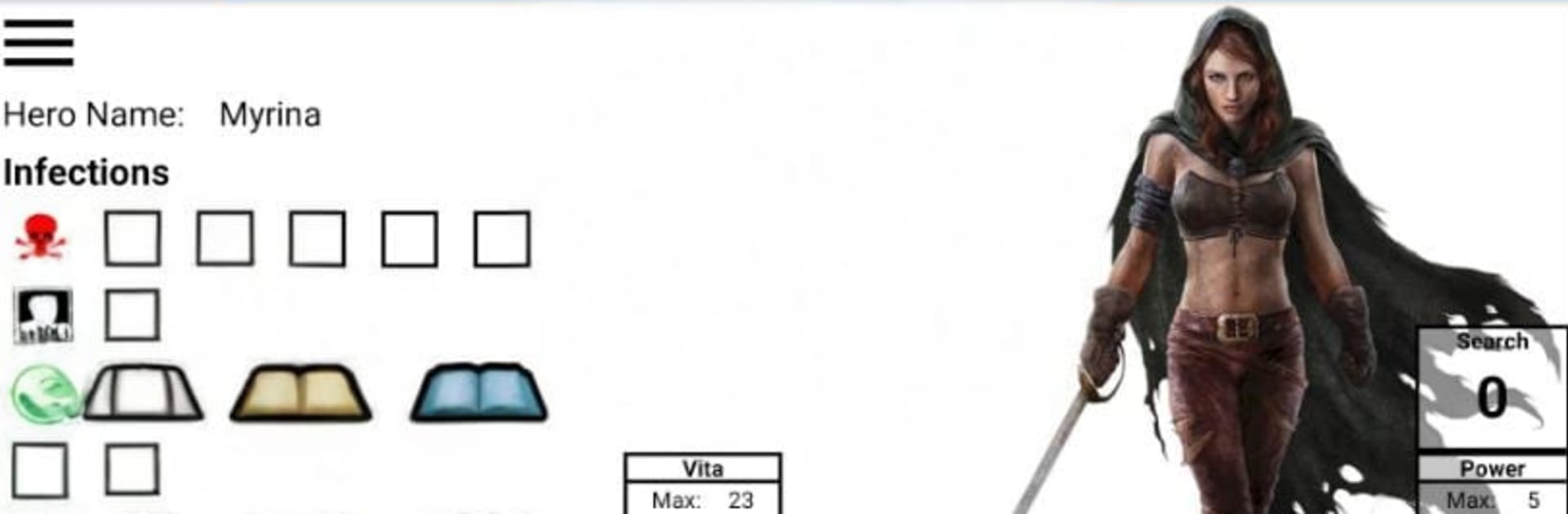
  • In-Play Control Center: Track Vita, Power, Search, Gold, Lore, Infections, Story Markers, and even your Character and Player names. Choose your Focus and see exactly what it does for your archetype. A handy notepad is built in.
  • Cards, Cleanly Tracked: Add Ability, Ritual, and Prayer cards. Tap to mark them exhausted, long-press to remove.
  • Stats That Update Themselves: Attributes and Skills show Base, Items, and Modifiers—and automatically adjust when status conditions change.
  • Status Made Simple: Check off positive or negative conditions and watch your sheets, skills, and in-play numbers update instantly.
  • Equipment & Lore Tree: Log gear, select Prayers, Rituals, and Companions from drop-downs, and track Lore choices limited to your Focus. Keep an eye on Ability Points—spent and unspent.
  • Foe Manager: Pull up any monster or Affliction, with Might and Vita scaling automatically to player count and difficulty. Includes generic foes and a general counter for custom scenarios.
  • Audio Options: Enable background music and optional sound effects for gaining or losing Vita—or when a character falls.
  • Built for the Table: Works on phones and tablets in portrait or landscape. Every change is auto-saved, so nothing gets lost.

Start your journey now. Download the game on BlueStacks, invite your friends, and march on a new adventure.


Game Features

Enhancements

  • Macros
  • Multi Instance
  • Multi Instance Sync
  • Script
  • Enhancements
Macros

Macros

Automate the predictable in Folklore Assistant and transform your gameplay with Macros. Get access to inventive Macros in the BlueStacks Macro Community
Multi Instance

Multi Instance

Play Folklore Assistant on one window. And chat with your friend on the other. Press CTRL + Shift + 8 to open the Multi-Instance Manager. And start creating fresh instances or clone an existing one.
Multi Instance Sync

Multi Instance Sync

Play Folklore Assistant with the power of Multi-Instance Sync. Replicate what you are doing on the main instance on all other instances. Level up faster, play more.
Script

Script

Script your way to gaming glory in Folklore Assistant with BlueStacks Script. Write and run a set of commands to automate repeated tasks. Trigger the command by assigning it to any key.
Read More

How to Download and Play Folklore Assistant on PC or Mac

  • Download and install BlueStacks on your PC or Mac

  • Complete Google sign-in to access the Play Store, or do it later

  • Look for Folklore Assistant in the search bar at the top right corner

  • Click to install Folklore Assistant from the search results

  • Complete Google sign-in (if you skipped step 2) to install Folklore Assistant

  • Click the Folklore Assistant icon on the home screen to start playing

video
Watch Video

Minimum System Requirements

With BlueStacks 5, you can get started on a PC that fulfills the following requirements.

  • Operating System

    Microsoft Windows 7 or above, macOS 11 (Big Sur) or above

  • Processor

    Intel, AMD or Apple Silicon Processor

  • RAM

    at least 4GB

  • HDD

    10GB Free Disk Space

Note:

* You must be an Administrator on your PC. Up to date graphics drivers from Microsoft or the chipset vendor.

Folklore Assistant - FAQs

  • How to play Folklore Assistant on Windows PC & Mac?

    Play Folklore Assistant on your PC or Mac by following these simple steps.

    • Click on 'Play Folklore Assistant on PC’ to download BlueStacks
    • Install it and log-in to Google Play Store
    • Launch and play the game.
  • Why is BlueStacks the fastest and safest platform to play games on PC?

    BlueStacks respects your privacy and is always safe and secure to use. It does not carry any malware, spyware, or any sort of additional software that could harm your PC.

    It is engineered to optimize speed and performance for a seamless gaming experience.

  • What are Folklore Assistant PC requirements?

    Minimum requirement to run Folklore Assistant on your PC

    • OS: Microsoft Windows 7 or above MacOS 11 (Big Sur) or above
    • Processor: Intel, AMD or Apple Silicon Processor
    • RAM: Your PC must have at least 4GB of RAM. (Note that having 4GB or more disk space is not a substitute for RAM)
    • HDD: 10GB Free Disk Space.
    • You must be an Administrator on your PC.