Legacy Chess Engines

Legacy Chess Engines

Board

| Chess Engines

Play on PC with BlueStacks or from our cloud

  • Overview
  • Game Features
  • How to Play

Page Modified On: April 13, 2026

Play Legacy Chess Engines on PC or Mac

Bring your A-game to Legacy Chess Engines, the Board game sensation from Chess Engines. Give your gameplay the much-needed boost with precise game controls, high FPS graphics, and top-tier features on your PC or Mac with BlueStacks.

About the Game

Legacy Chess Engines is a handy toolkit for chess fans who love running powerful engines inside their favorite Android chess GUIs. Built by Chess Engines, this Board title packs a curated set of UCI engines that plug right into apps you already use, so you can analyze games, practice lines, or spar against serious strength without fuss. Setup is quick, and the engines are discovered automatically through OEX support.

Game Features

  • Ten engines included
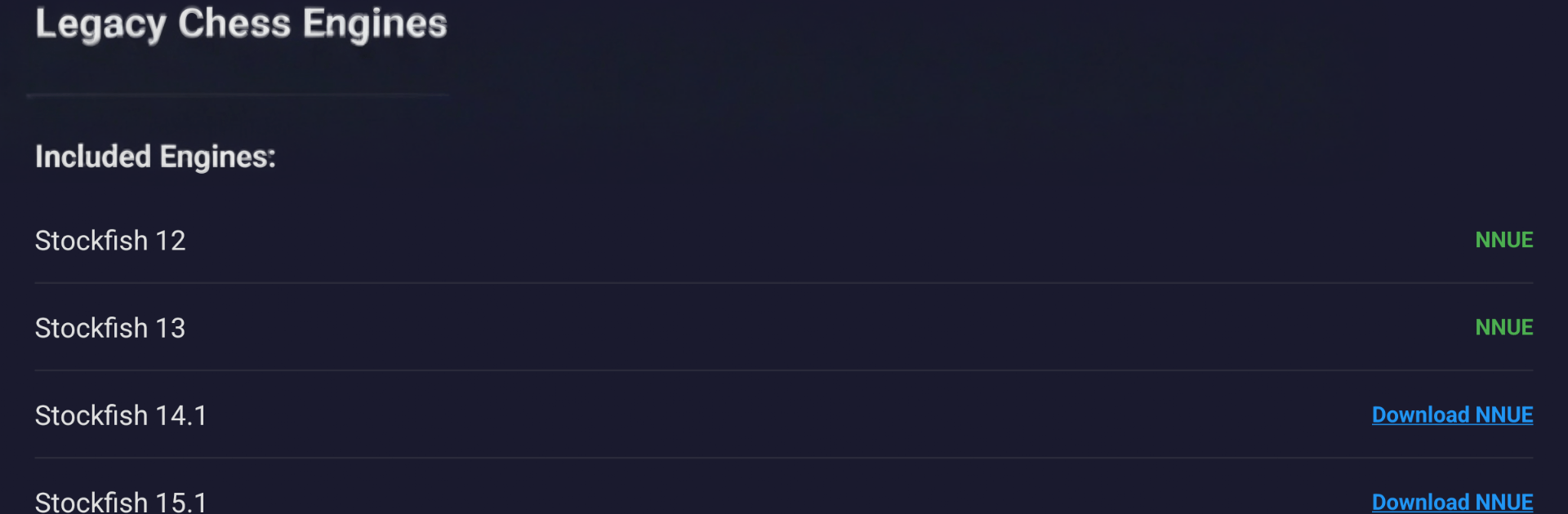
    Stockfish 17.1 (NNUE built in), Stockfish 15.1 and 14.1 (optional ~45 MB NNUE nets), Stockfish 13 and 12 (NNUE included), Berserk 13, RubiChess, Koivisto 9.0, plus the classics Fruit 2.1 and Toga II.

  • Plug-and-play integration
    Works seamlessly with OEX-capable chess GUIs like Chessis, DroidFish, and Chess for All—just pick an engine from your GUI’s settings and you’re set.

  • Simple, fast setup
    Install the app, open your preferred GUI, choose an engine, and the list shows up automatically. No manual paths, no tricky config.

  • NNUE strength when you want it
    Modern neural-network evaluation boosts playing strength and analysis quality. Some engines include the net; others let you add it later.

  • Lean install size
    Keep storage light by downloading optional NNUE networks only if you need them.

  • Runs on a wide range of devices
    Supports arm64-v8a, armeabi-v7a, x86, and x86_64, so older phones, new tablets, and many Chromebooks are covered.

  • Clean and private
    No ads, no tracking, and no data collection getting in the way of your study or matches.

  • Open-source foundations
    Every engine is free and open source under GPLv3, maintained by their original authors and communities.

  • Nice on desktop, too
    Prefer a bigger screen for long analysis sessions? You can run it on BlueStacks to manage engines alongside your favorite Android chess GUI on PC.

Start your journey now. Download the game on BlueStacks, invite your friends, and march on a new adventure.


Game Features

Enhancements

  • Macros
  • Multi Instance
  • Multi Instance Sync
  • Script
  • Enhancements
Macros

Macros

Automate the predictable in Legacy Chess Engines and transform your gameplay with Macros. Get access to inventive Macros in the BlueStacks Macro Community
Multi Instance

Multi Instance

Play Legacy Chess Engines on one window. And chat with your friend on the other. Press CTRL + Shift + 8 to open the Multi-Instance Manager. And start creating fresh instances or clone an existing one.
Multi Instance Sync

Multi Instance Sync

Play Legacy Chess Engines with the power of Multi-Instance Sync. Replicate what you are doing on the main instance on all other instances. Level up faster, play more.
Script

Script

Script your way to gaming glory in Legacy Chess Engines with BlueStacks Script. Write and run a set of commands to automate repeated tasks. Trigger the command by assigning it to any key.
Read More

How to Download and Play Legacy Chess Engines on PC or Mac

  • Download and install BlueStacks on your PC or Mac

  • Complete Google sign-in to access the Play Store, or do it later

  • Look for Legacy Chess Engines in the search bar at the top right corner

  • Click to install Legacy Chess Engines from the search results

  • Complete Google sign-in (if you skipped step 2) to install Legacy Chess Engines

  • Click the Legacy Chess Engines icon on the home screen to start playing

video
Watch Video

Minimum System Requirements

With BlueStacks 5, you can get started on a PC that fulfills the following requirements.

  • Operating System

    Microsoft Windows 7 or above, macOS 11 (Big Sur) or above

  • Processor

    Intel, AMD or Apple Silicon Processor

  • RAM

    at least 4GB

  • HDD

    10GB Free Disk Space

Note:

* You must be an Administrator on your PC. Up to date graphics drivers from Microsoft or the chipset vendor.

Legacy Chess Engines - FAQs

  • How to play Legacy Chess Engines on Windows PC & Mac?

    Play Legacy Chess Engines on your PC or Mac by following these simple steps.

    • Click on 'Play Legacy Chess Engines on PC’ to download BlueStacks
    • Install it and log-in to Google Play Store
    • Launch and play the game.
  • Why is BlueStacks the fastest and safest platform to play games on PC?

    BlueStacks respects your privacy and is always safe and secure to use. It does not carry any malware, spyware, or any sort of additional software that could harm your PC.

    It is engineered to optimize speed and performance for a seamless gaming experience.

  • What are Legacy Chess Engines PC requirements?

    Minimum requirement to run Legacy Chess Engines on your PC

    • OS: Microsoft Windows 7 or above MacOS 11 (Big Sur) or above
    • Processor: Intel, AMD or Apple Silicon Processor
    • RAM: Your PC must have at least 4GB of RAM. (Note that having 4GB or more disk space is not a substitute for RAM)
    • HDD: 10GB Free Disk Space.
    • You must be an Administrator on your PC.