Ages of Myth
Ages of Myth

Ages of Myth

Card

| Essameldin Ahmed

Play on PC with BlueStacks or from our cloud

  • Overview
  • Game Features
  • How to Play

Page Modified On: July 27, 2026

Play Ages of Myth on PC or Mac

Ages of Myth by Essameldin Ahmed has plenty to keep you busy. BlueStacks lets you play it on PC or Mac with more screen space, better control, and fewer mobile limits.

About the Game

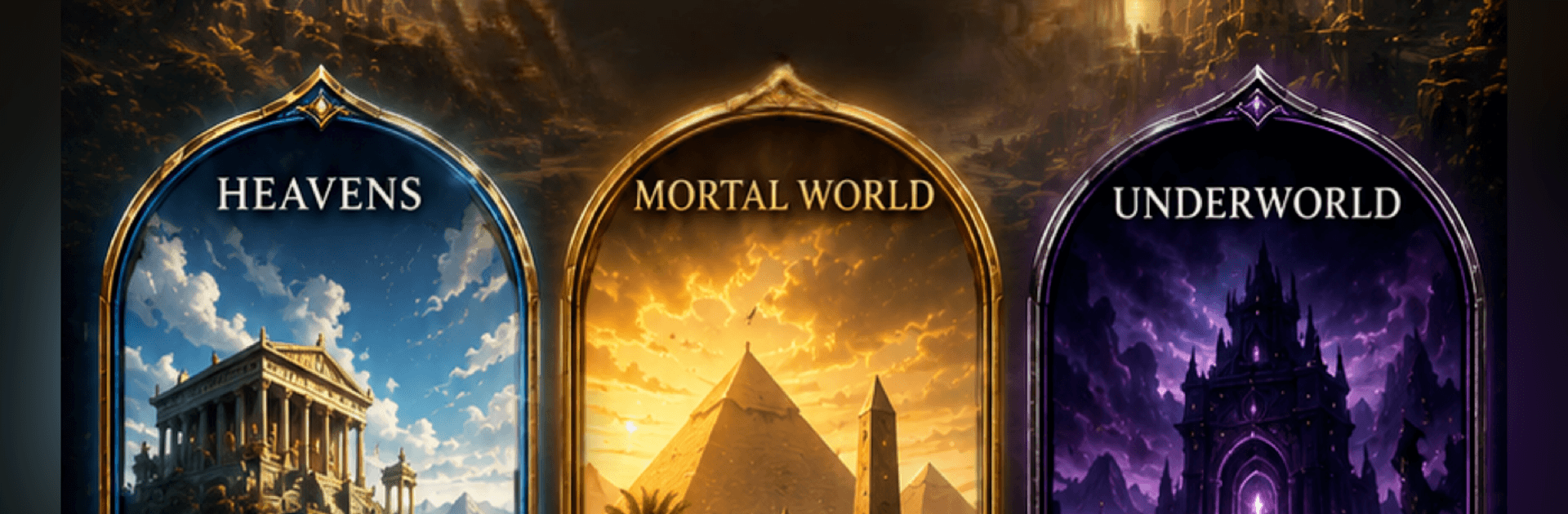
Ages of Myth is a Card battler that throws gods, heroes, and monsters from Arabic and Persian tales into tense, tactical skirmishes alongside icons from Greek, Norse, and Egyptian lore. Matches play out on a shifting board with layers to control, so every decision matters and every turn can swing the outcome. Build clever decks, react to changing rules on the fly, and snag smart wins in just a few minutes—also great on BlueStacks if you prefer playing on a bigger screen.

Game Features

  • Living Realms board: Battle across three spaces—the sky above, the world of mortals, and the depths below—each with effects that change as the Ages roll forward.
  • Evolving rules each Age: Realm conditions shift during the match, forcing you to pivot your plan, craft new chains, and steal control before the final turn.
  • Quick matches, real depth: Most games wrap in about three minutes, making it perfect for breaks, yet there’s plenty to master in timing, positioning, and counterplay.
  • Pantheons that actually mix: Build decks from Arabic, Persian, Greek, Norse, and Egyptian legends; from champions to creatures, every card brings fresh keywords and synergies.
  • Strategy over power creep: New releases open up different lines of play instead of replacing your favorites. Duplicate pulls feed a crafting system so you can chase specific cards.
  • Progress that sticks: Your cards, cosmetics, and account progress are permanent. Only the ranked ladder resets monthly, keeping competition fresh without wiping what you’ve earned.
  • Fair by design: Everything a paying player owns can be earned through play. Spending speeds things up, but it doesn’t buy a competitive edge.
  • Clan Wars: Start or join a clan, coordinate weekly pushes, and fly your banner together in organized clashes.
  • Share your best moments: Nab a clutch win or a wild combo? Share the replay so friends can watch the whole thing unfold.

Ready to top the leaderboard? We bet you do. Let precise controls and sharp visuals optimized on BlueStacks lead you to victory.


Game Features

Enhancements

  • Macros
  • Multi Instance
  • Multi Instance Sync
  • Script
  • Enhancements
Macros

Macros

Automate the predictable in Ages of Myth and transform your gameplay with Macros. Get access to inventive Macros in the BlueStacks Macro Community
Multi Instance

Multi Instance

Play Ages of Myth on one window. And chat with your friend on the other. Press CTRL + Shift + 8 to open the Multi-Instance Manager. And start creating fresh instances or clone an existing one.
Multi Instance Sync

Multi Instance Sync

Play Ages of Myth with the power of Multi-Instance Sync. Replicate what you are doing on the main instance on all other instances. Level up faster, play more.
Script

Script

Script your way to gaming glory in Ages of Myth with BlueStacks Script. Write and run a set of commands to automate repeated tasks. Trigger the command by assigning it to any key.
Read More

How to Download and Play Ages of Myth on PC or Mac

  • Download and install BlueStacks on your PC or Mac

  • Complete Google sign-in to access the Play Store, or do it later

  • Look for Ages of Myth in the search bar at the top right corner

  • Click to install Ages of Myth from the search results

  • Complete Google sign-in (if you skipped step 2) to install Ages of Myth

  • Click the Ages of Myth icon on the home screen to start playing

video
Watch Video

Minimum System Requirements

With BlueStacks 5, you can get started on a PC that fulfills the following requirements.

  • Operating System

    Microsoft Windows 7 or above, macOS 11 (Big Sur) or above

  • Processor

    Intel, AMD or Apple Silicon Processor

  • RAM

    at least 4GB

  • HDD

    10GB Free Disk Space

Note:

* You must be an Administrator on your PC. Up to date graphics drivers from Microsoft or the chipset vendor.

Ages of Myth - FAQs

  • How to play Ages of Myth on Windows PC & Mac?

    Play Ages of Myth on your PC or Mac by following these simple steps.

    • Click on 'Play Ages of Myth on PC’ to download BlueStacks
    • Install it and log-in to Google Play Store
    • Launch and play the game.
  • Why is BlueStacks the fastest and safest platform to play games on PC?

    BlueStacks respects your privacy and is always safe and secure to use. It does not carry any malware, spyware, or any sort of additional software that could harm your PC.

    It is engineered to optimize speed and performance for a seamless gaming experience.

  • What are Ages of Myth PC requirements?

    Minimum requirement to run Ages of Myth on your PC

    • OS: Microsoft Windows 7 or above MacOS 11 (Big Sur) or above
    • Processor: Intel, AMD or Apple Silicon Processor
    • RAM: Your PC must have at least 4GB of RAM. (Note that having 4GB or more disk space is not a substitute for RAM)
    • HDD: 10GB Free Disk Space.
    • You must be an Administrator on your PC.