데스티니 메이든 CCG
데스티니 메이든 CCG

데스티니 메이든 CCG

Card

| JUNGLEMONG Company

Play on PC with BlueStacks or from our cloud

  • Overview
  • Game Features
  • How to Play

Page Modified On: August 01, 2025

Play 데스티니 메이든 CCG on PC or Mac

데스티니 메이든 CCG brings the Card genre to life, and throws up exciting challenges for gamers. Developed by JUNGLEMONG Company, this Android game is best experienced on BlueStacks, the World’s #1 app player for PC and Mac users.

About the Game

If you’re into strategic card battles that keep you guessing, 데스티니 메이든 CCG might just be your next obsession. Built for fans of classic card tactics with a modern spin, this game from JUNGLEMONG Company shakes up the Card genre by bringing bluffing, deck-building, and sharp tactics together. Whether you’re plotting your next move or second-guessing your opponent’s game plan, there’s always something to keep your brain busy.

Game Features

  • Tactical Card Combos
    String together all kinds of unexpected card combos to swing the tide of battle your way. Every turn, the right mix can turn what looks like a loss into a wild victory.

  • Six Card Hands & Shuffle Option
    Start each round with six fresh cards in your hand, and—if luck or strategy isn’t on your side—take the chance to give your deck a shuffle.

  • Mind Games with Hidden Magic Cards
    Some magic cards are only visible to you, not your opponent, letting you play a serious psychological game and set up sneaky surprises.

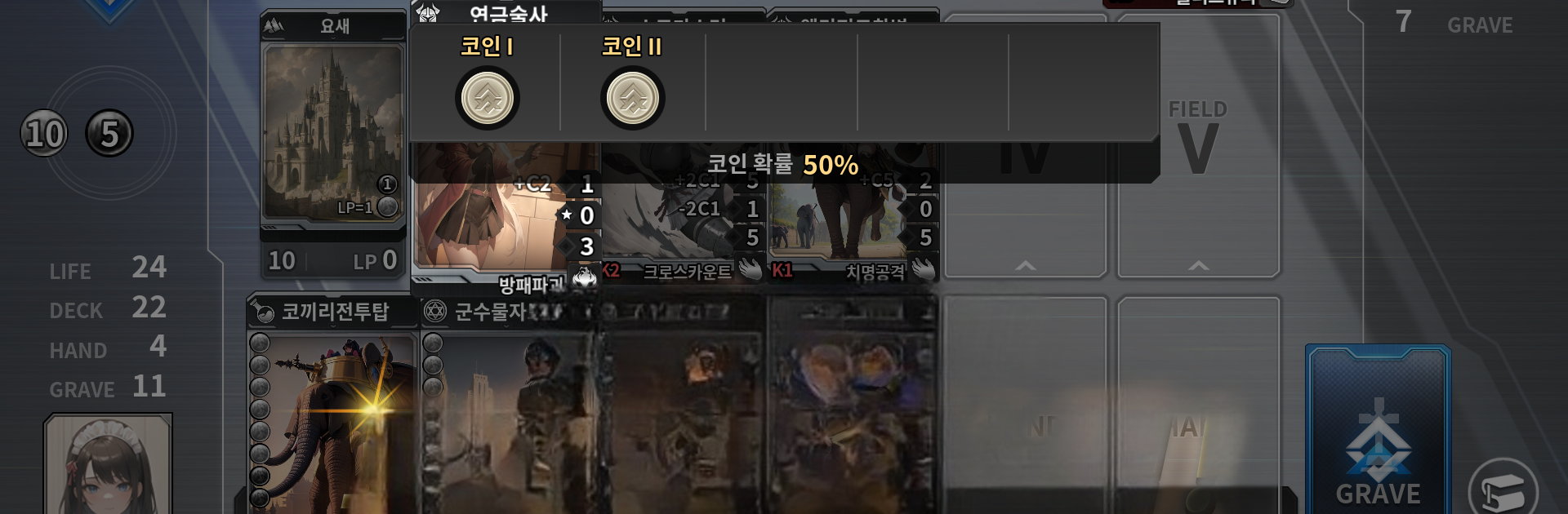
  • Unique Coin Mechanics
    Unit cards have their own coin system, introducing new ways to influence fights mid-match. Think you’ve got the upper hand? The coin drop might change all that.

  • Over 2,000 Cards to Collect
    The card roster here is massive, with new chapters rolling in every month, so there’s always something new to discover or build into your perfect deck.

  • Customizable Card Art
    Want your deck to look just how you like it? Swap out card art by transferring your favorite images straight from your PC, making your collection feel truly yours.

  • Starter Deck with 140 Cards
    The game gets you rolling fast by handing out 140 Season 1 cards right from the get-go—plenty to start experimenting and strategizing.

  • Recall System for Card Changes
    Decided you don’t need those recent upgrades? Use the recall system soon after a card patch to get all your resources back with zero hassle.

If you want crisp controls and a smooth way to play, 데스티니 메이든 CCG really shines when you fire it up on BlueStacks.

Make your gaming sessions memorable with precise controls that give you an edge in close combats and visuals that pop up, bringing every character to life.


Game Features

Enhancements

  • Macros
  • Multi Instance
  • Multi Instance Sync
  • Script
  • Enhancements
Macros

Macros

Automate the predictable in 데스티니 메이든 CCG and transform your gameplay with Macros. Get access to inventive Macros in the BlueStacks Macro Community
Multi Instance

Multi Instance

Play 데스티니 메이든 CCG on one window. And chat with your friend on the other. Press CTRL + Shift + 8 to open the Multi-Instance Manager. And start creating fresh instances or clone an existing one.
Multi Instance Sync

Multi Instance Sync

Play 데스티니 메이든 CCG with the power of Multi-Instance Sync. Replicate what you are doing on the main instance on all other instances. Level up faster, play more.
Script

Script

Script your way to gaming glory in 데스티니 메이든 CCG with BlueStacks Script. Write and run a set of commands to automate repeated tasks. Trigger the command by assigning it to any key.
Read More

How to Download and Play 데스티니 메이든 CCG on PC or Mac

  • Download and install BlueStacks on your PC or Mac

  • Complete Google sign-in to access the Play Store, or do it later

  • Look for 데스티니 메이든 CCG in the search bar at the top right corner

  • Click to install 데스티니 메이든 CCG from the search results

  • Complete Google sign-in (if you skipped step 2) to install 데스티니 메이든 CCG

  • Click the 데스티니 메이든 CCG icon on the home screen to start playing

video
Watch Video

Minimum System Requirements

With BlueStacks 5, you can get started on a PC that fulfills the following requirements.

  • Operating System

    Microsoft Windows 7 or above, macOS 11 (Big Sur) or above

  • Processor

    Intel, AMD or Apple Silicon Processor

  • RAM

    at least 4GB

  • HDD

    10GB Free Disk Space

Note:

* You must be an Administrator on your PC. Up to date graphics drivers from Microsoft or the chipset vendor.

데스티니 메이든 CCG - FAQs

  • How to play 데스티니 메이든 CCG on Windows PC & Mac?

    Play 데스티니 메이든 CCG on your PC or Mac by following these simple steps.

    • Click on 'Play 데스티니 메이든 CCG on PC’ to download BlueStacks
    • Install it and log-in to Google Play Store
    • Launch and play the game.
  • Why is BlueStacks the fastest and safest platform to play games on PC?

    BlueStacks respects your privacy and is always safe and secure to use. It does not carry any malware, spyware, or any sort of additional software that could harm your PC.

    It is engineered to optimize speed and performance for a seamless gaming experience.

  • What are 데스티니 메이든 CCG PC requirements?

    Minimum requirement to run 데스티니 메이든 CCG on your PC

    • OS: Microsoft Windows 7 or above MacOS 11 (Big Sur) or above
    • Processor: Intel, AMD or Apple Silicon Processor
    • RAM: Your PC must have at least 4GB of RAM. (Note that having 4GB or more disk space is not a substitute for RAM)
    • HDD: 10GB Free Disk Space.
    • You must be an Administrator on your PC.