Swoop Card Game
Swoop Card Game

Swoop Card Game

Card

| Brad Johansen

Play on PC with BlueStacks or from our cloud

  • Overview
  • Game Features
  • How to Play

Page Modified On: September 11, 2026

Play Swoop Card Game on PC or Mac

Step into the World of Swoop Card Game, a thrilling Card game from the house of Brad Johansen. Play this Android game on BlueStacks App Player and experience immersive gaming on PC or Mac.

About the Game

Swoop Card Game is a fast, push-your-luck Card experience where emptying your hand isn’t the only goal—you’re also trying to stick opponents with a fat pile of points. It’s quick to learn, packed with momentum swings, and those “did that just happen?” moments are constant. Prefer a bigger screen and snappy clicks? It plays smoothly on BlueStacks.

Game Features

  • Satisfying Swoops: Clear the center pile by dropping four of a kind in sequence—or by using a 10 or Joker—and take another turn while everyone else groans.
  • Play It Safe or Push: Match the top card’s number with equal or lower to stay clean, or play higher to grab the whole pile, then chain that same number to try for a Swoop anyway.
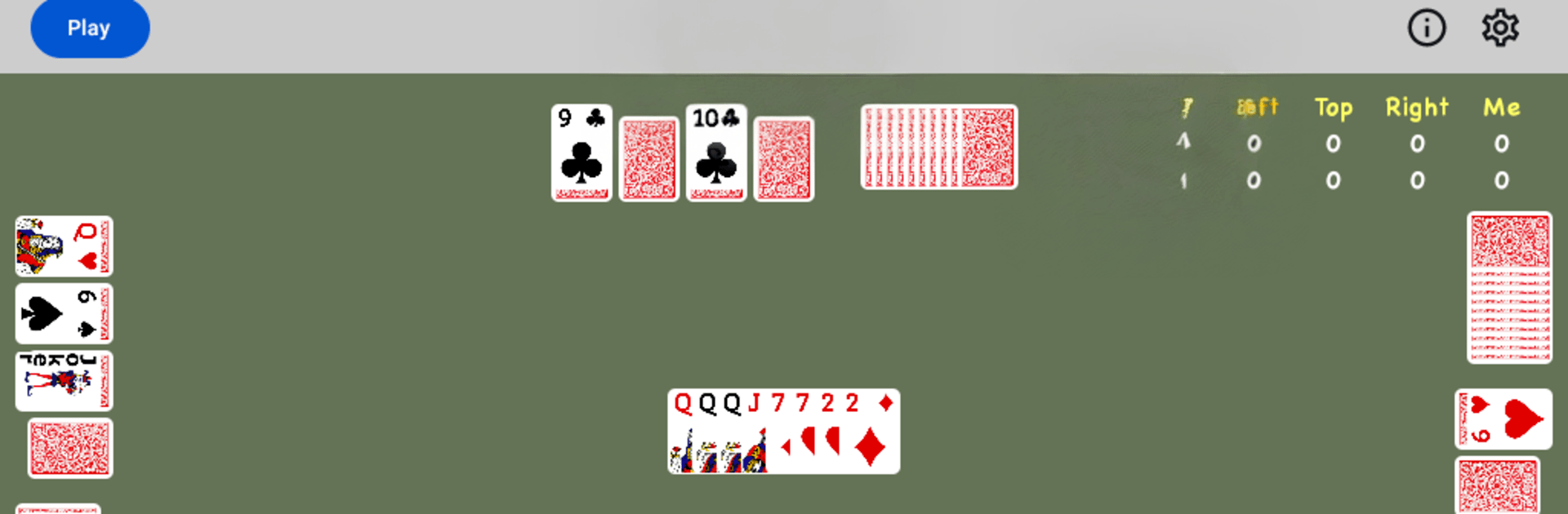
  • Mystery Cards: Set four face-down cards at the start; you can flip one only at the beginning of your turn. It might win the turn—or make you eat the pile if it’s too high.
  • Setup That Matters: Each hand deals 19 cards; stash 4 face-down and cover them with 4 face-up, with 11 left to hold. Smart planning pays off later.
  • Big Deck Energy: Two standard decks plus four Jokers (108 cards total) keep combos flowing and surprises coming.
  • Turn Flow You Can Read: You face three AI opponents—Left, Top, and Right—with play starting to the dealer’s left and circling around.
  • Start-Only Power Plays: 10s, Jokers, and those face-down flips are start-of-turn moves, so timing really matters.
  • Scoring With Bite: A–9 score face value, J/Q/K are 10, and 10s/Jokers are 50. A hand ends when someone goes out; the game ends when any player hits 300, and the lowest total wins. Two-tie, all-tie applies.
  • House Rules You Control: Toggle whether four-of-a-kind is the cap for a Swoop and if you can add matching cards right after taking the pile.

Start your journey now. Download the game on BlueStacks, invite your friends, and march on a new adventure.


Game Features

Enhancements

  • Macros
  • Multi Instance
  • Multi Instance Sync
  • Script
  • Enhancements
Macros

Macros

Automate the predictable in Swoop Card Game and transform your gameplay with Macros. Get access to inventive Macros in the BlueStacks Macro Community
Multi Instance

Multi Instance

Play Swoop Card Game on one window. And chat with your friend on the other. Press CTRL + Shift + 8 to open the Multi-Instance Manager. And start creating fresh instances or clone an existing one.
Multi Instance Sync

Multi Instance Sync

Play Swoop Card Game with the power of Multi-Instance Sync. Replicate what you are doing on the main instance on all other instances. Level up faster, play more.
Script

Script

Script your way to gaming glory in Swoop Card Game with BlueStacks Script. Write and run a set of commands to automate repeated tasks. Trigger the command by assigning it to any key.
Read More

How to Download and Play Swoop Card Game on PC or Mac

  • Download and install BlueStacks on your PC or Mac

  • Complete Google sign-in to access the Play Store, or do it later

  • Look for Swoop Card Game in the search bar at the top right corner

  • Click to install Swoop Card Game from the search results

  • Complete Google sign-in (if you skipped step 2) to install Swoop Card Game

  • Click the Swoop Card Game icon on the home screen to start playing

video
Watch Video

Minimum System Requirements

With BlueStacks 5, you can get started on a PC that fulfills the following requirements.

  • Operating System

    Microsoft Windows 7 or above, macOS 11 (Big Sur) or above

  • Processor

    Intel, AMD or Apple Silicon Processor

  • RAM

    at least 4GB

  • HDD

    10GB Free Disk Space

Note:

* You must be an Administrator on your PC. Up to date graphics drivers from Microsoft or the chipset vendor.

Swoop Card Game - FAQs

  • How to play Swoop Card Game on Windows PC & Mac?

    Play Swoop Card Game on your PC or Mac by following these simple steps.

    • Click on 'Play Swoop Card Game on PC’ to download BlueStacks
    • Install it and log-in to Google Play Store
    • Launch and play the game.
  • Why is BlueStacks the fastest and safest platform to play games on PC?

    BlueStacks respects your privacy and is always safe and secure to use. It does not carry any malware, spyware, or any sort of additional software that could harm your PC.

    It is engineered to optimize speed and performance for a seamless gaming experience.

  • What are Swoop Card Game PC requirements?

    Minimum requirement to run Swoop Card Game on your PC

    • OS: Microsoft Windows 7 or above MacOS 11 (Big Sur) or above
    • Processor: Intel, AMD or Apple Silicon Processor
    • RAM: Your PC must have at least 4GB of RAM. (Note that having 4GB or more disk space is not a substitute for RAM)
    • HDD: 10GB Free Disk Space.
    • You must be an Administrator on your PC.