Union of Gnomes F2P
Union of Gnomes F2P

Union of Gnomes F2P

Card

| HC GLOBAL DISTRIBUTION LIMITED

Play on PC with BlueStacks or from our cloud

  • Overview
  • Game Features
  • How to Play

Page Modified On: August 15, 2026

Play Union of Gnomes F2P on PC or Mac

Explore a whole new adventure with Union of Gnomes F2P, a Card game created by HC GLOBAL DISTRIBUTION LIMITED. Experience great gameplay with BlueStacks, the most popular gaming platform to play Android games on your PC or Mac.

About the Game

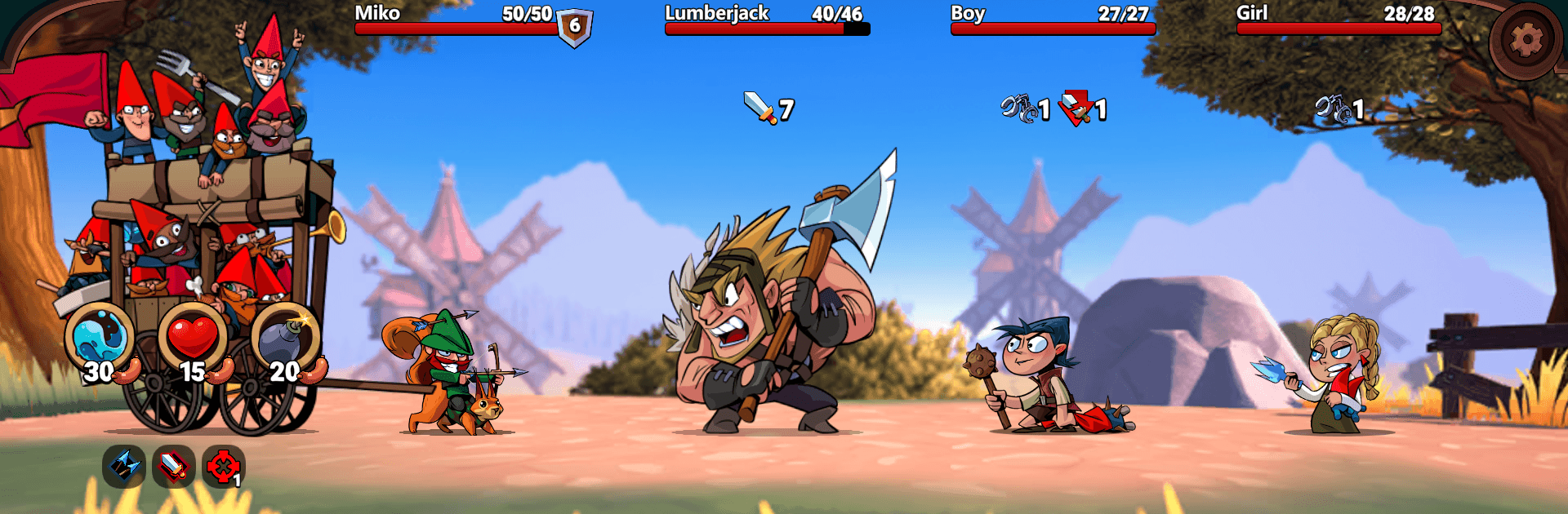
Union of Gnomes F2P flips the fairy tale you know on its head: the gnomes are staging a revolt, and Snow White’s the one in charge. It’s a Card adventure that blends cheeky humor with tactical deck-building and roguelite runs, where every uprising can play out differently. If you like a bigger screen and crisp controls, it runs smoothly with BlueStacks.

Game Features

  • Gnome Uprising: Rally scrappy freedom fighters and march through a kingdom that really doesn’t want you free, with Snow White sitting on the throne.
  • Three Bold Heroes: Choose from three distinct gnome leaders, each with their own style, signature deck, and special tricks—and upgrade them between runs to refine your favorite build.
  • Build Ridiculous Combos: Experiment with 130 cards to discover synergies that hit hard, poison, blind, weaken, or get your gnomes hilariously tipsy for unexpected boosts.
  • Tactical Positioning: Pay attention to enemy placement and timing; some skills punch through the line, others mess with morale—yes, even a brazen gnome mooning can break spirits.
  • Twisted Fairy-Tale Foes: Face off against familiar faces with not-so-cuddly attitudes—think Red Hood, Wizard of Oz, Pinocchio, and the queen herself—across 19 boss encounters and plenty of troublemakers in between.
  • Effects That Stack: Play around with 24 different status effects, layering buffs and debuffs on both sides to squeeze out every tactical edge.
  • Story and Endless Modes: Tackle a six-act campaign packed with quirky quests and hidden snippets of rebel history, or test your endurance in the Neverending Nightmare for infinite runs.
  • Grow Your Squad: Rescue captive gnomes to expand your ranks, then reshuffle lineups until your frontline sings and your backline bites.
  • Keep the Supplies Flowing: Manage the rebellion’s essentials—yes, the infamous “wieners”—so your crew stays fueled for the next showdown.
  • One Big Secret: Follow the breadcrumbs of the revolution to uncover a looming mystery that ties this fairy-tale chaos together.

BlueStacks gives you more room to focus on the game and less time adjusting around mobile limitations.


Game Features

Enhancements

  • Macros
  • Multi Instance
  • Multi Instance Sync
  • Script
  • Enhancements
Macros

Macros

Automate the predictable in Union of Gnomes F2P and transform your gameplay with Macros. Get access to inventive Macros in the BlueStacks Macro Community
Multi Instance

Multi Instance

Play Union of Gnomes F2P on one window. And chat with your friend on the other. Press CTRL + Shift + 8 to open the Multi-Instance Manager. And start creating fresh instances or clone an existing one.
Multi Instance Sync

Multi Instance Sync

Play Union of Gnomes F2P with the power of Multi-Instance Sync. Replicate what you are doing on the main instance on all other instances. Level up faster, play more.
Script

Script

Script your way to gaming glory in Union of Gnomes F2P with BlueStacks Script. Write and run a set of commands to automate repeated tasks. Trigger the command by assigning it to any key.
Read More

How to Download and Play Union of Gnomes F2P on PC or Mac

  • Download and install BlueStacks on your PC or Mac

  • Complete Google sign-in to access the Play Store, or do it later

  • Look for Union of Gnomes F2P in the search bar at the top right corner

  • Click to install Union of Gnomes F2P from the search results

  • Complete Google sign-in (if you skipped step 2) to install Union of Gnomes F2P

  • Click the Union of Gnomes F2P icon on the home screen to start playing

video
Watch Video

Minimum System Requirements

With BlueStacks 5, you can get started on a PC that fulfills the following requirements.

  • Operating System

    Microsoft Windows 7 or above, macOS 11 (Big Sur) or above

  • Processor

    Intel, AMD or Apple Silicon Processor

  • RAM

    at least 4GB

  • HDD

    10GB Free Disk Space

Note:

* You must be an Administrator on your PC. Up to date graphics drivers from Microsoft or the chipset vendor.

Union of Gnomes F2P - FAQs

  • How to play Union of Gnomes F2P on Windows PC & Mac?

    Play Union of Gnomes F2P on your PC or Mac by following these simple steps.

    • Click on 'Play Union of Gnomes F2P on PC’ to download BlueStacks
    • Install it and log-in to Google Play Store
    • Launch and play the game.
  • Why is BlueStacks the fastest and safest platform to play games on PC?

    BlueStacks respects your privacy and is always safe and secure to use. It does not carry any malware, spyware, or any sort of additional software that could harm your PC.

    It is engineered to optimize speed and performance for a seamless gaming experience.

  • What are Union of Gnomes F2P PC requirements?

    Minimum requirement to run Union of Gnomes F2P on your PC

    • OS: Microsoft Windows 7 or above MacOS 11 (Big Sur) or above
    • Processor: Intel, AMD or Apple Silicon Processor
    • RAM: Your PC must have at least 4GB of RAM. (Note that having 4GB or more disk space is not a substitute for RAM)
    • HDD: 10GB Free Disk Space.
    • You must be an Administrator on your PC.