MECCHA CHAMELEON
MECCHA CHAMELEON

MECCHA CHAMELEON

Casual

| GAWADAR COASTAL PRIVATE LIMITED

Play on PC with BlueStacks or from our cloud

  • Overview
  • Game Features
  • How to Play

Page Modified On: July 07, 2026

Play MECCHA CHAMELEON on PC or Mac

Step into the World of MECCHA CHAMELEON, a thrilling Casual game from the house of GAWADAR COASTAL PRIVATE LIMITED. Play this Android game on BlueStacks App Player and experience immersive gaming on PC or Mac.

About the Game

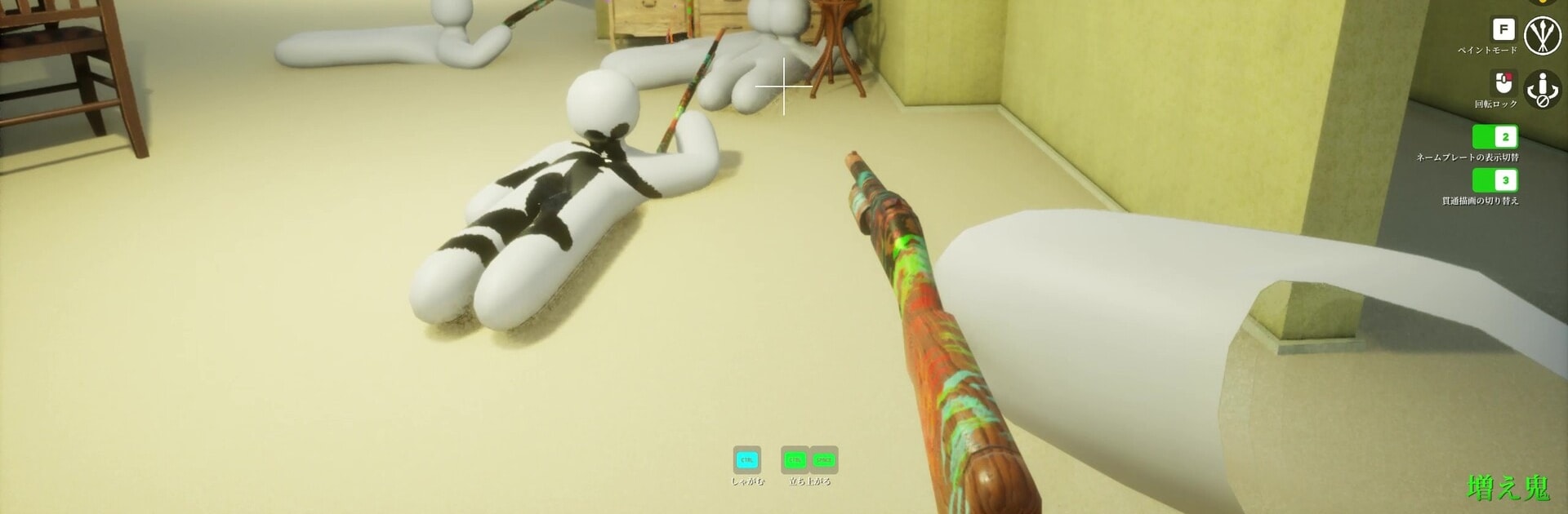
MECCHA CHAMELEON is a Casual twist on hide-and-seek where your best disguise is a paint job. You start as a blank, bright-white little critter, then splash on colors, strike a pose, and melt into the background while Seekers comb the map. It’s quick, creative, and surprisingly tense—one good color match can save you, and one sloppy brushstroke can give you away.

Game Features

  • Paint-to-Blend Camo: Cover your body with colors that match the environment, from walls to props. The closer your shades, the harder you are to spot.
  • Two-Sided Showdown: Play as a Hider or a Seeker. Hiders try to vanish in plain sight; Seekers race the clock to find everyone before time runs out.
  • Pose and Placement: It’s not just color—choose a stance and tuck into believable spots to sell the illusion.
  • Easy Online Play: Make a private room for friends or open your lobby so anyone can join. Simple setup, fast matches.
  • Host-Driven Rooms: The host runs the show. Player capacity depends on their network, so you can keep things smooth and stable.
  • Streamer-Friendly: Want viewer games? Hosting is straightforward, and it’s perfect for “Can you spot them?” moments with chat.
  • Learn Fast, Master Slowly: Rules are super clear, but perfecting that paint match and timing your moves takes practice—and a little creativity.
  • Play Where You Like: Jump in on mobile for quick rounds, or use BlueStacks if you’d rather hang out on a bigger screen.

BlueStacks gives you more room to focus on the game and less time adjusting around mobile limitations.


Game Features

Enhancements

  • Macros
  • Multi Instance
  • Script
  • Repeated Tap
  • Enhancements
Macros

Macros

Automate the predictable in MECCHA CHAMELEON and transform your gameplay with Macros. Get access to inventive Macros in the BlueStacks Macro Community
Multi Instance

Multi Instance

Play MECCHA CHAMELEON on one window. And chat with your friend on the other. Press CTRL + Shift + 8 to open the Multi-Instance Manager. And start creating fresh instances or clone an existing one.
Script

Script

Script your way to gaming glory in MECCHA CHAMELEON with BlueStacks Script. Write and run a set of commands to automate repeated tasks. Trigger the command by assigning it to any key.
Repeated Tap

Repeated Tap

BlueStacks lets you master MECCHA CHAMELEON with useful features like the Repeated Tap. Now you do not have to press the same key repeatedly to initiate an action. Just assign it to one key and you are good to go.
Read More

How to Download and Play MECCHA CHAMELEON on PC or Mac

  • Download and install BlueStacks on your PC or Mac

  • Complete Google sign-in to access the Play Store, or do it later

  • Look for MECCHA CHAMELEON in the search bar at the top right corner

  • Click to install MECCHA CHAMELEON from the search results

  • Complete Google sign-in (if you skipped step 2) to install MECCHA CHAMELEON

  • Click the MECCHA CHAMELEON icon on the home screen to start playing

video
Watch Video

Minimum System Requirements

With BlueStacks 5, you can get started on a PC that fulfills the following requirements.

  • Operating System

    Microsoft Windows 7 or above, macOS 11 (Big Sur) or above

  • Processor

    Intel, AMD or Apple Silicon Processor

  • RAM

    at least 4GB

  • HDD

    10GB Free Disk Space

Note:

* You must be an Administrator on your PC. Up to date graphics drivers from Microsoft or the chipset vendor.

MECCHA CHAMELEON - FAQs

  • How to play MECCHA CHAMELEON on Windows PC & Mac?

    Play MECCHA CHAMELEON on your PC or Mac by following these simple steps.

    • Click on 'Play MECCHA CHAMELEON on PC’ to download BlueStacks
    • Install it and log-in to Google Play Store
    • Launch and play the game.
  • Why is BlueStacks the fastest and safest platform to play games on PC?

    BlueStacks respects your privacy and is always safe and secure to use. It does not carry any malware, spyware, or any sort of additional software that could harm your PC.

    It is engineered to optimize speed and performance for a seamless gaming experience.

  • What are MECCHA CHAMELEON PC requirements?

    Minimum requirement to run MECCHA CHAMELEON on your PC

    • OS: Microsoft Windows 7 or above MacOS 11 (Big Sur) or above
    • Processor: Intel, AMD or Apple Silicon Processor
    • RAM: Your PC must have at least 4GB of RAM. (Note that having 4GB or more disk space is not a substitute for RAM)
    • HDD: 10GB Free Disk Space.
    • You must be an Administrator on your PC.