Монстриксы: Распаковка

Монстриксы: Распаковка

Casual

| LipoGame

Play on PC with BlueStacks or from our cloud

  • Overview
  • Game Features
  • How to Play

Page Modified On: September 25, 2026

Play Монстриксы: Распаковка on PC or Mac

Монстриксы: Распаковка by LipoGame has plenty to keep you busy. BlueStacks lets you play it on PC or Mac with more screen space, better control, and fewer mobile limits.

About the Game

Монстриксы: Распаковка is a bite-size, oddly satisfying unboxing game where every spin could reveal your next favorite little monster. It’s all about cracking open cases, watching the roulette roll, and filling out a quirky collection one pull at a time. This is a Casual experience through and through—simple to pick up, easy to enjoy, and just the right mix of luck and light strategy. Prefer a bigger screen and smooth clicks? It also plays nicely on BlueStacks.

Game Features

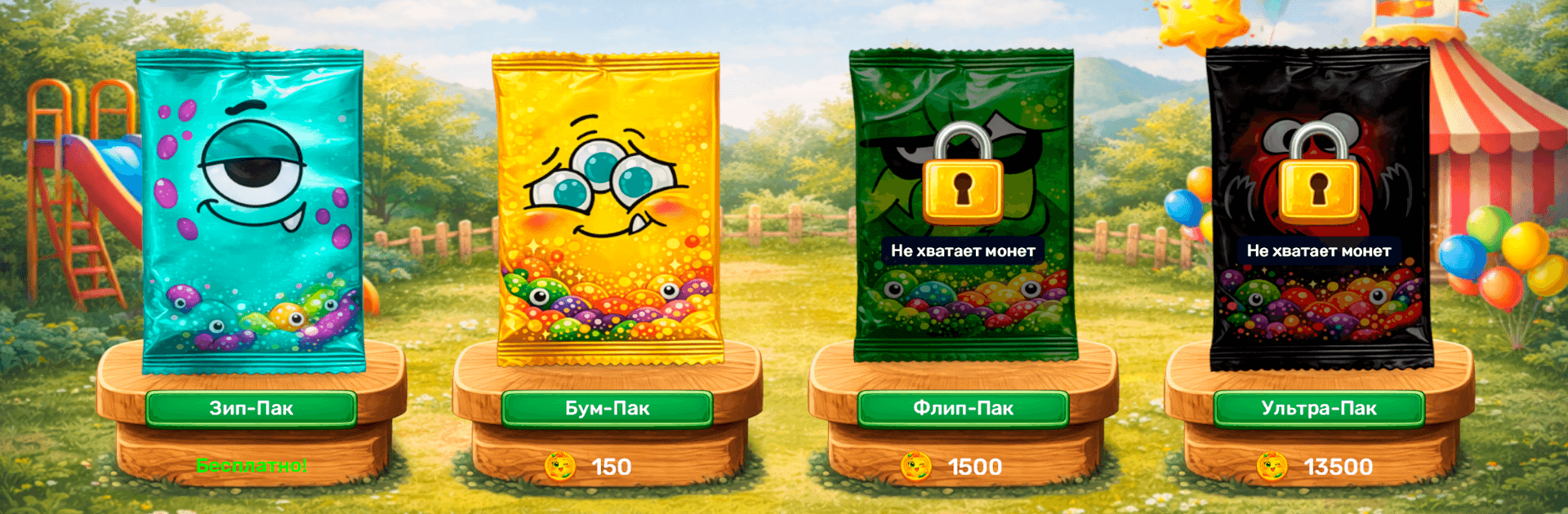
  • Satisfying Case Openings: Pop open four different case types, each with its own price and pool of monsters to discover.
  • Colorful Roulette Spin: Watch a lively roulette decide your prize, complete with punchy animations that make every reveal feel exciting.
  • 27 Collectibles: Build a full set of 27 unique Monstrix, each with its own look and personality to show off in your gallery.
  • Rarity Ladder: Pull everything from commons to ultra-rare legendaries, with odds that change depending on the case you choose.
  • Smart Dupes System: Got a duplicate? Sell it for coins and bankroll your next opening—save, splurge, or play it steady.
  • Progress Gallery: Track what you’ve found and what’s missing with a clean, easy-to-browse collection album.
  • One-Tap Flow: Open, reveal, repeat—fast taps keep the pace snappy whether you’ve got a minute or a whole chill session.
  • Pick-Your-Playstyle: Chase legendaries with pricier cases or go wide with budget options; mix it up depending on your goals.
  • Cute Look and Feel: Crisp art, cheerful effects, and playful details keep every spin and pull fun to watch.

BlueStacks gives you more room to focus on the game and less time adjusting around mobile limitations.


Game Features

Enhancements

  • Macros
  • Multi Instance
  • Script
  • Repeated Tap
  • Enhancements
Macros

Macros

Automate the predictable in Монстриксы: Распаковка and transform your gameplay with Macros. Get access to inventive Macros in the BlueStacks Macro Community
Multi Instance

Multi Instance

Play Монстриксы: Распаковка on one window. And chat with your friend on the other. Press CTRL + Shift + 8 to open the Multi-Instance Manager. And start creating fresh instances or clone an existing one.
Script

Script

Script your way to gaming glory in Монстриксы: Распаковка with BlueStacks Script. Write and run a set of commands to automate repeated tasks. Trigger the command by assigning it to any key.
Repeated Tap

Repeated Tap

BlueStacks lets you master Монстриксы: Распаковка with useful features like the Repeated Tap. Now you do not have to press the same key repeatedly to initiate an action. Just assign it to one key and you are good to go.
Read More

How to Download and Play Монстриксы: Распаковка on PC or Mac

  • Download and install BlueStacks on your PC or Mac

  • Complete Google sign-in to access the Play Store, or do it later

  • Look for Монстриксы: Распаковка in the search bar at the top right corner

  • Click to install Монстриксы: Распаковка from the search results

  • Complete Google sign-in (if you skipped step 2) to install Монстриксы: Распаковка

  • Click the Монстриксы: Распаковка icon on the home screen to start playing

video
Watch Video

Minimum System Requirements

With BlueStacks 5, you can get started on a PC that fulfills the following requirements.

  • Operating System

    Microsoft Windows 7 or above, macOS 11 (Big Sur) or above

  • Processor

    Intel, AMD or Apple Silicon Processor

  • RAM

    at least 4GB

  • HDD

    10GB Free Disk Space

Note:

* You must be an Administrator on your PC. Up to date graphics drivers from Microsoft or the chipset vendor.

Монстриксы: Распаковка - FAQs

  • How to play Монстриксы: Распаковка on Windows PC & Mac?

    Play Монстриксы: Распаковка on your PC or Mac by following these simple steps.

    • Click on 'Play Монстриксы: Распаковка on PC’ to download BlueStacks
    • Install it and log-in to Google Play Store
    • Launch and play the game.
  • Why is BlueStacks the fastest and safest platform to play games on PC?

    BlueStacks respects your privacy and is always safe and secure to use. It does not carry any malware, spyware, or any sort of additional software that could harm your PC.

    It is engineered to optimize speed and performance for a seamless gaming experience.

  • What are Монстриксы: Распаковка PC requirements?

    Minimum requirement to run Монстриксы: Распаковка on your PC

    • OS: Microsoft Windows 7 or above MacOS 11 (Big Sur) or above
    • Processor: Intel, AMD or Apple Silicon Processor
    • RAM: Your PC must have at least 4GB of RAM. (Note that having 4GB or more disk space is not a substitute for RAM)
    • HDD: 10GB Free Disk Space.
    • You must be an Administrator on your PC.