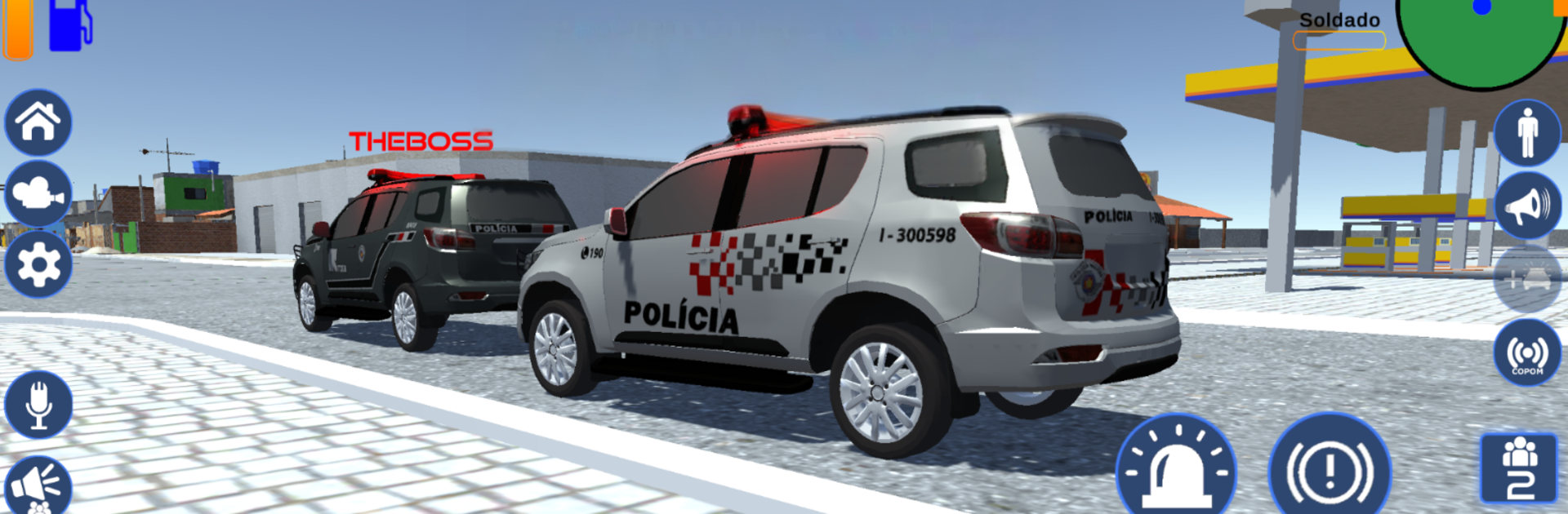
RP Elite – Op. Policial Online

RP Elite – Op. Policial Online

Casual

| Hurricane - Games and Apps

Play on PC with BlueStacks or from our cloud

  • Overview
  • Game Features
  • How to Play

Page Modified On: October 24, 2025

Play RP Elite – Op. Policial Online on PC or Mac

From the innovators and creators at Hurricane – Games and Apps, RP Elite – Op. Policial Online is another fun addition to the World of Casual games. Go beyond your mobile screen and play it bigger and better on your PC or Mac. An immersive experience awaits you.

About the Game

RP Elite – Op. Policial Online puts you in the driver’s seat of high-energy police patrols with friends. It’s a Casual roleplay experience where you pick your unit, hit the streets, and respond to live incidents across different regions. Want quick chases, teamwork, and a clean path to higher ranks? It’s all here from Hurricane – Games and Apps.

Game Features

  • Online Patrols with Friends: Create a private room for your squad or jump into an open lobby and start coordinating pursuits right away.
  • Fast-Paced Pursuits: Chase down suspects, block escape routes, and make clean captures. Rack up successful arrests to climb the ranks.
  • Choose Your Unit: Select the patrol car you like best and represent the state and police corporation you prefer.
  • Officer Customization: Switch up your look with different skins and build a style that matches your role on the team.
  • Dynamic Incidents: Respond to a mix of calls—routine checks, urgent pursuits, and everything in between—keeping each session fresh.
  • Teams from Multiple States: Roll out with guarnições inspired by various states, each adding a different flavor to your operation.
  • Casual, Pick-Up-and-Play: No heavy grind required. Jump in, handle a few calls, and log off feeling accomplished.
  • Smooth on PC with BlueStacks: Prefer keyboard and mouse? Play RP Elite – Op. Policial Online on your PC with BlueStacks for comfortable controls and steady performance.

Make your gaming sessions memorable with precise controls that give you an edge in close combats and visuals that pop up, bringing every character to life.


Game Features

Enhancements

  • Macros
  • Multi Instance
  • Script
  • Repeated Tap
  • Enhancements
Macros

Macros

Automate the predictable in RP Elite – Op. Policial Online and transform your gameplay with Macros. Get access to inventive Macros in the BlueStacks Macro Community
Multi Instance

Multi Instance

Play RP Elite – Op. Policial Online on one window. And chat with your friend on the other. Press CTRL + Shift + 8 to open the Multi-Instance Manager. And start creating fresh instances or clone an existing one.
Script

Script

Script your way to gaming glory in RP Elite – Op. Policial Online with BlueStacks Script. Write and run a set of commands to automate repeated tasks. Trigger the command by assigning it to any key.
Repeated Tap

Repeated Tap

BlueStacks lets you master RP Elite – Op. Policial Online with useful features like the Repeated Tap. Now you do not have to press the same key repeatedly to initiate an action. Just assign it to one key and you are good to go.
Read More

How to Download and Play RP Elite – Op. Policial Online on PC or Mac

  • Download and install BlueStacks on your PC or Mac

  • Complete Google sign-in to access the Play Store, or do it later

  • Look for RP Elite – Op. Policial Online in the search bar at the top right corner

  • Click to install RP Elite – Op. Policial Online from the search results

  • Complete Google sign-in (if you skipped step 2) to install RP Elite – Op. Policial Online

  • Click the RP Elite – Op. Policial Online icon on the home screen to start playing

video
Watch Video

Minimum System Requirements

With BlueStacks 5, you can get started on a PC that fulfills the following requirements.

  • Operating System

    Microsoft Windows 7 or above, macOS 11 (Big Sur) or above

  • Processor

    Intel, AMD or Apple Silicon Processor

  • RAM

    at least 4GB

  • HDD

    10GB Free Disk Space

Note:

* You must be an Administrator on your PC. Up to date graphics drivers from Microsoft or the chipset vendor.

RP Elite – Op. Policial Online - FAQs

  • How to play RP Elite – Op. Policial Online on Windows PC & Mac?

    Play RP Elite – Op. Policial Online on your PC or Mac by following these simple steps.

    • Click on 'Play RP Elite – Op. Policial Online on PC’ to download BlueStacks
    • Install it and log-in to Google Play Store
    • Launch and play the game.
  • Why is BlueStacks the fastest and safest platform to play games on PC?

    BlueStacks respects your privacy and is always safe and secure to use. It does not carry any malware, spyware, or any sort of additional software that could harm your PC.

    It is engineered to optimize speed and performance for a seamless gaming experience.

  • What are RP Elite – Op. Policial Online PC requirements?

    Minimum requirement to run RP Elite – Op. Policial Online on your PC

    • OS: Microsoft Windows 7 or above MacOS 11 (Big Sur) or above
    • Processor: Intel, AMD or Apple Silicon Processor
    • RAM: Your PC must have at least 4GB of RAM. (Note that having 4GB or more disk space is not a substitute for RAM)
    • HDD: 10GB Free Disk Space.
    • You must be an Administrator on your PC.