Star Warrior:RTS&TD
Star Warrior:RTS&TD

Star Warrior:RTS&TD

Casual

| MissionX

Play on PC with BlueStacks or from our cloud

  • Overview
  • Game Features
  • How to Play

Page Modified On: May 18, 2026

Play Star Warrior:RTS&TD on PC or Mac

Join millions to experience Star Warrior:RTS&TD, an exciting Casual game from MissionX. With BlueStacks App Player, you are always a step ahead of your opponent, ready to outplay them with faster gameplay and better control with the mouse and keyboard on your PC or Mac.

About the Game

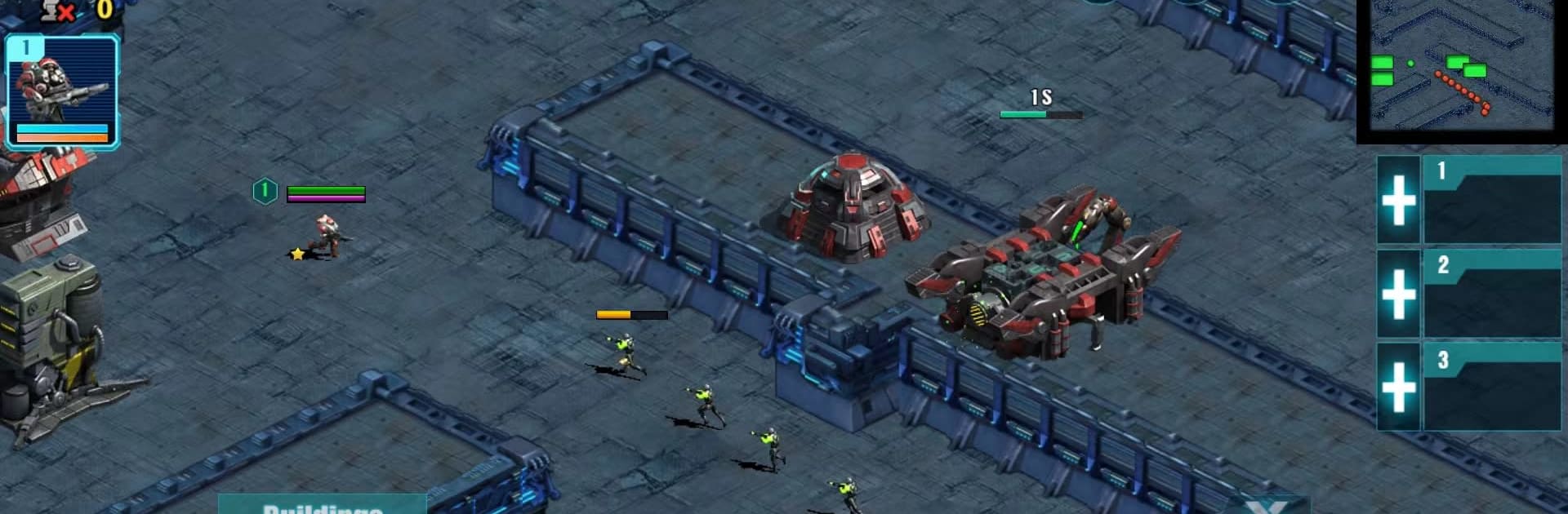
Star Warrior:RTS&TD from MissionX mixes classic tower defense with real-time strategy in a way that’s easy to pick up and hard to put down. Build out a base, drop defenses, and lead a small but mighty army in battles that can be quick 5-minute scraps or tense 30-minute brawls. It’s a Casual strategy playground with online skirmishes, story chapters, and a powerful editor if you like making your own challenges.

Game Features

  • Hybrid Strategy, Real-Time Action: Place towers, manage resources, and move your army on the fly—TD planning meets RTS hustle in every match.
  • Flexible Match Lengths: Jump in for short, snack-sized fights or settle in for longer clashes that give you room to experiment.
  • Build Your War Machine: Set up barracks to grow population and unlock troops, add resource structures for steady income, and stack defensive buildings where it counts.
  • Heroes With Teeth: Recruit heroes that outclass regular units, each with two unique skills, and use them as mission leads, anchors on defense, or the tip of your spear.
  • A Roster That Hits Hard: Train machine gunners, roll out tanks, and launch battleships to shield your base and crack enemy lines.
  • Online PvP and Co-op: Queue up for competitive matches or team with others in multiplayer TD/RTS modes to share the grind and the glory.
  • Map & Mode Editor: Craft your own scenarios and campaign-style missions, or tweak community maps to put a personal spin on them.
  • Clear, Snappy Controls: Micro a single squad or direct the whole force with simple commands that keep the pace brisk.
  • Resource-Driven Wins: Gather, spend, and deny resources in real time—upgrade smartly and starve the opposition to seal the victory.
  • Four Chapters to Tackle: Work through themed chapters that steadily turn up the heat and test new unit combos.
  • Online Battles Hub: Head to the Battles section whenever you’re ready to face human opponents or try player-made maps.
  • PC-Friendly Option: Prefer a bigger screen and mouse aim? It runs smoothly on BlueStacks without changing how the game feels.

Get ready for a buttery smooth, high-performance gaming action only on BlueStacks.

Game Features

Enhancements

  • Macros
  • Multi Instance
  • Script
  • Repeated Tap
  • Enhancements
Macros

Macros

Automate the predictable in Star Warrior:RTS&TD and transform your gameplay with Macros. Get access to inventive Macros in the BlueStacks Macro Community
Multi Instance

Multi Instance

Play Star Warrior:RTS&TD on one window. And chat with your friend on the other. Press CTRL + Shift + 8 to open the Multi-Instance Manager. And start creating fresh instances or clone an existing one.
Script

Script

Script your way to gaming glory in Star Warrior:RTS&TD with BlueStacks Script. Write and run a set of commands to automate repeated tasks. Trigger the command by assigning it to any key.
Repeated Tap

Repeated Tap

BlueStacks lets you master Star Warrior:RTS&TD with useful features like the Repeated Tap. Now you do not have to press the same key repeatedly to initiate an action. Just assign it to one key and you are good to go.
Read More

How to Download and Play Star Warrior:RTS&TD on PC or Mac

  • Download and install BlueStacks on your PC or Mac

  • Complete Google sign-in to access the Play Store, or do it later

  • Look for Star Warrior:RTS&TD in the search bar at the top right corner

  • Click to install Star Warrior:RTS&TD from the search results

  • Complete Google sign-in (if you skipped step 2) to install Star Warrior:RTS&TD

  • Click the Star Warrior:RTS&TD icon on the home screen to start playing

video
Watch Video

Minimum System Requirements

With BlueStacks 5, you can get started on a PC that fulfills the following requirements.

  • Operating System

    Microsoft Windows 7 or above, macOS 11 (Big Sur) or above

  • Processor

    Intel, AMD or Apple Silicon Processor

  • RAM

    at least 4GB

  • HDD

    10GB Free Disk Space

Note:

* You must be an Administrator on your PC. Up to date graphics drivers from Microsoft or the chipset vendor.

Star Warrior:RTS&TD - FAQs

  • How to play Star Warrior:RTS&TD on Windows PC & Mac?

    Play Star Warrior:RTS&TD on your PC or Mac by following these simple steps.

    • Click on 'Play Star Warrior:RTS&TD on PC’ to download BlueStacks
    • Install it and log-in to Google Play Store
    • Launch and play the game.
  • Why is BlueStacks the fastest and safest platform to play games on PC?

    BlueStacks respects your privacy and is always safe and secure to use. It does not carry any malware, spyware, or any sort of additional software that could harm your PC.

    It is engineered to optimize speed and performance for a seamless gaming experience.

  • What are Star Warrior:RTS&TD PC requirements?

    Minimum requirement to run Star Warrior:RTS&TD on your PC

    • OS: Microsoft Windows 7 or above MacOS 11 (Big Sur) or above
    • Processor: Intel, AMD or Apple Silicon Processor
    • RAM: Your PC must have at least 4GB of RAM. (Note that having 4GB or more disk space is not a substitute for RAM)
    • HDD: 10GB Free Disk Space.
    • You must be an Administrator on your PC.