Toddler Princess Pop

Toddler Princess Pop

Casual

| ToddlerTap

Play on PC with BlueStacks or from our cloud

  • Overview
  • Game Features
  • How to Play

Page Modified On: August 24, 2026

Play Toddler Princess Pop on PC or Mac

Bring your A-game to Toddler Princess Pop, the Casual game sensation from ToddlerTap. Give your gameplay the much-needed boost with precise game controls, high FPS graphics, and top-tier features on your PC or Mac with BlueStacks.

About the Game

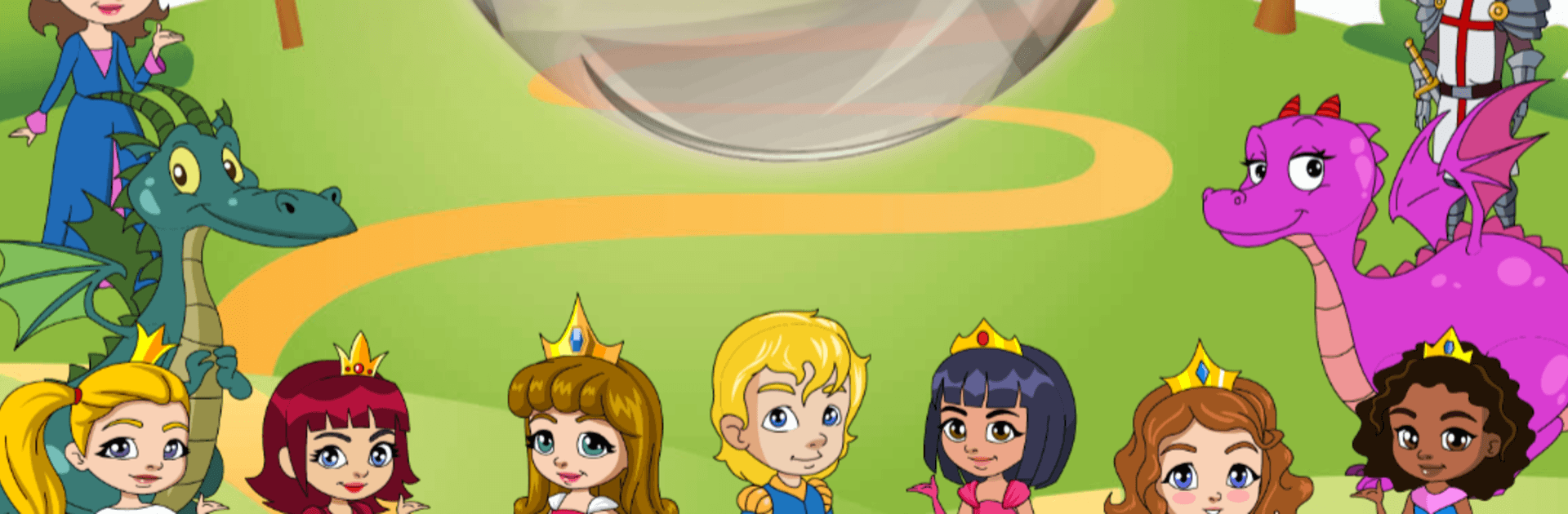
Toddler Princess Pop is a tap-happy Casual game built for little hands and big imaginations. Kids pick a fairy-tale buddy and pop colorful goodies while cheerful sounds and animations keep them giggling. Prefer a bigger screen? It runs smoothly on PC with BlueStacks, too.

Game Features

  • Made for ages 18 months+: Super simple controls and clear visuals mean you’ll show it once and they’re off.
  • 30 fairy‑tale friends: Choose from princesses, princes, knights, and dragons, each with cute voice lines and playful animations.
  • Over 150 poppables: Bubbles, cookies, stars, hearts, jewels, and more keep every round feeling fresh and satisfying.
  • Multitouch popping: Little hands can use lots of fingers at once—and a grown-up can jump in alongside.
  • Smooth difficulty curve: Objects start big and slow, then gradually get smaller and faster to match growing skills.
  • Castle showcase: Completed characters move into a storybook castle where kids can tap and interact between rounds.
  • Builds early skills: Encourages hand–eye coordination, fine motor control, and an understanding of cause and effect.
  • No reading required: Big buttons, friendly prompts, and quick restarts make it easy to play independently.

Start your journey now. Download the game on BlueStacks, invite your friends, and march on a new adventure.


Game Features

Enhancements

  • Macros
  • Multi Instance
  • Script
  • Repeated Tap
  • Enhancements
Macros

Macros

Automate the predictable in Toddler Princess Pop and transform your gameplay with Macros. Get access to inventive Macros in the BlueStacks Macro Community
Multi Instance

Multi Instance

Play Toddler Princess Pop on one window. And chat with your friend on the other. Press CTRL + Shift + 8 to open the Multi-Instance Manager. And start creating fresh instances or clone an existing one.
Script

Script

Script your way to gaming glory in Toddler Princess Pop with BlueStacks Script. Write and run a set of commands to automate repeated tasks. Trigger the command by assigning it to any key.
Repeated Tap

Repeated Tap

BlueStacks lets you master Toddler Princess Pop with useful features like the Repeated Tap. Now you do not have to press the same key repeatedly to initiate an action. Just assign it to one key and you are good to go.
Read More

How to Download and Play Toddler Princess Pop on PC or Mac

  • Download and install BlueStacks on your PC or Mac

  • Complete Google sign-in to access the Play Store, or do it later

  • Look for Toddler Princess Pop in the search bar at the top right corner

  • Click to install Toddler Princess Pop from the search results

  • Complete Google sign-in (if you skipped step 2) to install Toddler Princess Pop

  • Click the Toddler Princess Pop icon on the home screen to start playing

video
Watch Video

Minimum System Requirements

With BlueStacks 5, you can get started on a PC that fulfills the following requirements.

  • Operating System

    Microsoft Windows 7 or above, macOS 11 (Big Sur) or above

  • Processor

    Intel, AMD or Apple Silicon Processor

  • RAM

    at least 4GB

  • HDD

    10GB Free Disk Space

Note:

* You must be an Administrator on your PC. Up to date graphics drivers from Microsoft or the chipset vendor.

Toddler Princess Pop - FAQs

  • How to play Toddler Princess Pop on Windows PC & Mac?

    Play Toddler Princess Pop on your PC or Mac by following these simple steps.

    • Click on 'Play Toddler Princess Pop on PC’ to download BlueStacks
    • Install it and log-in to Google Play Store
    • Launch and play the game.
  • Why is BlueStacks the fastest and safest platform to play games on PC?

    BlueStacks respects your privacy and is always safe and secure to use. It does not carry any malware, spyware, or any sort of additional software that could harm your PC.

    It is engineered to optimize speed and performance for a seamless gaming experience.

  • What are Toddler Princess Pop PC requirements?

    Minimum requirement to run Toddler Princess Pop on your PC

    • OS: Microsoft Windows 7 or above MacOS 11 (Big Sur) or above
    • Processor: Intel, AMD or Apple Silicon Processor
    • RAM: Your PC must have at least 4GB of RAM. (Note that having 4GB or more disk space is not a substitute for RAM)
    • HDD: 10GB Free Disk Space.
    • You must be an Administrator on your PC.