المواريث
المواريث

المواريث

Education

| Arabia For Information & Technology

Play on PC with BlueStacks or from our cloud

  • Overview
  • How to Download

Page Modified On: September 12, 2025

Run المواريث on PC or Mac

Get freedom from your phone’s obvious limitations. Use المواريث, made by Arabia For Information & Technology, a Education app on your PC or Mac with BlueStacks, and level up your experience.

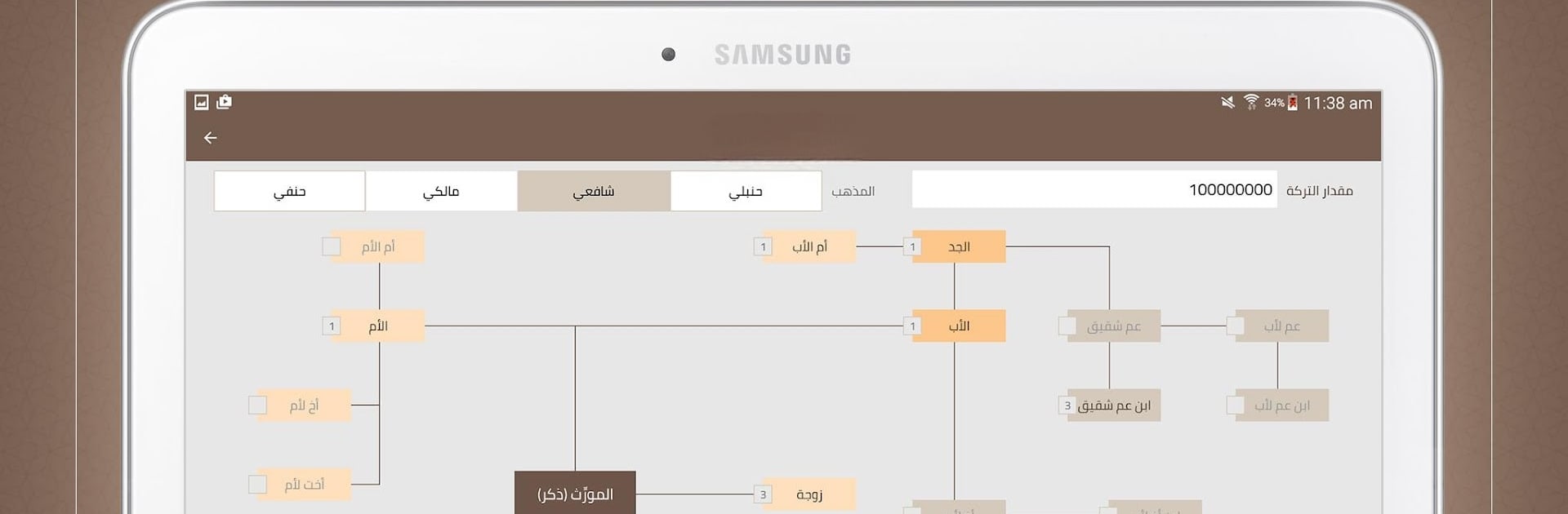
Al-Mawarith is basically a focused tool for Islamic inheritance. A person enters the details of a case, such as who the heirs are and the situation around them, taps solve, and the app lays out every share in seconds. It does not stop at numbers. It also shows the reasoning with clear references to Quran and Sunnah so the result does not feel like a black box. What stands out is the option to view the distribution according to the four madhhabs, Hanbali, Maliki, Shafi’i, and Hanafi, which is very helpful when someone needs to compare opinions or teach the differences.

The interface is clean and straight to the point. Results show each heir, their portion, and the percentage of the estate, paired with a short analysis that explains why. There is a built-in library that covers the science of faraid, so learners have context right where they need it. It feels like the app was put together with care by people who know both the technical side and the scholarly side. It is still important that the user enters accurate information, but once they do, the calculations look consistent and careful.

On PC with BlueStacks, the whole thing is easier to read, especially the tables and the proofs. Typing heir data with a keyboard and glancing at the library on a bigger screen makes studying or checking a case much less cramped.

Ready to experience المواريث on a bigger screen, in all its glory? Download BlueStacks now.

How to Download and Run المواريث on PC or Mac

  • Download and install BlueStacks on your PC or Mac

  • Complete Google sign-in to access the Play Store, or do it later

  • Look for المواريث in the search bar at the top right corner

  • Click to install المواريث from the search results

  • Complete Google sign-in (if you skipped step 2) to install المواريث

  • Click the المواريث icon on the home screen to start playing

video
Watch Video

Minimum System Requirements

With BlueStacks 5, you can get started on a PC that fulfills the following requirements.

  • Operating System

    Microsoft Windows 7 or above, macOS 11 (Big Sur) or above

  • Processor

    Intel, AMD or Apple Silicon Processor

  • RAM

    at least 4GB

  • HDD

    10GB Free Disk Space

Note:

* You must be an Administrator on your PC. Up to date graphics drivers from Microsoft or the chipset vendor.

المواريث - FAQs

  • How to Run المواريث on Windows PC & Mac?

    Run المواريث on your PC or Mac by following these simple steps.

    • Click on ‘Download المواريث on PC’ to download BlueStacks
    • Install it and log-in to Google Play Store
    • Launch and run the app.
  • Why is BlueStacks the fastest and safest platform to play games on PC?

    BlueStacks respects your privacy and is always safe and secure to use. It does not carry any malware, spyware, or any sort of additional software that could harm your PC.

    It is engineered to optimize speed and performance for a seamless gaming experience.

  • What are المواريث PC requirements?

    Minimum requirement to run المواريث on your PC

    • OS: Microsoft Windows 7 and above:
    • Processor: Intel or AMD Processor:
    • RAM: Your PC must have at least 2GB of RAM. (Note that having 2GB or more disk space is not a substitute for RAM):
    • HDD: 5GB Free Disk Space.
    • You must be an Administrator on your PC.