
GEFAHREN LERNEN
GEFAHREN LERNEN

GEFAHREN LERNEN

Education

| Springer Fachmedien München GmbH

Play on PC with BlueStacks or from our cloud

  • Overview
  • How to Download

Page Modified On: October 24, 2025

Run GEFAHREN LERNEN on PC or Mac

Multitask effortlessly on your PC or Mac as you try out GEFAHREN LERNEN, a Education app by Springer Fachmedien München GmbH on BlueStacks.

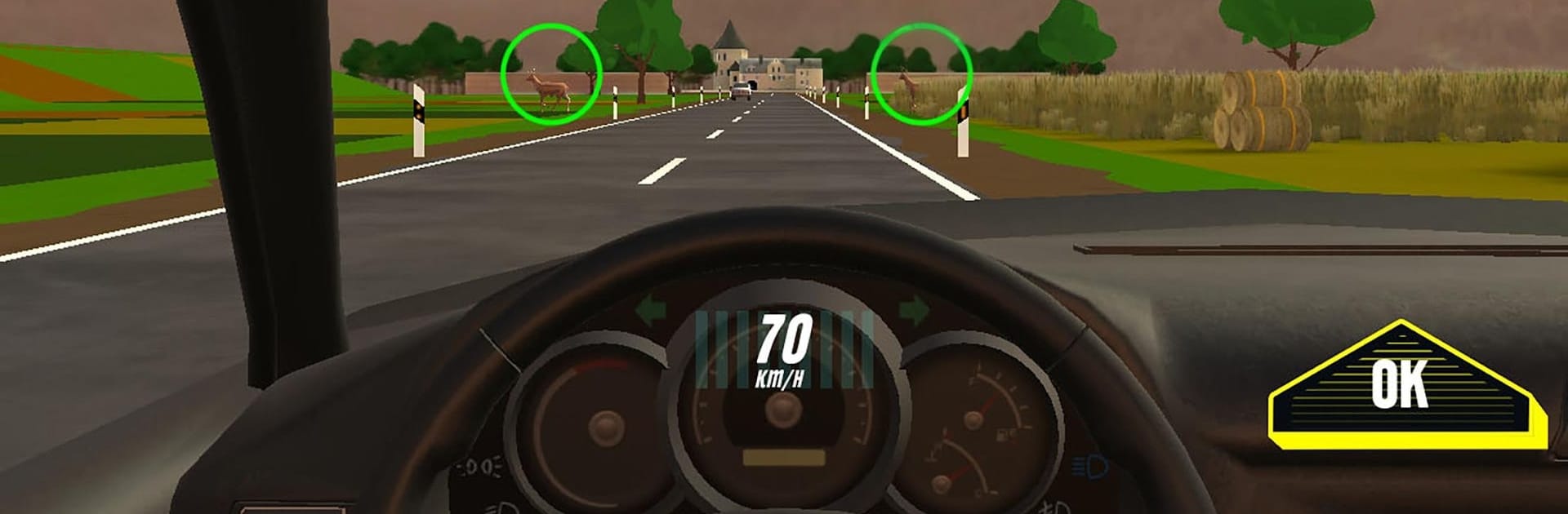
GEFAHREN LERNEN feels more like a hands-on hazard training than a driving game. It drops the player into short scenes on city streets, country roads, and the autobahn, then asks what could go wrong. Tap the risky stuff in the scene, like a deer by the shoulder, a busy bus stop, or the lights of an ambulance creeping up behind. After that, it asks what to do about it. Brake or accelerate, steer left or right, signal, do a shoulder check, use interior or side mirrors. Actions can be chained in the right order for bonus points, which is neat because it teaches proper sequence without turning into a lecture. The 32 levels are quick and focused, so it never drags. On PC with BlueStacks the bigger screen helps catch tiny signs or pedestrians in the background, which actually matters here.

Access is linked to FAHREN LERNEN through a driving school in Germany, but there is a demo to try first. It needs an internet connection for login and downloading, then runs offline just fine. The game keeps score and tracks highscores, so practice feels more like a challenge than homework, and the tutorial explains the rules and controls in a simple way. It supports 12 languages beyond German, including English, Turkish, Arabic, Spanish, and more, so learners can study in a language that feels comfortable. For anyone working toward the class B licence or wanting sharper reactions in real traffic, it is practical, clear, and a bit addictive in that one more level way.

Big screen. Bigger performance. Use BlueStacks on your PC or Mac to run your favorite apps.

How to Download and Run GEFAHREN LERNEN on PC or Mac

  • Download and install BlueStacks on your PC or Mac

  • Complete Google sign-in to access the Play Store, or do it later

  • Look for GEFAHREN LERNEN in the search bar at the top right corner

  • Click to install GEFAHREN LERNEN from the search results

  • Complete Google sign-in (if you skipped step 2) to install GEFAHREN LERNEN

  • Click the GEFAHREN LERNEN icon on the home screen to start playing

video
Watch Video

Minimum System Requirements

With BlueStacks 5, you can get started on a PC that fulfills the following requirements.

  • Operating System

    Microsoft Windows 7 or above, macOS 11 (Big Sur) or above

  • Processor

    Intel, AMD or Apple Silicon Processor

  • RAM

    at least 4GB

  • HDD

    10GB Free Disk Space

Note:

* You must be an Administrator on your PC. Up to date graphics drivers from Microsoft or the chipset vendor.

GEFAHREN LERNEN - FAQs

  • How to Run GEFAHREN LERNEN on Windows PC & Mac?

    Run GEFAHREN LERNEN on your PC or Mac by following these simple steps.

    • Click on ‘Download GEFAHREN LERNEN on PC’ to download BlueStacks
    • Install it and log-in to Google Play Store
    • Launch and run the app.
  • Why is BlueStacks the fastest and safest platform to play games on PC?

    BlueStacks respects your privacy and is always safe and secure to use. It does not carry any malware, spyware, or any sort of additional software that could harm your PC.

    It is engineered to optimize speed and performance for a seamless gaming experience.

  • What are GEFAHREN LERNEN PC requirements?

    Minimum requirement to run GEFAHREN LERNEN on your PC

    • OS: Microsoft Windows 7 and above:
    • Processor: Intel or AMD Processor:
    • RAM: Your PC must have at least 2GB of RAM. (Note that having 2GB or more disk space is not a substitute for RAM):
    • HDD: 5GB Free Disk Space.
    • You must be an Administrator on your PC.




