Билеты ПДД 2019-2020

Билеты ПДД 2019-2020

Education

| Alexander Kucher

Play on PC with BlueStacks or from our cloud

  • Overview
  • How to Download

Page Modified On: September 12, 2025

Run Билеты ПДД 2019-2020 on PC or Mac

Get freedom from your phone’s obvious limitations. Use Билеты ПДД 2019-2020, made by Alexander Kucher, a Education app on your PC or Mac with BlueStacks, and level up your experience.

About the App

Getting ready for the Russian traffic theory test? Билеты ПДД 2019-2020 keeps everything you need to study in one clean, easy-to-use place. It blends the full road rules with up-to-date question sets, so you can practice smart, see where you stand, and go into the exam confident. Created by Alexander Kucher in the Education genre, it’s built for focused prep without the fluff.

App Features

  • Full rules text: The complete Russian traffic regulations with updates through January 2, 2020, neatly organized by chapters for quick lookup.
  • Current question banks: Practice tickets for categories ABM, A1B1, CD, and C1D1 based on the official set dated 21.12.2018 and relevant for 2019–2020.
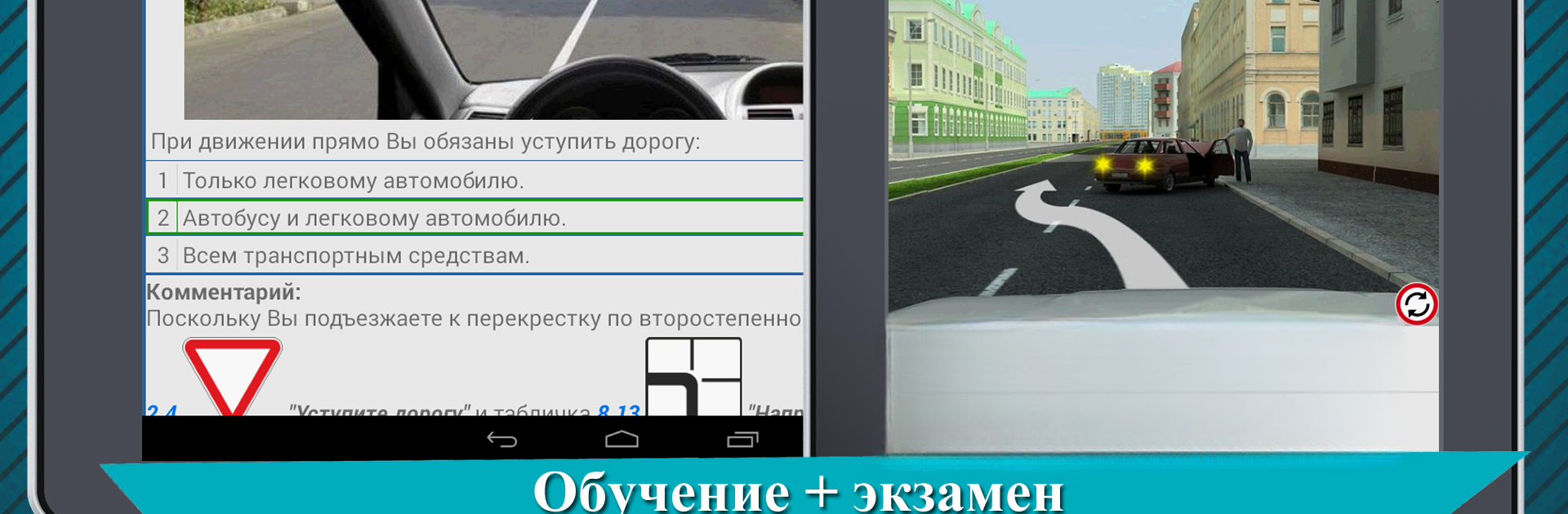
  • Learning mode with explanations: Go question by question with clear, illustrated comments and pointers to the right theory, so answers make sense—not just stick.
  • Two illustration styles: Toggle between standard and alternative images to better visualize road situations.
  • Realistic exam mode: Check your readiness with a test experience that feels like the real thing.
  • Topic-based grouping: Tickets are arranged by sections of the rules, making it easy to drill into specific areas.
  • Work on mistakes: Automatically collect missed questions and revisit them until you’ve got them down.
  • Favorites and bookmarks: Flag tricky items and return to them anytime in the Favorites section.
  • Progress stats: See how you’re doing with detailed tracking of completed tickets, accuracy, and improvement over time.
  • Optional big-screen study: Prefer a larger view? You can run the app on your computer using BlueStacks and keep your practice going wherever you are.

Big screen. Bigger performance. Use BlueStacks on your PC or Mac to run your favorite apps.

How to Download and Run Билеты ПДД 2019-2020 on PC or Mac

  • Download and install BlueStacks on your PC or Mac

  • Complete Google sign-in to access the Play Store, or do it later

  • Look for Билеты ПДД 2019-2020 in the search bar at the top right corner

  • Click to install Билеты ПДД 2019-2020 from the search results

  • Complete Google sign-in (if you skipped step 2) to install Билеты ПДД 2019-2020

  • Click the Билеты ПДД 2019-2020 icon on the home screen to start playing

video
Watch Video

Minimum System Requirements

With BlueStacks 5, you can get started on a PC that fulfills the following requirements.

  • Operating System

    Microsoft Windows 7 or above, macOS 11 (Big Sur) or above

  • Processor

    Intel, AMD or Apple Silicon Processor

  • RAM

    at least 4GB

  • HDD

    10GB Free Disk Space

Note:

* You must be an Administrator on your PC. Up to date graphics drivers from Microsoft or the chipset vendor.

Билеты ПДД 2019-2020 - FAQs

  • How to Run Билеты ПДД 2019-2020 on Windows PC & Mac?

    Run Билеты ПДД 2019-2020 on your PC or Mac by following these simple steps.

    • Click on ‘Download Билеты ПДД 2019-2020 on PC’ to download BlueStacks
    • Install it and log-in to Google Play Store
    • Launch and run the app.
  • Why is BlueStacks the fastest and safest platform to play games on PC?

    BlueStacks respects your privacy and is always safe and secure to use. It does not carry any malware, spyware, or any sort of additional software that could harm your PC.

    It is engineered to optimize speed and performance for a seamless gaming experience.

  • What are Билеты ПДД 2019-2020 PC requirements?

    Minimum requirement to run Билеты ПДД 2019-2020 on your PC

    • OS: Microsoft Windows 7 and above:
    • Processor: Intel or AMD Processor:
    • RAM: Your PC must have at least 2GB of RAM. (Note that having 2GB or more disk space is not a substitute for RAM):
    • HDD: 5GB Free Disk Space.
    • You must be an Administrator on your PC.