My Space Town Adventure - Universe Games for Kids

My Space Town Adventure - Universe Games for Kids

Educational

| IDZ Digital Private Limited

Play on PC with BlueStacks or from our cloud

  • Overview
  • Game Features
  • How to Play

Page Modified On: May 18, 2026

Play My Space Town Adventure - Universe Games for Kids on PC or Mac

Bring your A-game to My Space Town Adventure – Universe Games for Kids, the Educational game sensation from IDZ Digital Private Limited. Give your gameplay the much-needed boost with precise game controls, high FPS graphics, and top-tier features on your PC or Mac with BlueStacks.

About the Game

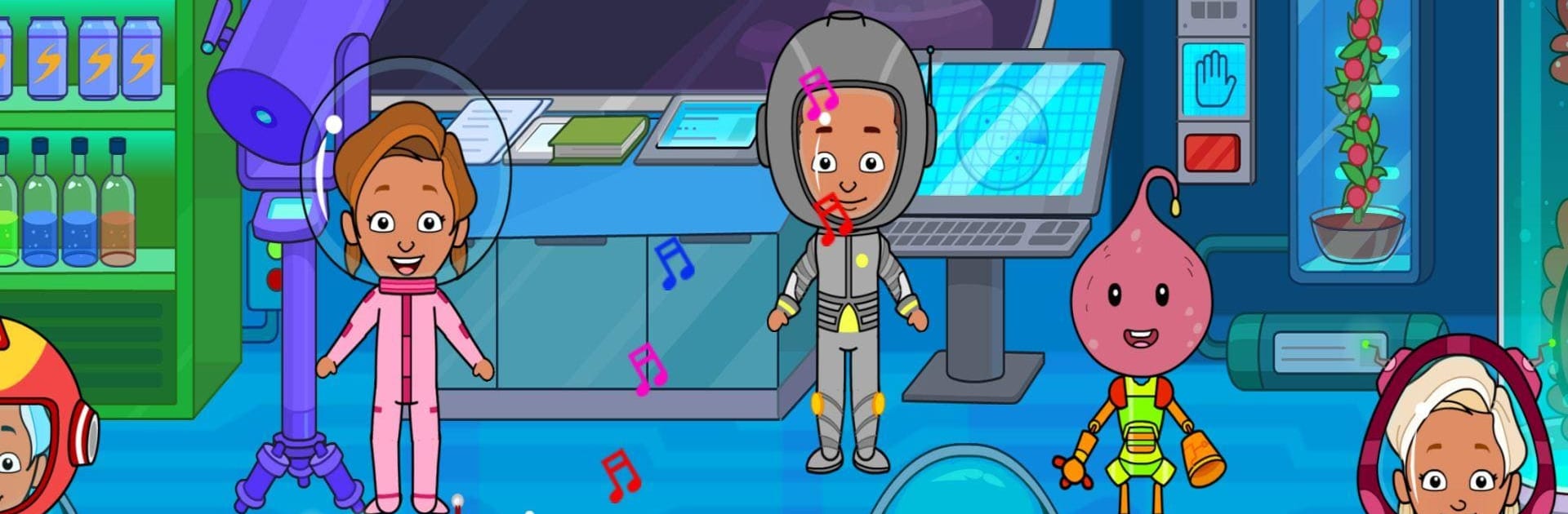
Ever wondered what a day in a space station feels like—minus the heavy suit and bumpy rocket ride? My Space Town Adventure – Universe Games for Kids from IDZ Digital Private Limited is an Educational, open-ended playground where kids create their own stories, meet friendly aliens, and poke around a bustling station full of curious rooms. It’s cozy, imaginative, and now packed with seven fresh spaces to explore at your own pace.

Game Features

  • Seven New Rooms: Wander through newly added areas across the station, each filled with interactive bits to discover and tinker with.
  • Space Lab Experiments: Play with gravity, set objects drifting, and see how everyday items behave when weightlessness kicks in.
  • Research Hub (Space Center): Study unusual plants and animals from across the cosmos, check every nook, and uncover hidden surprises.
  • Space Kitchen Fun: Sample space-ready snacks and learn why some foods float and others stay put—no messy crumbs flying around.
  • Story Maker & Dress-Up: Build your own space tale and mix-and-match outfits for little astronauts and their alien buddies.
  • Activity Room & Band Time: Jam with instruments, play with toys, and team up on mini “planet” projects with friends.
  • Friendly Alien Crew: Meet cheerful characters with big personalities who love to help, play, and explore.
  • Tap, Drag, Discover: Nearly everything reacts—move objects, test gadgets, and see what happens next.
  • Kid-Safe by Design: Gentle, curiosity-first play with no scary stuff. Perfect for ages 6–8, and still fun for older siblings (and curious grown-ups).
  • Rocket Countdown Moments: Suit up, prep the ship, and enjoy that thrilling “3…2…1…” before heading off to the moon.
  • Big-Screen Option: Prefer the comfort of a PC? It plays nicely on BlueStacks for a roomier view of your space station.

Get ready for a buttery smooth, high-performance gaming action only on BlueStacks.

Game Features

Enhancements

  • Macros
  • Multi Instance
  • Multi Instance Sync
  • Script
  • Enhancements
Macros

Macros

Automate the predictable in My Space Town Adventure - Universe Games for Kids and transform your gameplay with Macros. Get access to inventive Macros in the BlueStacks Macro Community
Multi Instance

Multi Instance

Play My Space Town Adventure - Universe Games for Kids on one window. And chat with your friend on the other. Press CTRL + Shift + 8 to open the Multi-Instance Manager. And start creating fresh instances or clone an existing one.
Multi Instance Sync

Multi Instance Sync

Play My Space Town Adventure - Universe Games for Kids with the power of Multi-Instance Sync. Replicate what you are doing on the main instance on all other instances. Level up faster, play more.
Script

Script

Script your way to gaming glory in My Space Town Adventure - Universe Games for Kids with BlueStacks Script. Write and run a set of commands to automate repeated tasks. Trigger the command by assigning it to any key.
Read More

How to Download and Play My Space Town Adventure - Universe Games for Kids on PC or Mac

  • Download and install BlueStacks on your PC or Mac

  • Complete Google sign-in to access the Play Store, or do it later

  • Look for My Space Town Adventure - Universe Games for Kids in the search bar at the top right corner

  • Click to install My Space Town Adventure - Universe Games for Kids from the search results

  • Complete Google sign-in (if you skipped step 2) to install My Space Town Adventure - Universe Games for Kids

  • Click the My Space Town Adventure - Universe Games for Kids icon on the home screen to start playing

video
Watch Video

Minimum System Requirements

With BlueStacks 5, you can get started on a PC that fulfills the following requirements.

  • Operating System

    Microsoft Windows 7 or above, macOS 11 (Big Sur) or above

  • Processor

    Intel, AMD or Apple Silicon Processor

  • RAM

    at least 4GB

  • HDD

    10GB Free Disk Space

Note:

* You must be an Administrator on your PC. Up to date graphics drivers from Microsoft or the chipset vendor.

My Space Town Adventure - Universe Games for Kids - FAQs

  • How to play My Space Town Adventure - Universe Games for Kids on Windows PC & Mac?

    Play My Space Town Adventure - Universe Games for Kids on your PC or Mac by following these simple steps.

    • Click on 'Play My Space Town Adventure - Universe Games for Kids on PC’ to download BlueStacks
    • Install it and log-in to Google Play Store
    • Launch and play the game.
  • Why is BlueStacks the fastest and safest platform to play games on PC?

    BlueStacks respects your privacy and is always safe and secure to use. It does not carry any malware, spyware, or any sort of additional software that could harm your PC.

    It is engineered to optimize speed and performance for a seamless gaming experience.

  • What are My Space Town Adventure - Universe Games for Kids PC requirements?

    Minimum requirement to run My Space Town Adventure - Universe Games for Kids on your PC

    • OS: Microsoft Windows 7 or above MacOS 11 (Big Sur) or above
    • Processor: Intel, AMD or Apple Silicon Processor
    • RAM: Your PC must have at least 4GB of RAM. (Note that having 4GB or more disk space is not a substitute for RAM)
    • HDD: 10GB Free Disk Space.
    • You must be an Administrator on your PC.