トミカ あちこちアドベンチャー
トミカ あちこちアドベンチャー

トミカ あちこちアドベンチャー

Educational

| 株式会社タカラトミーアイビス

Play on PC with BlueStacks or from our cloud

  • Overview
  • Game Features
  • How to Play

Page Modified On: September 02, 2025

Play トミカ あちこちアドベンチャー on PC or Mac

Explore a whole new adventure with トミカ あちこちアドベンチャー, a Educational game created by 株式会社タカラトミーアイビス. Experience great gameplay with BlueStacks, the most popular gaming platform to play Android games on your PC or Mac.

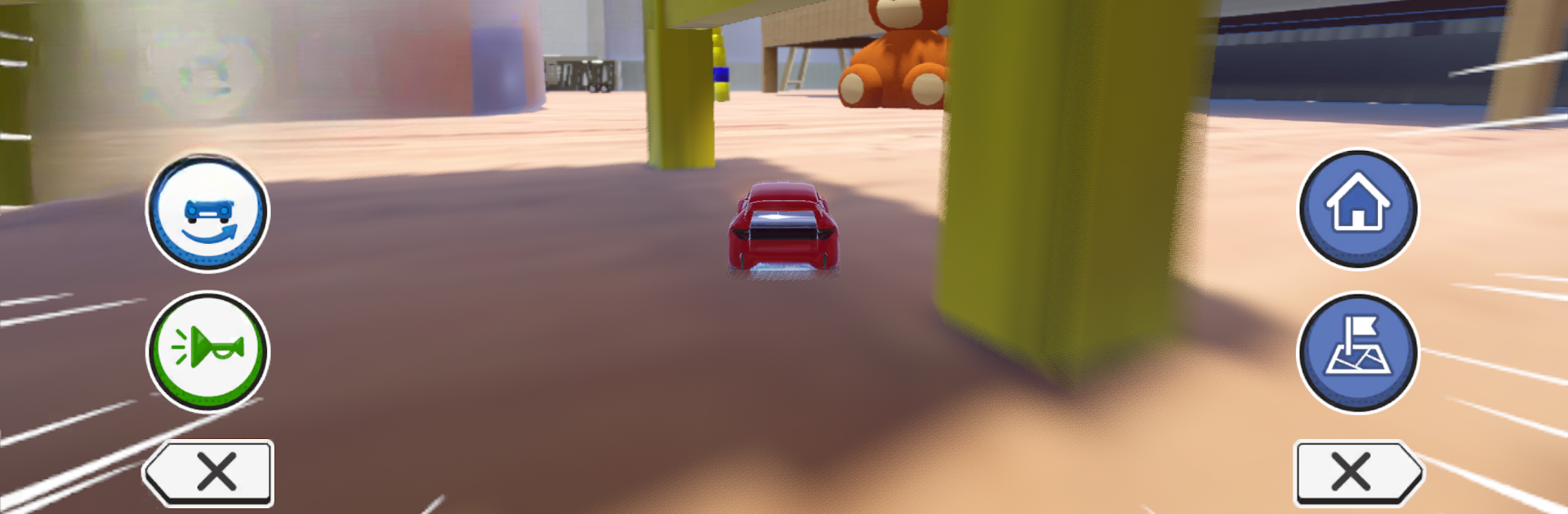
This feels like taking a tiny Tomica car and turning a regular house into a giant playground. The camera sits low so the living room and kids room feel huge, with chair legs like gates and scattered toys acting like bumpers. It is smooth and bright, and the cars can jump, drift, dash with a quick flick, even do a big spin move. Stairs are not walls here, they are ramps to the second floor. On PC with BlueStacks, the swipes and flicks translate nicely to mouse or keys, so dashes and drifts feel clean and the bigger screen helps spot little shortcuts between furniture.

It is not just free roaming. There are quick mini-games sprinkled around the map: bowling with toy pins, chasing little mouse toys, and a time attack that pushes for a clean route to the goal. Finishing stuff earns Tomica Points, and those turn into paint colors, stickers, and emblems to build a My Tomica that actually looks unique. Runs are short, so it works for a few minutes of play without pressure, but there is enough to tinker with if someone wants to perfect a path. It clearly aims at kids but adults who like toy-car messing about will get the appeal, too. There is a parent gate to avoid accidental purchases and a timer to keep sessions reasonable. First launch pulls extra data, so Wi‑Fi is smart. Overall it is playful, simple to pick up, and the house setting gives it a fun sense of scale.

Get ready for a buttery smooth, high-performance gaming action only on BlueStacks.

Game Features

Enhancements

  • Macros
  • Multi Instance
  • Multi Instance Sync
  • Script
  • Enhancements
Macros

Macros

Automate the predictable in トミカ あちこちアドベンチャー and transform your gameplay with Macros. Get access to inventive Macros in the BlueStacks Macro Community
Multi Instance

Multi Instance

Play トミカ あちこちアドベンチャー on one window. And chat with your friend on the other. Press CTRL + Shift + 8 to open the Multi-Instance Manager. And start creating fresh instances or clone an existing one.
Multi Instance Sync

Multi Instance Sync

Play トミカ あちこちアドベンチャー with the power of Multi-Instance Sync. Replicate what you are doing on the main instance on all other instances. Level up faster, play more.
Script

Script

Script your way to gaming glory in トミカ あちこちアドベンチャー with BlueStacks Script. Write and run a set of commands to automate repeated tasks. Trigger the command by assigning it to any key.
Read More

How to Download and Play トミカ あちこちアドベンチャー on PC or Mac

  • Download and install BlueStacks on your PC or Mac

  • Complete Google sign-in to access the Play Store, or do it later

  • Look for トミカ あちこちアドベンチャー in the search bar at the top right corner

  • Click to install トミカ あちこちアドベンチャー from the search results

  • Complete Google sign-in (if you skipped step 2) to install トミカ あちこちアドベンチャー

  • Click the トミカ あちこちアドベンチャー icon on the home screen to start playing

video
Watch Video

Minimum System Requirements

With BlueStacks 5, you can get started on a PC that fulfills the following requirements.

  • Operating System

    Microsoft Windows 7 or above, macOS 11 (Big Sur) or above

  • Processor

    Intel, AMD or Apple Silicon Processor

  • RAM

    at least 4GB

  • HDD

    10GB Free Disk Space

Note:

* You must be an Administrator on your PC. Up to date graphics drivers from Microsoft or the chipset vendor.

トミカ あちこちアドベンチャー - FAQs

  • How to play トミカ あちこちアドベンチャー on Windows PC & Mac?

    Play トミカ あちこちアドベンチャー on your PC or Mac by following these simple steps.

    • Click on 'Play トミカ あちこちアドベンチャー on PC’ to download BlueStacks
    • Install it and log-in to Google Play Store
    • Launch and play the game.
  • Why is BlueStacks the fastest and safest platform to play games on PC?

    BlueStacks respects your privacy and is always safe and secure to use. It does not carry any malware, spyware, or any sort of additional software that could harm your PC.

    It is engineered to optimize speed and performance for a seamless gaming experience.

  • What are トミカ あちこちアドベンチャー PC requirements?

    Minimum requirement to run トミカ あちこちアドベンチャー on your PC

    • OS: Microsoft Windows 7 or above MacOS 11 (Big Sur) or above
    • Processor: Intel, AMD or Apple Silicon Processor
    • RAM: Your PC must have at least 4GB of RAM. (Note that having 4GB or more disk space is not a substitute for RAM)
    • HDD: 10GB Free Disk Space.
    • You must be an Administrator on your PC.