
Zing MP3 - Android TV

Zing MP3 - Android TV

Entertainment

| Zalo Group

Play on PC with BlueStacks or from our cloud

  • Overview
  • How to Download

Page Modified On: January 06, 2026

Run Zing MP3 - Android TV on PC or Mac

Get freedom from your phone’s obvious limitations. Use Zing MP3 – Android TV, made by Zalo Group, a Entertainment app on your PC or Mac with BlueStacks, and level up your experience.

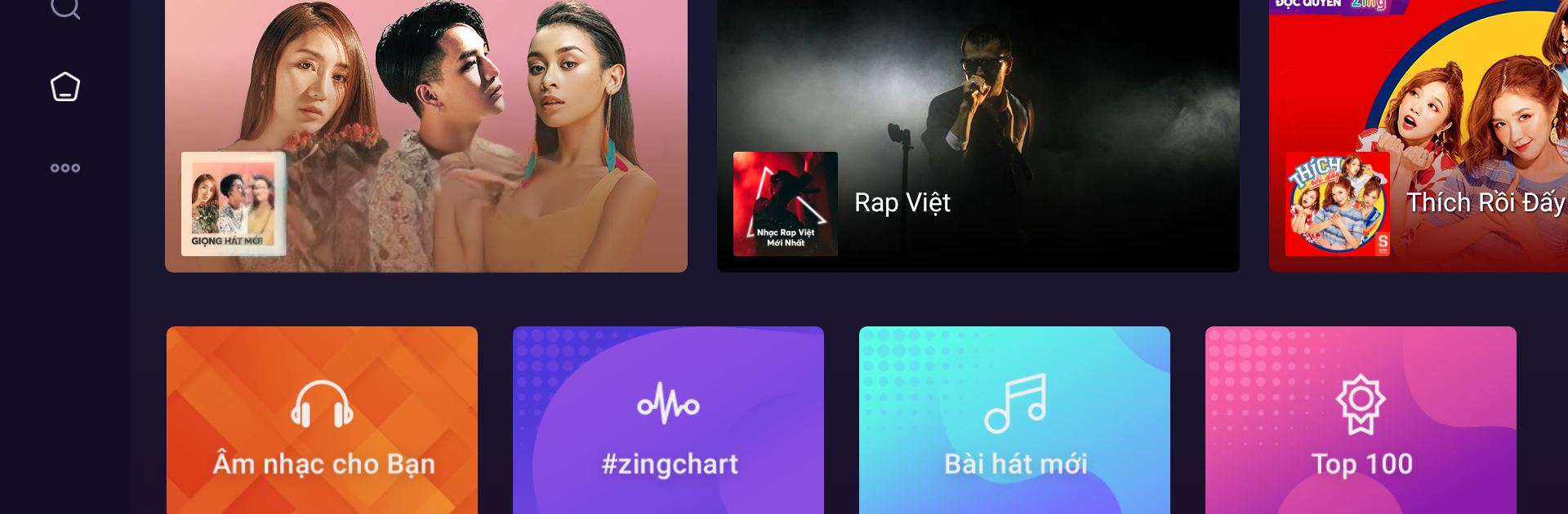
Zing MP3 – Android TV feels like a living room music player that just happens to run nicely on a PC. The layout is big and clean, so it is easy to cruise through albums, playlists, and videos with the arrow keys or a mouse. On BlueStacks it loads fast and stays stable, and if a mic is set up, the voice search is handy. Say a song or artist and it pulls stuff up quickly, otherwise typing with a keyboard is no problem.

Sound quality is the main draw. It handles a bunch of formats, including lossless, so tracks come through crisp if good speakers or headphones are plugged in. The online streams and music videos look sharp too. The karaoke lyrics are fun, with large text that stays in sync, so it works for a quick sing along or just to follow the words without squinting. It is popular in Vietnam, and the whole design has that TV-first feel: simple menus on the side, big tiles, not a lot of clutter or fussy settings getting in the way.

It suits anyone who wants music on a big screen or a desktop without overthinking it. Queue a few songs, let it run in the background, or pop open a video. There are not many gimmicks, which is kind of the point. It just plays well, looks clean, and gets out of the way.

BlueStacks gives you the much-needed freedom to experience your favorite apps on a bigger screen. Get it now.


How to Download and Run Zing MP3 - Android TV on PC or Mac

  • Download and install BlueStacks on your PC or Mac

  • Complete Google sign-in to access the Play Store, or do it later

  • Look for Zing MP3 - Android TV in the search bar at the top right corner

  • Click to install Zing MP3 - Android TV from the search results

  • Complete Google sign-in (if you skipped step 2) to install Zing MP3 - Android TV

  • Click the Zing MP3 - Android TV icon on the home screen to start playing

video
Watch Video

Minimum System Requirements

With BlueStacks 5, you can get started on a PC that fulfills the following requirements.

  • Operating System

    Microsoft Windows 7 or above, macOS 11 (Big Sur) or above

  • Processor

    Intel, AMD or Apple Silicon Processor

  • RAM

    at least 4GB

  • HDD

    10GB Free Disk Space

Note:

* You must be an Administrator on your PC. Up to date graphics drivers from Microsoft or the chipset vendor.

Zing MP3 - Android TV - FAQs

  • How to Run Zing MP3 - Android TV on Windows PC & Mac?

    Run Zing MP3 - Android TV on your PC or Mac by following these simple steps.

    • Click on ‘Download Zing MP3 - Android TV on PC’ to download BlueStacks
    • Install it and log-in to Google Play Store
    • Launch and run the app.
  • Why is BlueStacks the fastest and safest platform to play games on PC?

    BlueStacks respects your privacy and is always safe and secure to use. It does not carry any malware, spyware, or any sort of additional software that could harm your PC.

    It is engineered to optimize speed and performance for a seamless gaming experience.

  • What are Zing MP3 - Android TV PC requirements?

    Minimum requirement to run Zing MP3 - Android TV on your PC

    • OS: Microsoft Windows 7 and above:
    • Processor: Intel or AMD Processor:
    • RAM: Your PC must have at least 2GB of RAM. (Note that having 2GB or more disk space is not a substitute for RAM):
    • HDD: 5GB Free Disk Space.
    • You must be an Administrator on your PC.



