
Accordion Diatonic Cassoto

Accordion Diatonic Cassoto

Music & Audio

| GMobiler Apps

Play on PC with BlueStacks or from our cloud

  • Overview
  • How to Download

Page Modified On: October 03, 2025

Run Accordion Diatonic Cassoto on PC or Mac

Upgrade your experience. Try Accordion Diatonic Cassoto, the fantastic Music & Audio app from GMobiler Apps, from the comfort of your laptop, PC, or Mac, only on BlueStacks.

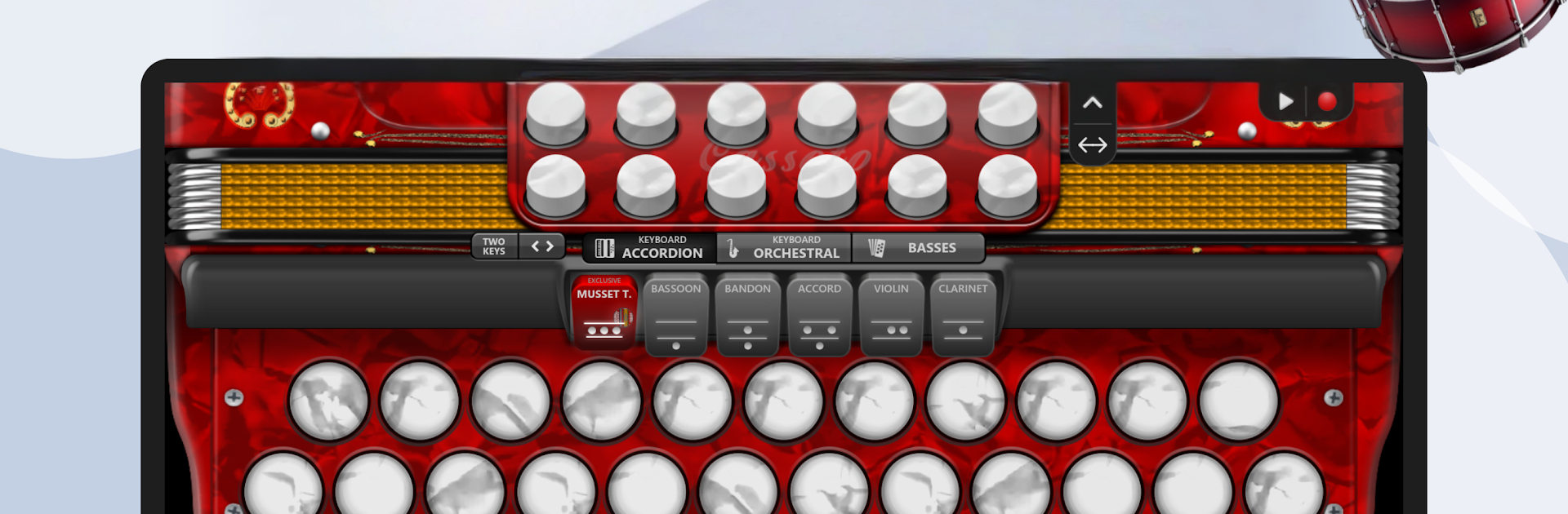
Accordion Diatonic Cassoto feels like a pocket melodeon that moved onto a bigger stage. The app gives a big spread of sounds, more than a hundred accordion types with registers like Musette, Violin, Bandoneon, Organ, Harmonium, Piccolo and a bunch more. It does not just fake it either, the bellows direction changes the notes like a real diatonic box, so playing feels alive, a little push and pull. Notes can show on each button, the buttons can be resized, there are up to three rows and 16 basses, and it even lets a player paint their own accordion with colors and shapes. For learning, that clarity helps a lot, it is easy to see what finger should go where.

The rhythm tools are what jump out. There are loads of loops and beat patterns, Norteño, Vallenato, Forró, Cumbia, Country, Waltz, Bhangra, Bhajan, Qawwali, Carnatic, Chamamé, Vanerão, and others, plus a metronome. Tempo can be changed so practice does not rush ahead, or drag. There are more than 100 tunings like G C F, E A D, F B flat E flat, so people can match the keys they are used to. Recording is built in, save as video or MIDI, then share if that is the goal. On PC with BlueStacks, the larger screen makes the three rows easier to hit, and keymapping works well for bass buttons on one side and melody on the other. It may take a minute to map a comfortable layout, but once it is set the response feels quick and steady, and it is fun to flip through registers while a loop runs in the background.

BlueStacks brings your apps to life on a bigger screen—seamless and straightforward.

How to Download and Run Accordion Diatonic Cassoto on PC or Mac

  • Download and install BlueStacks on your PC or Mac

  • Complete Google sign-in to access the Play Store, or do it later

  • Look for Accordion Diatonic Cassoto in the search bar at the top right corner

  • Click to install Accordion Diatonic Cassoto from the search results

  • Complete Google sign-in (if you skipped step 2) to install Accordion Diatonic Cassoto

  • Click the Accordion Diatonic Cassoto icon on the home screen to start playing

video
Watch Video

Minimum System Requirements

With BlueStacks 5, you can get started on a PC that fulfills the following requirements.

  • Operating System

    Microsoft Windows 7 or above, macOS 11 (Big Sur) or above

  • Processor

    Intel, AMD or Apple Silicon Processor

  • RAM

    at least 4GB

  • HDD

    10GB Free Disk Space

Note:

* You must be an Administrator on your PC. Up to date graphics drivers from Microsoft or the chipset vendor.

Accordion Diatonic Cassoto - FAQs

  • How to Run Accordion Diatonic Cassoto on Windows PC & Mac?

    Run Accordion Diatonic Cassoto on your PC or Mac by following these simple steps.

    • Click on ‘Download Accordion Diatonic Cassoto on PC’ to download BlueStacks
    • Install it and log-in to Google Play Store
    • Launch and run the app.
  • Why is BlueStacks the fastest and safest platform to play games on PC?

    BlueStacks respects your privacy and is always safe and secure to use. It does not carry any malware, spyware, or any sort of additional software that could harm your PC.

    It is engineered to optimize speed and performance for a seamless gaming experience.

  • What are Accordion Diatonic Cassoto PC requirements?

    Minimum requirement to run Accordion Diatonic Cassoto on your PC

    • OS: Microsoft Windows 7 and above:
    • Processor: Intel or AMD Processor:
    • RAM: Your PC must have at least 2GB of RAM. (Note that having 2GB or more disk space is not a substitute for RAM):
    • HDD: 5GB Free Disk Space.
    • You must be an Administrator on your PC.




