Harmonium
Harmonium

Harmonium

Music

| GameG

Play on PC with BlueStacks or from our cloud

  • Overview
  • Game Features
  • How to Play

Page Modified On: December 22, 2025

Play Harmonium on PC or Mac

Bring your A-game to Harmonium, the Music game sensation from GameG. Give your gameplay the much-needed boost with precise game controls, high FPS graphics, and top-tier features on your PC or Mac with BlueStacks.

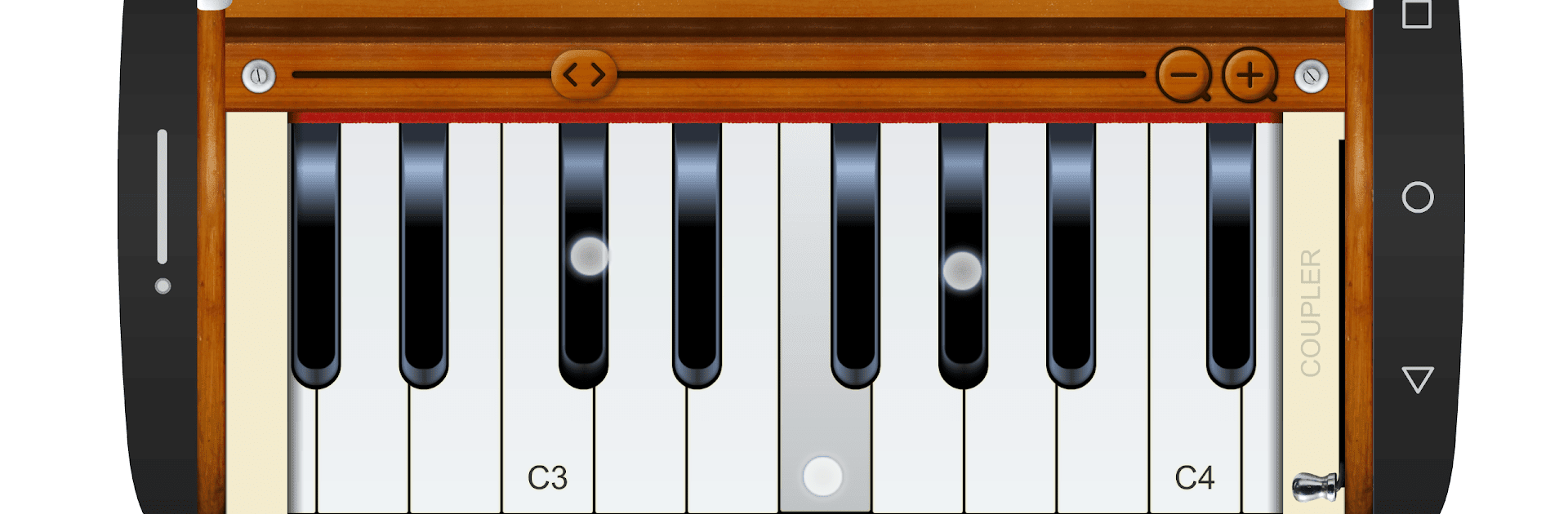
Harmonium is not a rhythm game, it is a straight virtual harmonium that feels close to the real box. The keys respond fast, and sliding across them lets a player move to the next note without lifting a finger, which works nicely for runs or a gentle meend style glide. There is a coupler switch that doubles the note an octave up, so the sound gets thicker and a bit brighter without turning the volume up. Singers will get why that matters. It suits vocal practice, Sur work, Raag sadhana, even Kharaj riyaz for building those low, steady notes. The tone is clean and a little reedy, and it sits well under a voice.

There are simple tools that help a lot. Zooming the keys in or out makes small or big hands comfortable, and a fullscreen keys view lets the board fill the display so more notes are visible at once. The range starts at about 42 keys and can stretch to a full extended layout, so hopping across multiple saptaks is no trouble. On PC through BlueStacks, the bigger screen and a mouse make sliding between notes easier, and key mapping can be set up so certain notes sit on the keyboard. For anyone who wants a practice partner without dragging a real instrument around, this gets the job done without fuss.

Get ready for a buttery smooth, high-performance gaming action only on BlueStacks.

Game Features

Enhancements

  • Macros
  • Multi Instance
  • Multi Instance Sync
  • Script
  • Enhancements
Macros

Macros

Automate the predictable in Harmonium and transform your gameplay with Macros. Get access to inventive Macros in the BlueStacks Macro Community
Multi Instance

Multi Instance

Play Harmonium on one window. And chat with your friend on the other. Press CTRL + Shift + 8 to open the Multi-Instance Manager. And start creating fresh instances or clone an existing one.
Multi Instance Sync

Multi Instance Sync

Play Harmonium with the power of Multi-Instance Sync. Replicate what you are doing on the main instance on all other instances. Level up faster, play more.
Script

Script

Script your way to gaming glory in Harmonium with BlueStacks Script. Write and run a set of commands to automate repeated tasks. Trigger the command by assigning it to any key.
Read More

How to Download and Play Harmonium on PC or Mac

  • Download and install BlueStacks on your PC or Mac

  • Complete Google sign-in to access the Play Store, or do it later

  • Look for Harmonium in the search bar at the top right corner

  • Click to install Harmonium from the search results

  • Complete Google sign-in (if you skipped step 2) to install Harmonium

  • Click the Harmonium icon on the home screen to start playing

video
Watch Video

Minimum System Requirements

With BlueStacks 5, you can get started on a PC that fulfills the following requirements.

  • Operating System

    Microsoft Windows 7 or above, macOS 11 (Big Sur) or above

  • Processor

    Intel, AMD or Apple Silicon Processor

  • RAM

    at least 4GB

  • HDD

    10GB Free Disk Space

Note:

* You must be an Administrator on your PC. Up to date graphics drivers from Microsoft or the chipset vendor.

Harmonium - FAQs

  • How to play Harmonium on Windows PC & Mac?

    Play Harmonium on your PC or Mac by following these simple steps.

    • Click on 'Play Harmonium on PC’ to download BlueStacks
    • Install it and log-in to Google Play Store
    • Launch and play the game.
  • Why is BlueStacks the fastest and safest platform to play games on PC?

    BlueStacks respects your privacy and is always safe and secure to use. It does not carry any malware, spyware, or any sort of additional software that could harm your PC.

    It is engineered to optimize speed and performance for a seamless gaming experience.

  • What are Harmonium PC requirements?

    Minimum requirement to run Harmonium on your PC

    • OS: Microsoft Windows 7 or above MacOS 11 (Big Sur) or above
    • Processor: Intel, AMD or Apple Silicon Processor
    • RAM: Your PC must have at least 4GB of RAM. (Note that having 4GB or more disk space is not a substitute for RAM)
    • HDD: 10GB Free Disk Space.
    • You must be an Administrator on your PC.