
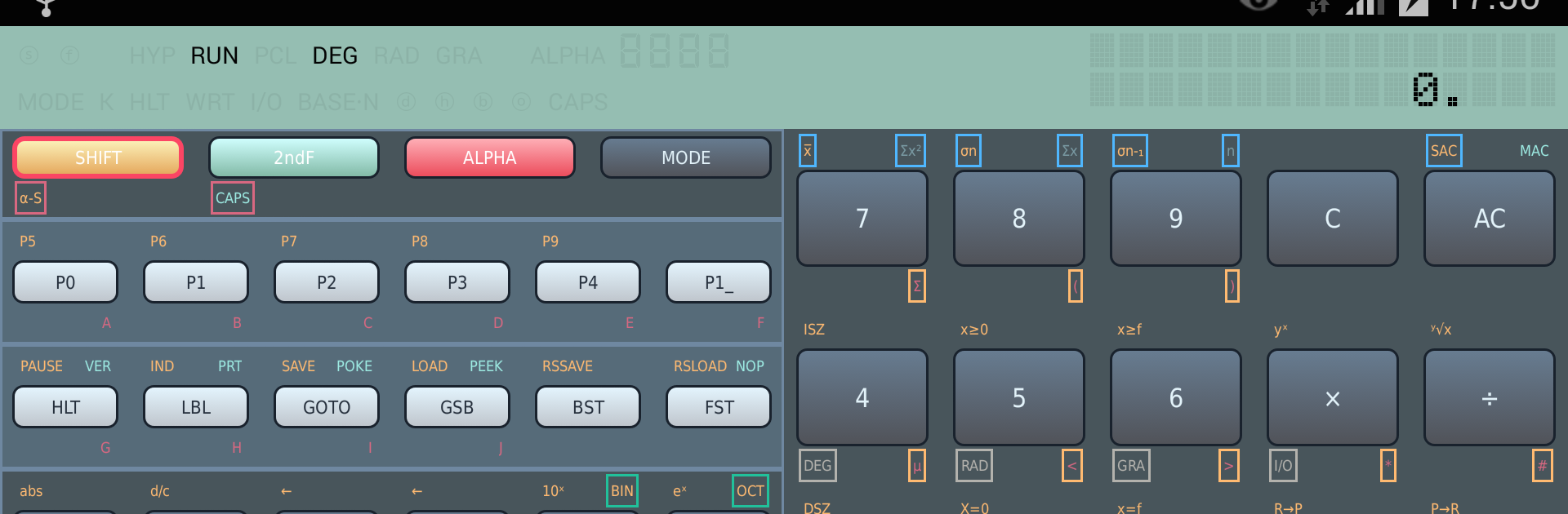
FX-603P programable calculator

FX-603P programable calculator

Productivity

| Martin Krischik

Play on PC with BlueStacks or from our cloud

  • Overview
  • How to Download

Page Modified On: October 13, 2025

Run FX-603P programable calculator on PC or Mac

Get freedom from your phone’s obvious limitations. Use FX-603P programable calculator, made by Martin Krischik, a Productivity app on your PC or Mac with BlueStacks, and level up your experience.

FX-603P Simulator feels like someone put a classic pocket computer on the screen and left all the nerdy goodness intact. It is not a cute calculator skin. It is the whole thing, with proper order of operations, deep parentheses, full scientific stuff like trig in degrees or radians or grads, logs, exponentials, hyperbolics, factorial, DMS conversions, even coordinate transforms. It handles fractions, randoms, and Base-N work too, so binary, octal, hex with bitwise and, or, xor, not. The number range is huge and the math engine uses an 18 digit mantissa, so it stays steady with big or tiny values. There is a proper memory layout, 5-key memories plus 110 non-volatile registers, and the alphanumeric display is there so results look like they should. On BlueStacks it is nice to have the bigger screen and a real keyboard for entering programs.

Programming is the fun part. Up to 20 programs, 999 steps, jumps and conditionals, ISZ and DSZ counters, nine subroutines with depth, and indirect addressing for flexible logic. There is a pause, manual GOTO, and a check mode that shows command codes and step numbers, so debugging does not feel blind. It even simulates the old FA-6 cassette interface to save or load programs and data, and a tiny thermal printer to print results that can be copied out to other apps. Clipboard copy works, tablet layouts are supported, backup and restore plays nice, and it can live on external storage. Missing bits like VER, PEEK, and POKE are noted, but most of the original workflow is here, faithful and fast.

Big screen. Bigger performance. Use BlueStacks on your PC or Mac to run your favorite apps.

How to Download and Run FX-603P programable calculator on PC or Mac

  • Download and install BlueStacks on your PC or Mac

  • Complete Google sign-in to access the Play Store, or do it later

  • Look for FX-603P programable calculator in the search bar at the top right corner

  • Click to install FX-603P programable calculator from the search results

  • Complete Google sign-in (if you skipped step 2) to install FX-603P programable calculator

  • Click the FX-603P programable calculator icon on the home screen to start playing

video
Watch Video

Minimum System Requirements

With BlueStacks 5, you can get started on a PC that fulfills the following requirements.

  • Operating System

    Microsoft Windows 7 or above, macOS 11 (Big Sur) or above

  • Processor

    Intel, AMD or Apple Silicon Processor

  • RAM

    at least 4GB

  • HDD

    10GB Free Disk Space

Note:

* You must be an Administrator on your PC. Up to date graphics drivers from Microsoft or the chipset vendor.

FX-603P programable calculator - FAQs

  • How to Run FX-603P programable calculator on Windows PC & Mac?

    Run FX-603P programable calculator on your PC or Mac by following these simple steps.

    • Click on ‘Download FX-603P programable calculator on PC’ to download BlueStacks
    • Install it and log-in to Google Play Store
    • Launch and run the app.
  • Why is BlueStacks the fastest and safest platform to play games on PC?

    BlueStacks respects your privacy and is always safe and secure to use. It does not carry any malware, spyware, or any sort of additional software that could harm your PC.

    It is engineered to optimize speed and performance for a seamless gaming experience.

  • What are FX-603P programable calculator PC requirements?

    Minimum requirement to run FX-603P programable calculator on your PC

    • OS: Microsoft Windows 7 and above:
    • Processor: Intel or AMD Processor:
    • RAM: Your PC must have at least 2GB of RAM. (Note that having 2GB or more disk space is not a substitute for RAM):
    • HDD: 5GB Free Disk Space.
    • You must be an Administrator on your PC.




