Goods Card Sort: Match Pair 3D

Goods Card Sort: Match Pair 3D

Puzzle

| Mind Crush

Play on PC with BlueStacks or from our cloud

  • Overview
  • Game Features
  • How to Play

Page Modified On: September 18, 2026

Play Goods Card Sort: Match Pair 3D on PC or Mac

Bring your A-game to Goods Card Sort: Match Pair 3D, the Puzzle game sensation from Mind Crush. Give your gameplay the much-needed boost with precise game controls, high FPS graphics, and top-tier features on your PC or Mac with BlueStacks.

About the Game

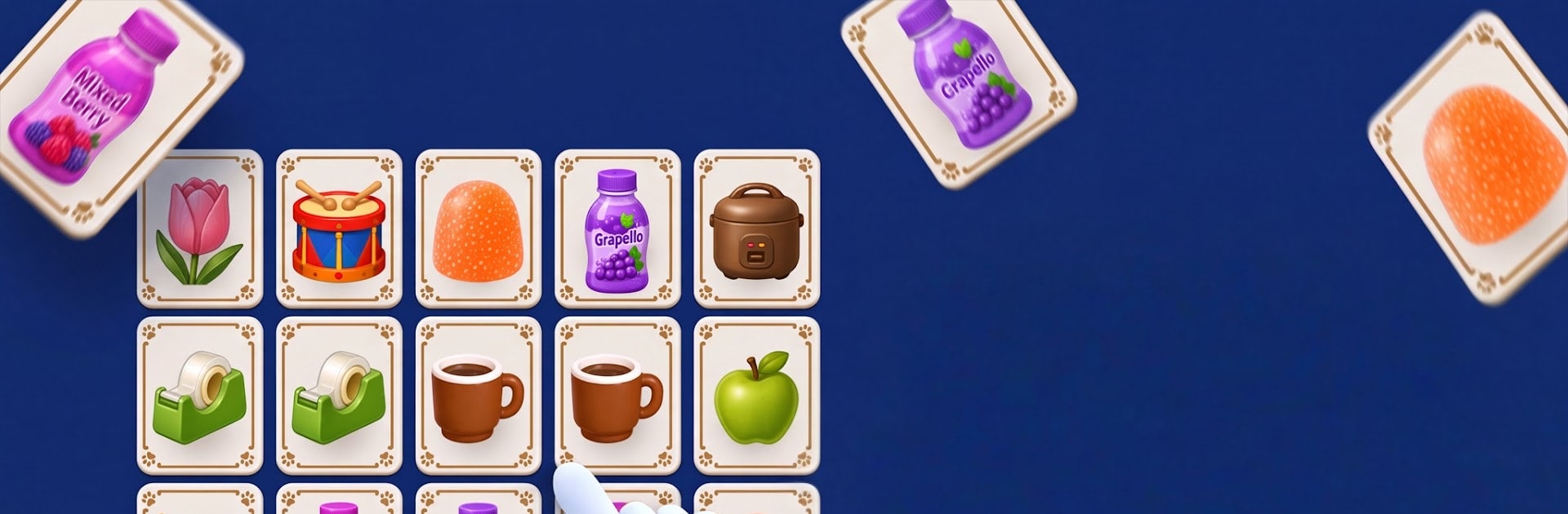
Goods Card Sort: Match Pair 3D is a laid-back, think-first Puzzle game where every tap sets up the next one. You’ll sort through layered card stacks, uncover what’s hiding underneath, and pair identical items while juggling a tiny set of holding slots. It’s easy to pick up, surprisingly strategic, and feels especially crisp on a bigger screen with BlueStacks.

Game Features

  • Layered stacks, real choices: Cards sit in tiers, so freeing one spot can reveal a smarter match waiting just below.
  • Five holding slots, big stakes: Manage a compact tray of five—place wisely or risk jamming your whole board.
  • Tap, collect, and clear: Send unlocked cards to the tray, pair matching items, and watch space open up for the next move.
  • Chain clears for momentum: String together rapid matches to trigger satisfying combo bursts and keep the rhythm going.
  • Read what the board’s telling you: Shapes, colors, and depth cues make it easier to spot safe pairs at a glance.
  • Quick rounds, growing depth: Levels are short and snackable, while later boards demand planning a few steps ahead.
  • Fresh items, familiar clarity: New object types and added layers keep things interesting without turning into visual noise.
  • Plan routes like a pro: Look two moves forward to avoid dead ends and carve a clean path through tough layouts.
  • Clean look, fair difficulty: A tidy, readable interface puts your decisions—not guesswork—at the center of every solve.
  • Little puzzles within puzzles: When two moves compete for space, a smart hold or timely match can unlock a cleaner finish.
  • Layouts that change your approach: Different board shapes tweak the logic, rewarding patience on one stage and speed on the next.

BlueStacks gives you more room to focus on the game and less time adjusting around mobile limitations.


Game Features

Enhancements

  • Macros
  • Multi Instance
  • Multi Instance Sync
  • Script
  • Enhancements
Macros

Macros

Automate the predictable in Goods Card Sort: Match Pair 3D and transform your gameplay with Macros. Get access to inventive Macros in the BlueStacks Macro Community
Multi Instance

Multi Instance

Play Goods Card Sort: Match Pair 3D on one window. And chat with your friend on the other. Press CTRL + Shift + 8 to open the Multi-Instance Manager. And start creating fresh instances or clone an existing one.
Multi Instance Sync

Multi Instance Sync

Play Goods Card Sort: Match Pair 3D with the power of Multi-Instance Sync. Replicate what you are doing on the main instance on all other instances. Level up faster, play more.
Script

Script

Script your way to gaming glory in Goods Card Sort: Match Pair 3D with BlueStacks Script. Write and run a set of commands to automate repeated tasks. Trigger the command by assigning it to any key.
Read More

How to Download and Play Goods Card Sort: Match Pair 3D on PC or Mac

  • Download and install BlueStacks on your PC or Mac

  • Complete Google sign-in to access the Play Store, or do it later

  • Look for Goods Card Sort: Match Pair 3D in the search bar at the top right corner

  • Click to install Goods Card Sort: Match Pair 3D from the search results

  • Complete Google sign-in (if you skipped step 2) to install Goods Card Sort: Match Pair 3D

  • Click the Goods Card Sort: Match Pair 3D icon on the home screen to start playing

video
Watch Video

Minimum System Requirements

With BlueStacks 5, you can get started on a PC that fulfills the following requirements.

  • Operating System

    Microsoft Windows 7 or above, macOS 11 (Big Sur) or above

  • Processor

    Intel, AMD or Apple Silicon Processor

  • RAM

    at least 4GB

  • HDD

    10GB Free Disk Space

Note:

* You must be an Administrator on your PC. Up to date graphics drivers from Microsoft or the chipset vendor.

Goods Card Sort: Match Pair 3D - FAQs

  • How to play Goods Card Sort: Match Pair 3D on Windows PC & Mac?

    Play Goods Card Sort: Match Pair 3D on your PC or Mac by following these simple steps.

    • Click on 'Play Goods Card Sort: Match Pair 3D on PC’ to download BlueStacks
    • Install it and log-in to Google Play Store
    • Launch and play the game.
  • Why is BlueStacks the fastest and safest platform to play games on PC?

    BlueStacks respects your privacy and is always safe and secure to use. It does not carry any malware, spyware, or any sort of additional software that could harm your PC.

    It is engineered to optimize speed and performance for a seamless gaming experience.

  • What are Goods Card Sort: Match Pair 3D PC requirements?

    Minimum requirement to run Goods Card Sort: Match Pair 3D on your PC

    • OS: Microsoft Windows 7 or above MacOS 11 (Big Sur) or above
    • Processor: Intel, AMD or Apple Silicon Processor
    • RAM: Your PC must have at least 4GB of RAM. (Note that having 4GB or more disk space is not a substitute for RAM)
    • HDD: 10GB Free Disk Space.
    • You must be an Administrator on your PC.