Jewels Temple Fantasy

Jewels Temple Fantasy

Puzzle

| springpocket

Play on PC with BlueStacks or from our cloud

  • Overview
  • Game Features
  • How to Play

Page Modified On: November 20, 2025

Play Jewels Temple Fantasy on PC or Mac

Bring your A-game to Jewels Temple Fantasy, the Puzzle game sensation from springpocket. Give your gameplay the much-needed boost with precise game controls, high FPS graphics, and top-tier features on your PC or Mac with BlueStacks.

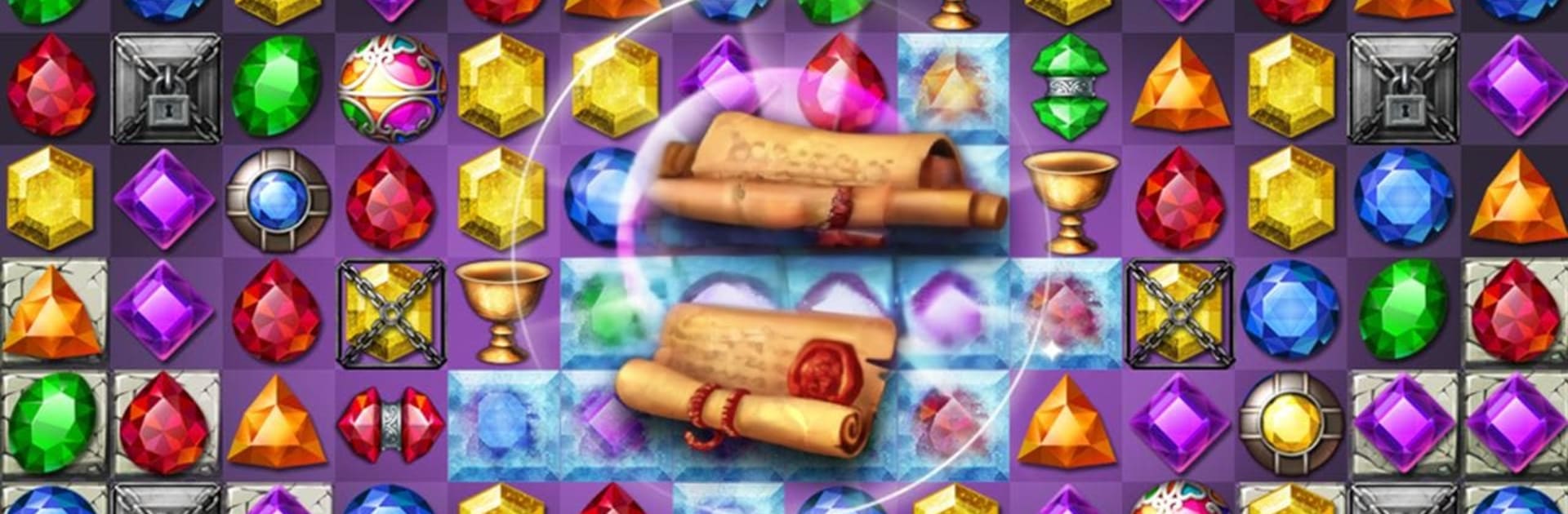
Jewels Temple Fantasy is a relaxed match-3 that leans into a time-traveling temple theme, with shiny gems, ruins, and little story bits that pop up as stages roll by. Matches feel quick and clean, and the game keeps mixing up goals so it is not just clearing tiles. One stage wants relics collected, another wants keys dropped, then a boss pops up that gets chipped down with smart matches and a couple of well-timed boosters. It looks bright without being messy, so it is easy to read the board and spot those four and five matches that set off big clears. On PC with BlueStacks, mouse swapping feels very precise and the larger screen helps a lot when blockers stack up.

There are loads of stages and it keeps adding new twists as progress is made. Treasure-hunt objectives are a nice change of pace, and the secret item-collect mode shows up when someone wants something a bit different. There is a costume system for Jerome that lets players dress the little hero, it is just a fun extra to unlock while chipping through puzzles. The game supports offline play for flights or spotty internet, and there are rankings for global and country if someone likes chasing scores. Co-op and PVP via friends are there too, nothing pushy. It is free to play, with optional purchases for boosters or extra tries if a tough stage will not budge, and it is localized in a bunch of languages so most folks can jump in without hassle.

Slay your opponents with your epic moves. Play it your way on BlueStacks and dominate the battlefield.


Game Features

Enhancements

  • Macros
  • Multi Instance
  • Multi Instance Sync
  • Script
  • Enhancements
Macros

Macros

Automate the predictable in Jewels Temple Fantasy and transform your gameplay with Macros. Get access to inventive Macros in the BlueStacks Macro Community
Multi Instance

Multi Instance

Play Jewels Temple Fantasy on one window. And chat with your friend on the other. Press CTRL + Shift + 8 to open the Multi-Instance Manager. And start creating fresh instances or clone an existing one.
Multi Instance Sync

Multi Instance Sync

Play Jewels Temple Fantasy with the power of Multi-Instance Sync. Replicate what you are doing on the main instance on all other instances. Level up faster, play more.
Script

Script

Script your way to gaming glory in Jewels Temple Fantasy with BlueStacks Script. Write and run a set of commands to automate repeated tasks. Trigger the command by assigning it to any key.
Read More

How to Download and Play Jewels Temple Fantasy on PC or Mac

  • Download and install BlueStacks on your PC or Mac

  • Complete Google sign-in to access the Play Store, or do it later

  • Look for Jewels Temple Fantasy in the search bar at the top right corner

  • Click to install Jewels Temple Fantasy from the search results

  • Complete Google sign-in (if you skipped step 2) to install Jewels Temple Fantasy

  • Click the Jewels Temple Fantasy icon on the home screen to start playing

video
Watch Video

Minimum System Requirements

With BlueStacks 5, you can get started on a PC that fulfills the following requirements.

  • Operating System

    Microsoft Windows 7 or above, macOS 11 (Big Sur) or above

  • Processor

    Intel, AMD or Apple Silicon Processor

  • RAM

    at least 4GB

  • HDD

    10GB Free Disk Space

Note:

* You must be an Administrator on your PC. Up to date graphics drivers from Microsoft or the chipset vendor.

Jewels Temple Fantasy - FAQs

  • How to play Jewels Temple Fantasy on Windows PC & Mac?

    Play Jewels Temple Fantasy on your PC or Mac by following these simple steps.

    • Click on 'Play Jewels Temple Fantasy on PC’ to download BlueStacks
    • Install it and log-in to Google Play Store
    • Launch and play the game.
  • Why is BlueStacks the fastest and safest platform to play games on PC?

    BlueStacks respects your privacy and is always safe and secure to use. It does not carry any malware, spyware, or any sort of additional software that could harm your PC.

    It is engineered to optimize speed and performance for a seamless gaming experience.

  • What are Jewels Temple Fantasy PC requirements?

    Minimum requirement to run Jewels Temple Fantasy on your PC

    • OS: Microsoft Windows 7 or above MacOS 11 (Big Sur) or above
    • Processor: Intel, AMD or Apple Silicon Processor
    • RAM: Your PC must have at least 4GB of RAM. (Note that having 4GB or more disk space is not a substitute for RAM)
    • HDD: 10GB Free Disk Space.
    • You must be an Administrator on your PC.