PancitoMerge
PancitoMerge

PancitoMerge

Puzzle

| FayerDev

Play on PC with BlueStacks or from our cloud

Click here to Pre-Register for PancitoMerge
  • Overview
  • Features
  • How to Play

Page Modified On: June 18, 2026

Play PancitoMerge on PC or Mac

Step into the World of PancitoMerge, a thrilling Puzzle game from the house of FayerDev. Play this Android game on BlueStacks App Player and experience immersive gaming on PC or Mac.

About the Game

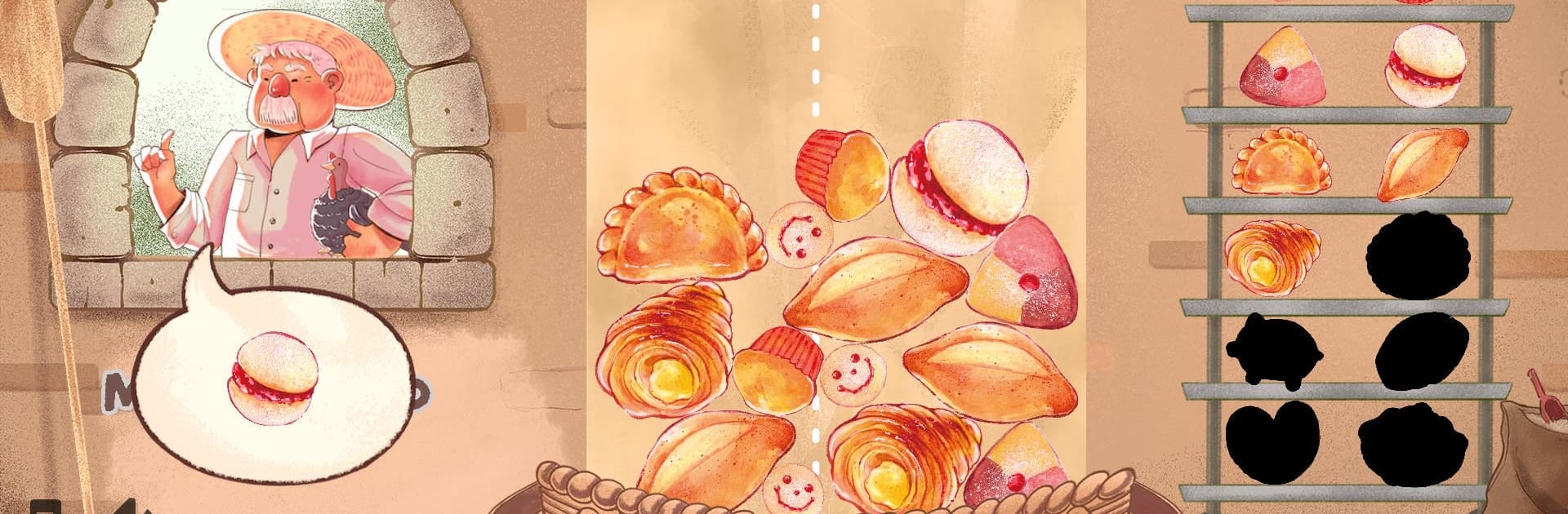
PancitoMerge is a cozy Puzzle that’s all about stacking sweet breads and watching them transform into even tastier creations. You’ll guide falling pastries—think conchas, cuernitos, and other pan dulce favorites—into the perfect spots to spark satisfying merges and chase a new personal best. It’s easy to play in short bursts, and if you prefer a bigger view, it feels great on BlueStacks too.

Game Features

  • Merge-and-evolve pastries: Match identical breads to create higher-tier treats, build chains, and keep the score climbing.
  • Falling-piece strategy: Pastries drop one by one, so planning ahead matters; if your stack reaches the top of the bag, that run’s over.
  • Customer check-ins: After every fifth drop, a customer swings by with a specific craving—tap the matching bread in your bag to serve it on the spot.
  • One-run collection challenge: Try to discover every bread type in a single session for a tasty completion goal.
  • Panadería vibes: Conchas, cuernitos, and more are lovingly illustrated, inspired by the real flavors and textures you’d see in a neighborhood bakery.
  • Quick breaks or score chases: Great for a few minutes between tasks—or settle in and push for a leaderboard-worthy run.
  • Light learning curve, real depth: Simple rules meet clever decisions about spacing, timing, and chain reactions.
  • Smooth anywhere: Touch controls feel natural on mobile, and on BlueStacks the extra screen space makes planning your merges even easier.

BlueStacks gives you more room to focus on the game and less time adjusting around mobile limitations.


Features

  • Macros

    Automate the predictable in PancitoMerge and transform your gameplay with Macros. Get access to inventive Macros in the BlueStacks Macro Community

  • Multi Instance

    Play PancitoMerge on one window. And chat with your friend on the other. Press CTRL + Shift + 8 to open the Multi-Instance Manager. And start creating fresh instances or clone an existing one.

  • Multi Instance Sync

    Play PancitoMerge with the power of Multi-Instance Sync. Replicate what you are doing on the main instance on all other instances. Level up faster, play more.

  • Script

    Script your way to gaming glory in PancitoMerge with BlueStacks Script. Write and run a set of commands to automate repeated tasks. Trigger the command by assigning it to any key.

How to Download and Play PancitoMerge on PC or Mac

  • Download and install BlueStacks on your PC or Mac

  • Complete Google sign-in to access the Play Store, or do it later

  • Look for PancitoMerge in the search bar at the top right corner

  • Click to install PancitoMerge from the search results

  • Complete Google sign-in (if you skipped step 2) to install PancitoMerge

  • Click the PancitoMerge icon on the home screen to start playing

video
Watch Video

Minimum System Requirements

With BlueStacks 5, you can get started on a PC that fulfills the following requirements.

  • Operating System

    Microsoft Windows 7 or above, macOS 11 (Big Sur) or above

  • Processor

    Intel, AMD or Apple Silicon Processor

  • RAM

    at least 4GB

  • HDD

    10GB Free Disk Space

Note:

* You must be an Administrator on your PC. Up to date graphics drivers from Microsoft or the chipset vendor.

Exclusive Gaming Content. And More.

Get the latest updates on the BlueStacks Blog.

See More
PancitoMerge

Be among the first to play PancitoMerge on PC

Get notified when the Game launches

PancitoMerge - FAQs

  • How to play PancitoMerge on Windows PC & Mac?

    Play PancitoMerge on your PC or Mac by following these simple steps.

    • Click on 'Play PancitoMerge on PC’ to download BlueStacks
    • Install it and log-in to Google Play Store
    • Launch and play the game.
  • Why is BlueStacks the fastest and safest platform to play games on PC?

    BlueStacks respects your privacy and is always safe and secure to use. It does not carry any malware, spyware, or any sort of additional software that could harm your PC.

    It is engineered to optimize speed and performance for a seamless gaming experience.

  • What are PancitoMerge PC requirements?

    Minimum requirement to run PancitoMerge on your PC

    • OS: Microsoft Windows 7 or above MacOS 11 (Big Sur) or above
    • Processor: Intel, AMD or Apple Silicon Processor
    • RAM: Your PC must have at least 4GB of RAM. (Note that having 4GB or more disk space is not a substitute for RAM)
    • HDD: 10GB Free Disk Space.
    • You must be an Administrator on your PC.