Lada 2113 Russian City Driving

Lada 2113 Russian City Driving

Racing

| SBlazer

Play on PC with BlueStacks or from our cloud

  • Overview
  • Game Features
  • How to Play

Page Modified On: May 05, 2026

Play Lada 2113 Russian City Driving on PC or Mac

Bring your A-game to Lada 2113 Russian City Driving, the Racing game sensation from SBlazer. Give your gameplay the much-needed boost with precise game controls, high FPS graphics, and top-tier features on your PC or Mac with BlueStacks.

About the Game

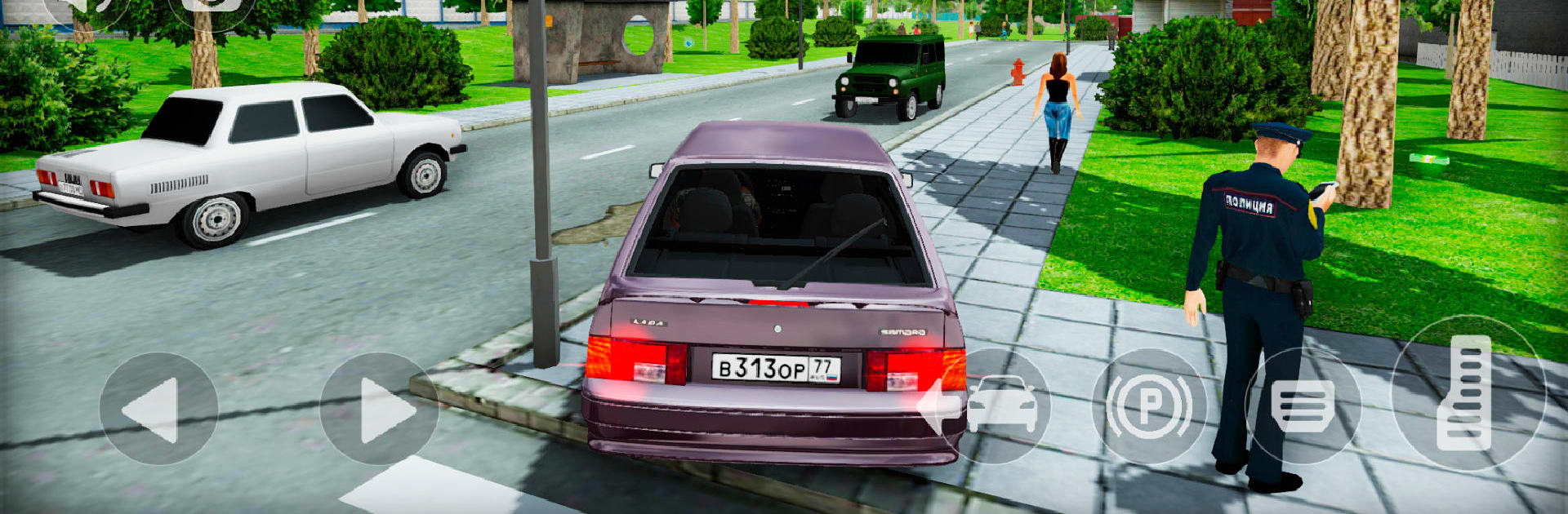
Lada 2113 Russian City Driving drops you back into Zarechensk after years away, handing you the keys to a scruffy, lovable Lada and a city that remembers its past. Part grounded sim, part open-world wander, it’s about cruising, hopping out to explore on foot, and slowly turning a humble car into something you’re proud of. Built by SBlazer, this Racing ride pairs everyday city life with plenty of side hunts, secrets, and that unmistakable Soviet-era vibe.

Game Features

  • Open-world Zarechensk: Roam a detailed Russian city ringed by forests and hills—new high-rises mix with old courtyards and familiar brickwork.
  • Drive or walk: Slide behind the wheel, then step out whenever you want to check backstreets, courtyards, and interior spaces.
  • Realistic city traffic: Navigate busy roads and pedestrians. Follow the rules like a model driver—or push your luck and deal with the consequences.
  • Your Lada, your project: Earn cash and tune the Vaz Lada 2113 in your own garage—fresh paint, new wheels, and adjustable suspension included.
  • Hidden loot, real rewards: Track down rare crystals and stashed suitcases; complete the set to unlock nitrous for your VAZ 2113.
  • Places to call home: Start small with an apartment, or save up for a roomy house outside the city.
  • Local car culture: Spot classics everywhere—Priora sedans, a UAZ “Loaf,” GAZ Volgas, PAZ buses, Oka hatchbacks, Zaporozhets, VAZ 2109s, Lada Granta, and more.
  • Quick car recall: Parked too far? Ping your ride and it’ll pop up near you.
  • Genre: Racing: City cruising with sim-style handling and open-ended exploration.
  • Play on PC: Prefer a bigger view? Run it through BlueStacks and soak in more of the city at once.

Slay your opponents with your epic moves. Play it your way on BlueStacks and dominate the battlefield.


Game Features

Enhancements

  • Macros
  • Multi Instance
  • Multi Instance Sync
  • Script
  • Enhancements
Macros

Macros

Automate the predictable in Lada 2113 Russian City Driving and transform your gameplay with Macros. Get access to inventive Macros in the BlueStacks Macro Community
Multi Instance

Multi Instance

Play Lada 2113 Russian City Driving on one window. And chat with your friend on the other. Press CTRL + Shift + 8 to open the Multi-Instance Manager. And start creating fresh instances or clone an existing one.
Multi Instance Sync

Multi Instance Sync

Play Lada 2113 Russian City Driving with the power of Multi-Instance Sync. Replicate what you are doing on the main instance on all other instances. Level up faster, play more.
Script

Script

Script your way to gaming glory in Lada 2113 Russian City Driving with BlueStacks Script. Write and run a set of commands to automate repeated tasks. Trigger the command by assigning it to any key.
Read More

How to Download and Play Lada 2113 Russian City Driving on PC or Mac

  • Download and install BlueStacks on your PC or Mac

  • Complete Google sign-in to access the Play Store, or do it later

  • Look for Lada 2113 Russian City Driving in the search bar at the top right corner

  • Click to install Lada 2113 Russian City Driving from the search results

  • Complete Google sign-in (if you skipped step 2) to install Lada 2113 Russian City Driving

  • Click the Lada 2113 Russian City Driving icon on the home screen to start playing

video
Watch Video

Minimum System Requirements

With BlueStacks 5, you can get started on a PC that fulfills the following requirements.

  • Operating System

    Microsoft Windows 7 or above, macOS 11 (Big Sur) or above

  • Processor

    Intel, AMD or Apple Silicon Processor

  • RAM

    at least 4GB

  • HDD

    10GB Free Disk Space

Note:

* You must be an Administrator on your PC. Up to date graphics drivers from Microsoft or the chipset vendor.

Lada 2113 Russian City Driving - FAQs

  • How to play Lada 2113 Russian City Driving on Windows PC & Mac?

    Play Lada 2113 Russian City Driving on your PC or Mac by following these simple steps.

    • Click on 'Play Lada 2113 Russian City Driving on PC’ to download BlueStacks
    • Install it and log-in to Google Play Store
    • Launch and play the game.
  • Why is BlueStacks the fastest and safest platform to play games on PC?

    BlueStacks respects your privacy and is always safe and secure to use. It does not carry any malware, spyware, or any sort of additional software that could harm your PC.

    It is engineered to optimize speed and performance for a seamless gaming experience.

  • What are Lada 2113 Russian City Driving PC requirements?

    Minimum requirement to run Lada 2113 Russian City Driving on your PC

    • OS: Microsoft Windows 7 or above MacOS 11 (Big Sur) or above
    • Processor: Intel, AMD or Apple Silicon Processor
    • RAM: Your PC must have at least 4GB of RAM. (Note that having 4GB or more disk space is not a substitute for RAM)
    • HDD: 10GB Free Disk Space.
    • You must be an Administrator on your PC.