MX Motocross
MX Motocross

MX Motocross

Racing

| vndynapp

Play on PC with BlueStacks or from our cloud

  • Overview
  • Game Features
  • How to Play

Page Modified On: June 25, 2026

Play MX Motocross on PC or Mac

Play MX Motocross by vndynapp on PC or Mac with BlueStacks. Use a bigger screen, mouse and keyboard controls, and smoother performance while you play.

About the Game

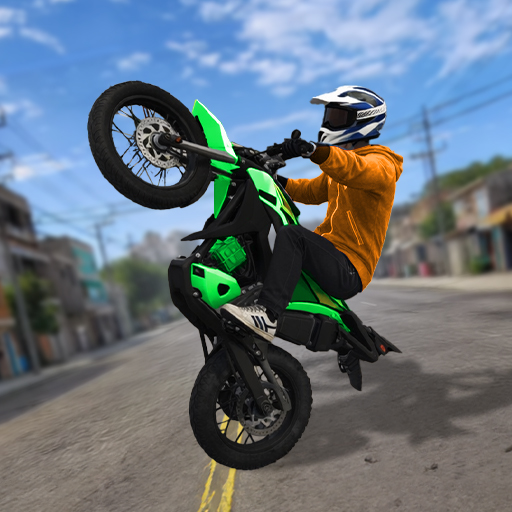
MX Motocross is a fast, no-nonsense Racing game that’s all about balance, momentum, and gutsy lines. You’re threading a dirt bike through bumpy tracks packed with jumps and obstacles, trying to hit the finish line in the shortest time possible. Want a bigger view of every landing and wheelie? It plays smoothly on BlueStacks, too.

Game Features

  • Realistic physics: Every bump, tilt, and throttle press changes how your bike reacts. Smooth landings and steady traction are the difference between flying and face-planting.
  • Tilt-to-ride controls: Lean by tilting your phone to shift your rider’s weight, then hit RUN for gas and tap the brake when things get sketchy.
  • Chase the clock: The timer starts the moment you press RUN, so quick reflexes and clean lines matter from the very first second.
  • Keep the rear down: Plant that back wheel to build speed faster, especially out of jumps and over rough sections.
  • Obstacle-packed tracks: Multiple scenes with different layouts keep you thinking—tight hills, awkward ramps, and sneaky bumps that punish sloppy balance.
  • Clean, punchy visuals: Crisp graphics make it easy to read the track and spot the best approach before you commit.
  • Built for short bursts: Tracks are tuned for repeat runs, making it easy to tweak your line, shave off a second, and go again.

Get ready for a buttery smooth, high-performance gaming action only on BlueStacks.

Game Features

Enhancements

  • Macros
  • Multi Instance
  • Multi Instance Sync
  • Script
  • Enhancements
Macros

Macros

Automate the predictable in MX Motocross and transform your gameplay with Macros. Get access to inventive Macros in the BlueStacks Macro Community
Multi Instance

Multi Instance

Play MX Motocross on one window. And chat with your friend on the other. Press CTRL + Shift + 8 to open the Multi-Instance Manager. And start creating fresh instances or clone an existing one.
Multi Instance Sync

Multi Instance Sync

Play MX Motocross with the power of Multi-Instance Sync. Replicate what you are doing on the main instance on all other instances. Level up faster, play more.
Script

Script

Script your way to gaming glory in MX Motocross with BlueStacks Script. Write and run a set of commands to automate repeated tasks. Trigger the command by assigning it to any key.
Read More

How to Download and Play MX Motocross on PC or Mac

  • Download and install BlueStacks on your PC or Mac

  • Complete Google sign-in to access the Play Store, or do it later

  • Look for MX Motocross in the search bar at the top right corner

  • Click to install MX Motocross from the search results

  • Complete Google sign-in (if you skipped step 2) to install MX Motocross

  • Click the MX Motocross icon on the home screen to start playing

video
Watch Video

Minimum System Requirements

With BlueStacks 5, you can get started on a PC that fulfills the following requirements.

  • Operating System

    Microsoft Windows 7 or above, macOS 11 (Big Sur) or above

  • Processor

    Intel, AMD or Apple Silicon Processor

  • RAM

    at least 4GB

  • HDD

    10GB Free Disk Space

Note:

* You must be an Administrator on your PC. Up to date graphics drivers from Microsoft or the chipset vendor.

MX Motocross - FAQs

  • How to play MX Motocross on Windows PC & Mac?

    Play MX Motocross on your PC or Mac by following these simple steps.

    • Click on 'Play MX Motocross on PC’ to download BlueStacks
    • Install it and log-in to Google Play Store
    • Launch and play the game.
  • Why is BlueStacks the fastest and safest platform to play games on PC?

    BlueStacks respects your privacy and is always safe and secure to use. It does not carry any malware, spyware, or any sort of additional software that could harm your PC.

    It is engineered to optimize speed and performance for a seamless gaming experience.

  • What are MX Motocross PC requirements?

    Minimum requirement to run MX Motocross on your PC

    • OS: Microsoft Windows 7 or above MacOS 11 (Big Sur) or above
    • Processor: Intel, AMD or Apple Silicon Processor
    • RAM: Your PC must have at least 4GB of RAM. (Note that having 4GB or more disk space is not a substitute for RAM)
    • HDD: 10GB Free Disk Space.
    • You must be an Administrator on your PC.