Pixel X Racer: Pixel Cars

Pixel X Racer: Pixel Cars

Racing

| HuntRed Games

Play on PC with BlueStacks or from our cloud

  • Overview
  • Game Features
  • How to Play

Page Modified On: August 20, 2026

Play Pixel X Racer: Pixel Cars on PC or Mac

Pixel X Racer: Pixel Cars by HuntRed Games has plenty to keep you busy. BlueStacks lets you play it on PC or Mac with more screen space, better control, and fewer mobile limits.

About the Game

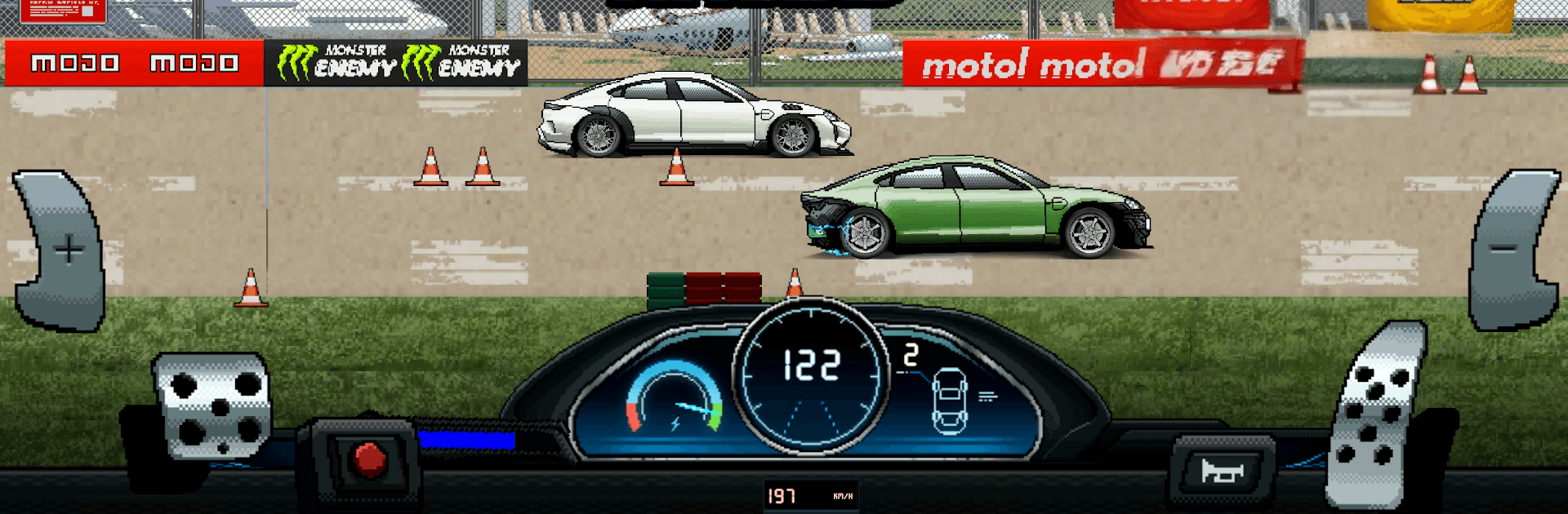
Pixel X Racer: Pixel Cars is a retro-flavored Racing game built around pure drag thrills and obsessive tuning. Squeeze every last tenth from your setup, then prove it in quick, high-stakes sprints. It also runs nicely on BlueStacks if you prefer playing on a bigger screen.

Game Features

  • Total Custom Builds: Swap engines, bolt on big turbos, and fine-tune gearbox ratios, tires, and suspension to craft a setup that fits your driving style.
  • Launch Mastery: Balance revs, control wheelspin, and hit crisp shift points to shave off precious milliseconds from your run.
  • Real Wrenching Depth: Dial in boost, gearing, and ride height—every tweak changes how hard your car hooks and pulls down the strip.
  • Authentic Progression: Earn parts and credits, unlock quicker machines, and feel real gains with each meaningful upgrade.
  • Retro Look, Modern Feel: Clean pixel art, smooth effects, and a tidy UI deliver old-school charm with today’s responsiveness.
  • Online Head-to-Heads: Challenge drivers worldwide in quick duels and competitive events that reward sharp timing and smart builds.
  • Build a Dream Garage: Collect, tune, and personalize a lineup from subtle sleepers to wild turbo monsters, then keep iterating for that perfect pass.
  • Easy In, Hard to Master: Simple controls make it accessible, while precision and timing separate casual runs from record-setters.

Ready to top the leaderboard? We bet you do. Let precise controls and sharp visuals optimized on BlueStacks lead you to victory.


Game Features

Enhancements

  • Macros
  • Multi Instance
  • Multi Instance Sync
  • Script
  • Enhancements
Macros

Macros

Automate the predictable in Pixel X Racer: Pixel Cars and transform your gameplay with Macros. Get access to inventive Macros in the BlueStacks Macro Community
Multi Instance

Multi Instance

Play Pixel X Racer: Pixel Cars on one window. And chat with your friend on the other. Press CTRL + Shift + 8 to open the Multi-Instance Manager. And start creating fresh instances or clone an existing one.
Multi Instance Sync

Multi Instance Sync

Play Pixel X Racer: Pixel Cars with the power of Multi-Instance Sync. Replicate what you are doing on the main instance on all other instances. Level up faster, play more.
Script

Script

Script your way to gaming glory in Pixel X Racer: Pixel Cars with BlueStacks Script. Write and run a set of commands to automate repeated tasks. Trigger the command by assigning it to any key.
Read More

How to Download and Play Pixel X Racer: Pixel Cars on PC or Mac

  • Download and install BlueStacks on your PC or Mac

  • Complete Google sign-in to access the Play Store, or do it later

  • Look for Pixel X Racer: Pixel Cars in the search bar at the top right corner

  • Click to install Pixel X Racer: Pixel Cars from the search results

  • Complete Google sign-in (if you skipped step 2) to install Pixel X Racer: Pixel Cars

  • Click the Pixel X Racer: Pixel Cars icon on the home screen to start playing

video
Watch Video

Minimum System Requirements

With BlueStacks 5, you can get started on a PC that fulfills the following requirements.

  • Operating System

    Microsoft Windows 7 or above, macOS 11 (Big Sur) or above

  • Processor

    Intel, AMD or Apple Silicon Processor

  • RAM

    at least 4GB

  • HDD

    10GB Free Disk Space

Note:

* You must be an Administrator on your PC. Up to date graphics drivers from Microsoft or the chipset vendor.

Pixel X Racer: Pixel Cars - FAQs

  • How to play Pixel X Racer: Pixel Cars on Windows PC & Mac?

    Play Pixel X Racer: Pixel Cars on your PC or Mac by following these simple steps.

    • Click on 'Play Pixel X Racer: Pixel Cars on PC’ to download BlueStacks
    • Install it and log-in to Google Play Store
    • Launch and play the game.
  • Why is BlueStacks the fastest and safest platform to play games on PC?

    BlueStacks respects your privacy and is always safe and secure to use. It does not carry any malware, spyware, or any sort of additional software that could harm your PC.

    It is engineered to optimize speed and performance for a seamless gaming experience.

  • What are Pixel X Racer: Pixel Cars PC requirements?

    Minimum requirement to run Pixel X Racer: Pixel Cars on your PC

    • OS: Microsoft Windows 7 or above MacOS 11 (Big Sur) or above
    • Processor: Intel, AMD or Apple Silicon Processor
    • RAM: Your PC must have at least 4GB of RAM. (Note that having 4GB or more disk space is not a substitute for RAM)
    • HDD: 10GB Free Disk Space.
    • You must be an Administrator on your PC.